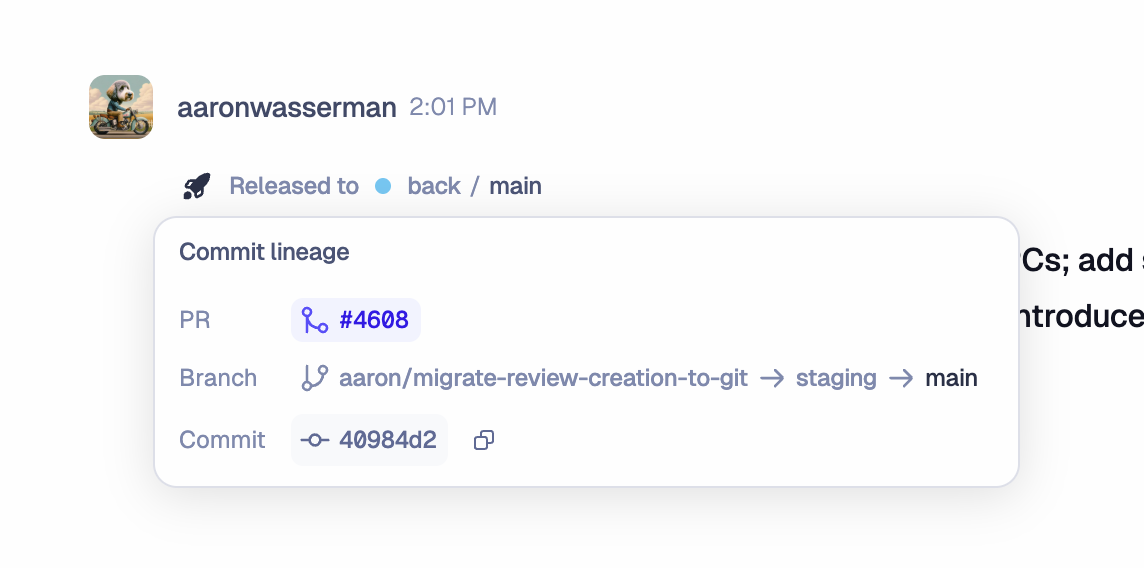
> ## Documentation Index
> Fetch the complete documentation index at: https://docs.macroscope.com/llms.txt
> Use this file to discover all available pages before exploring further.
# Release Notes
**New Models in Check Run Agents**
Check Run Agents now support Kimi K3. K3 delivers performance rivaling top frontier closed models, at a fraction of the price of Fable 5 or GPT-5.6 Sol. Check Run Agents also now support Claude Opus 5. [Learn more about Check Run Agent models and pricing](/check-run-agents/models-and-pricing).
**Lower Check Run Agent Model Pricing for GPT-5.6 Terra and Luna**
We've reduced Check Run Agent pricing for two GPT-5.6 models: `gpt-5-6-luna` is now \$0.20 per 1M input tokens and \$1.20 per 1M output tokens, and `gpt-5-6-terra` is now \$2.00 and \$12.00. [See the full pricing table](/check-run-agents/models-and-pricing#pricing).
**Screen Recordings in Slack Commit Summaries**
Screen recordings attached to a PR — in the description or a comment — now appear in that commit’s Slack summary thread, alongside the images Macroscope already posts, so your team can review visual PR context without leaving Slack.
**Faster, More Accurate Code Review**
We've shipped a major update to Code Review that makes reviews faster and better at finding bugs: up to 20% lower latency on average and up to 20% better recall, depending on your [Detection Mode](/bug-detection-and-fixes#detection-mode) setting.
**Bug Grouping in Review Comments**
We've improved how findings are surfaced in PR comments:
* Critical and High severity bugs are now separated from related lower-severity findings.
* Related findings are grouped more accurately.
**Macroscope CLI Interactive Code Review**
The [Macroscope CLI](/cli) now has a full-screen interactive review experience. Run `macroscope` with no arguments for a guided setup wizard. You can also run Macroscope from inside Claude Code, Codex, Cursor, and OpenCode using the agent plugin installed alongside the CLI.
[Read more on the blog](https://macroscope.com/blog/introducing-macroscope-cli).
**Code Review Improvements**
We've made several improvements to our code review pipeline, particularly for Go, Rust, and Python.
**Run Limits for Check Run Agents**
You can now set `maxRuns` in a Check Run Agent's front matter to cap how many times it runs on a single pull request. Once the cap is reached, later pushes conclude the check as skipped with a "Maximum runs reached" message instead of running the agent — commenting `@macroscope review` still runs it past the cap. [Learn more](/check-run-agents#run-limits).
**Adjust Billing Chart Date Range**
You can now drag across the usage chart in [Billing](https://app.macroscope.com/settings/billing) to select a date range within the billing period. The usage tables and totals update to reflect just the selected range.
**Code Review Improvements for Swift and Rust**
We've made improvements to our code review pipeline for Swift and Rust, helping Macroscope catch more idiomatic issues in those languages.
**Open-Source Models in Check Run Agents**
Check Run Agents now support `kimi-k2-7-code`, `glm-5-2`, `minimax-m3`, and `qwen-3-7-plus`. [Learn more about Check Run Agent models and pricing](/check-run-agents/models-and-pricing).
**GPT-5.6 Models in Check Run Agents**
Check Run Agents now support GPT-5.6 Sol, Terra, and Luna.
**Run Filters for Check Run Agents**
You can now configure Check Run Agents to run only on specific PRs via `runFilters` in the front matter. Use the `labels`, `authors`, and `targets` fields to scope CRA to PRs that carry a specific label, come from a specific author, or target a specific branch.
**PR Metadata Input Mode for Check Run Agents**
Check Run Agents now support `input: pr_metadata` : a new mode for reviewing a PR's title, author, description, labels, and commit messages instead of the code diff. This is useful for checks that enforce PR conventions, ticket requirements, or metadata standards.
**Required Status Checks for Check Run Agents**
You can now set `requiredStatusCheck: true` on a Check Run Agent so it always reports a conclusion, even when its `include`, `exclude`, or applicability filters skip a PR. Skipped runs report as `skipped`, which GitHub branch protection treats as passing, so the agent can be used as a required status check without blocking unrelated PRs.
**Improved Cache Hits for Check Run Agents**
We've improved cache hit rates for Check Run Agents to help you save on costs. Unchanged runs are now more likely to return cached results (e.g. after a rebase) so you don't pay to recompute the same review.
**Check Run Agent Filters Override Soft Exclusions**
Check Run Agent `include` and `exclude` patterns now override Macroscope's default soft exclusion patterns, so your CRA runs on exactly the files you've configured. The same override applies to [custom correctness instruction](/custom-instructions) `include` and `exclude` patterns.
**New Models in Check Run Agents**
Check Run Agents now supports two additional models: `fable-5` and `claude-sonnet-5`. [Learn more](/check-run-agents/models-and-pricing).
**Check Run Agent Usage in Billing**
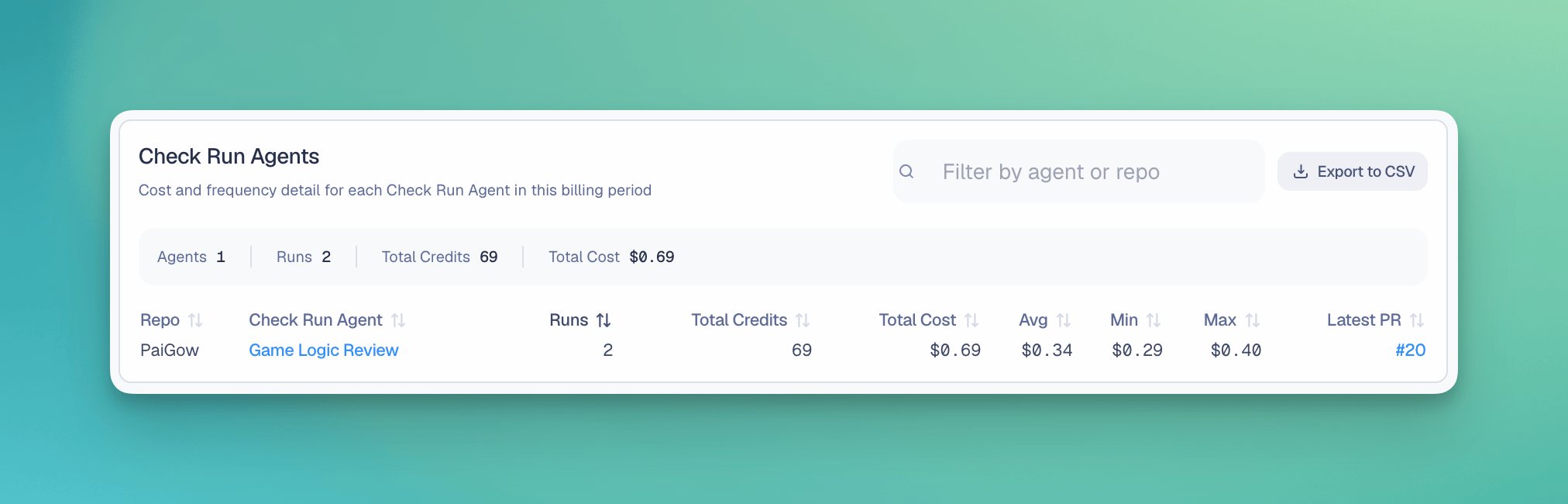
We've added a Check Run Agent usage table to Billing so you can see which repositories and pull requests are using agent credits. The table includes sortable and filterable usage details, links back to the relevant checks, pagination, and CSV export.
 **New Code Review Pipeline**
We've released a new version of Code Review that finds substantially more bugs. In our benchmarks it surfaces:
* 71% more critical issues
* 27% more high-severity issues
* 50% more medium-severity issues
* 31% more valid issues overall
This is now the default pipeline ("Prefer Coverage"). If you prefer the previous behavior, you can switch to "Prefer Precision" using the new Detection Mode setting below.
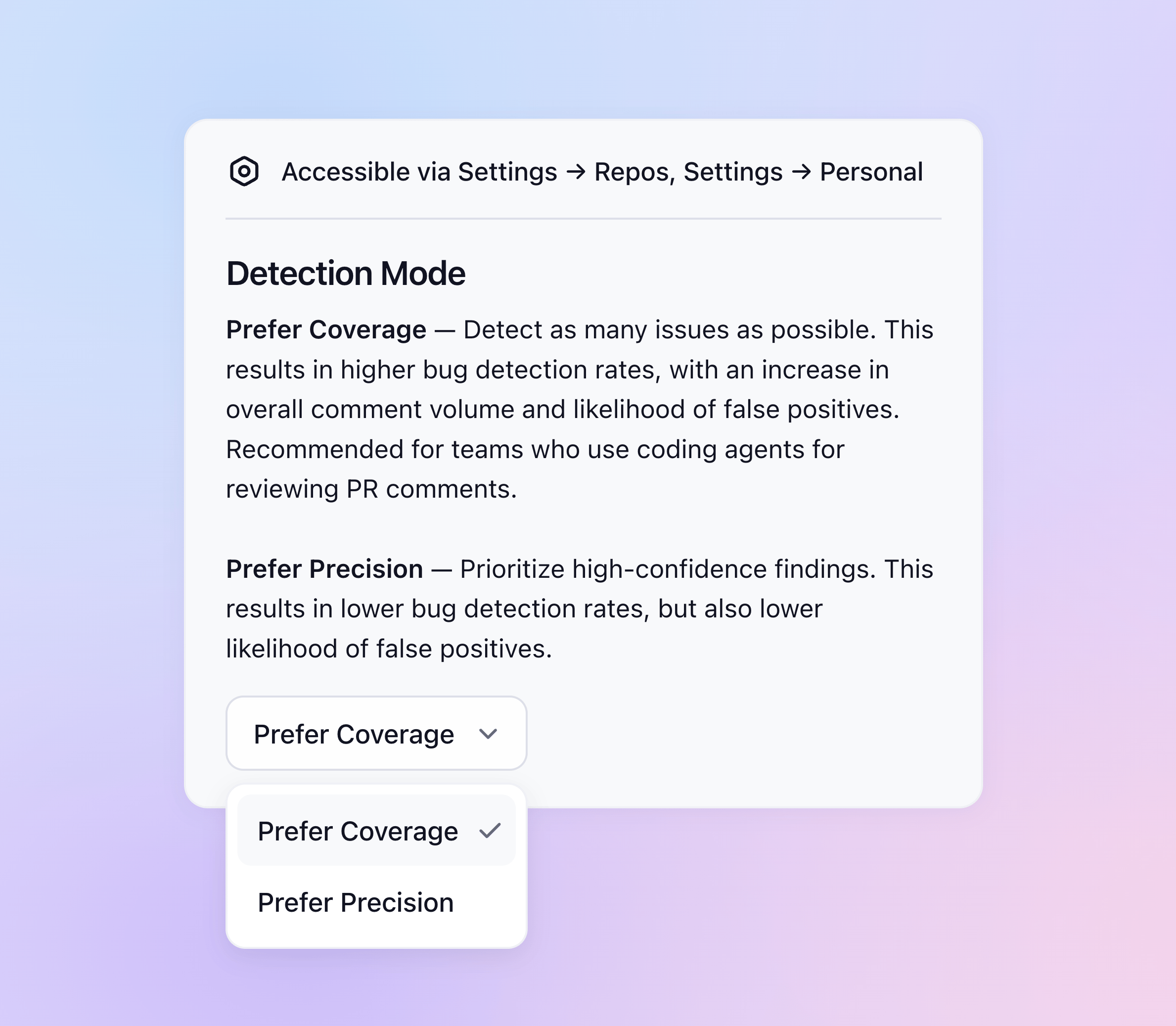
**Detection Mode**
Detection Mode is a new setting that controls how Macroscope balances finding more bugs against minimizing noise:
* **Prefer Coverage** (default) — maximizes detection, with higher comment volume and more false positives. Built for teams using coding agents to validate PR comments.
* **Prefer Precision** — prioritizes high-confidence findings: fewer bugs caught, but fewer false positives. Mirrors the experience of the past few months.
You can set Detection Mode from **Settings** at the [repository level](https://app.macroscope.com/settings#Repos) or at the [individual developer level](https://app.macroscope.com/settings#Personal).
**New Code Review Pipeline**
We've released a new version of Code Review that finds substantially more bugs. In our benchmarks it surfaces:
* 71% more critical issues
* 27% more high-severity issues
* 50% more medium-severity issues
* 31% more valid issues overall
This is now the default pipeline ("Prefer Coverage"). If you prefer the previous behavior, you can switch to "Prefer Precision" using the new Detection Mode setting below.
**Detection Mode**
Detection Mode is a new setting that controls how Macroscope balances finding more bugs against minimizing noise:
* **Prefer Coverage** (default) — maximizes detection, with higher comment volume and more false positives. Built for teams using coding agents to validate PR comments.
* **Prefer Precision** — prioritizes high-confidence findings: fewer bugs caught, but fewer false positives. Mirrors the experience of the past few months.
You can set Detection Mode from **Settings** at the [repository level](https://app.macroscope.com/settings#Repos) or at the [individual developer level](https://app.macroscope.com/settings#Personal).
 **Templates for Check Run Agents**
Teams can create [Check Run Agents](/check-run-agents) from pre-built templates. Browse templates on the [Code Review page](https://app.macroscope.com/code-review) and select a template to customize it or use as-is. Templates cover common review patterns including ticket requirements, language idioms, architecture standards, and security review.
**Organize Check Run Agents into Subfolders**
[Check Run Agents](/check-run-agents) now support nested directories inside `.macroscope/check-run-agents/`, so teams can organize their configuration files into subfolders.
**Manual Review Links to Check Runs**
When you manually trigger a review with `@macroscope review`, Macroscope now posts a link from the PR thread to the generated check run.
**Improved Python Code Understanding**
We've improved our Python codewalker to follow imports, type hints, class relationships, and nearby dependencies more accurately during review.
**Personal MCP Connections**
You can now connect your own MCP servers as personal connections from **Settings** → **Personal**. These connections are separate from the MCP connections admins can set up for their workspace. Macroscope can use those personal connections on your behalf when answering your questions in Slack. [Learn more about MCP Connectors](/integrations#mcp-connectors).
**Skip Automatic Reviews by Author**
Workspace admins can now skip automatic Code Review for specific GitHub authors under **Settings → Repos → Pull Requests** → **Skip PRs by Author**.
**Default View for the Commits Feed**
You can now save your preferred filters as the default view for your commits feed.
**Slack Agent Improvements**
We've made several improvements to how [Macroscope's agent](/agent) answers questions in Slack, including:
* **Live "Thinking..." status.** When you @ mention Macroscope, a native status indicator appears on the thread while it works, then clears when the answer posts.
* **Native tables.** Tabular answers render as tables instead of plain text.
* **Clickable links.** Links render as clickable labels instead of bare URLs.
**Landed vs. Pushed Coding Time**
Productivity stats now separate **pushed** coding time (everything authored and pushed to git) from **landed** coding time (the portion that merged to your default branch), so you can see not just how much code was written but how much actually shipped. Available with [Status](/productivity) enabled, with rollups at the organization, team, engineer, and agent level. [Read the blog](https://macroscope.com/blog/beyond-tokenmaxxing).
**Templates for Check Run Agents**
Teams can create [Check Run Agents](/check-run-agents) from pre-built templates. Browse templates on the [Code Review page](https://app.macroscope.com/code-review) and select a template to customize it or use as-is. Templates cover common review patterns including ticket requirements, language idioms, architecture standards, and security review.
**Organize Check Run Agents into Subfolders**
[Check Run Agents](/check-run-agents) now support nested directories inside `.macroscope/check-run-agents/`, so teams can organize their configuration files into subfolders.
**Manual Review Links to Check Runs**
When you manually trigger a review with `@macroscope review`, Macroscope now posts a link from the PR thread to the generated check run.
**Improved Python Code Understanding**
We've improved our Python codewalker to follow imports, type hints, class relationships, and nearby dependencies more accurately during review.
**Personal MCP Connections**
You can now connect your own MCP servers as personal connections from **Settings** → **Personal**. These connections are separate from the MCP connections admins can set up for their workspace. Macroscope can use those personal connections on your behalf when answering your questions in Slack. [Learn more about MCP Connectors](/integrations#mcp-connectors).
**Skip Automatic Reviews by Author**
Workspace admins can now skip automatic Code Review for specific GitHub authors under **Settings → Repos → Pull Requests** → **Skip PRs by Author**.
**Default View for the Commits Feed**
You can now save your preferred filters as the default view for your commits feed.
**Slack Agent Improvements**
We've made several improvements to how [Macroscope's agent](/agent) answers questions in Slack, including:
* **Live "Thinking..." status.** When you @ mention Macroscope, a native status indicator appears on the thread while it works, then clears when the answer posts.
* **Native tables.** Tabular answers render as tables instead of plain text.
* **Clickable links.** Links render as clickable labels instead of bare URLs.
**Landed vs. Pushed Coding Time**
Productivity stats now separate **pushed** coding time (everything authored and pushed to git) from **landed** coding time (the portion that merged to your default branch), so you can see not just how much code was written but how much actually shipped. Available with [Status](/productivity) enabled, with rollups at the organization, team, engineer, and agent level. [Read the blog](https://macroscope.com/blog/beyond-tokenmaxxing).
.png?fit=max&auto=format&n=RyCUVg3_pdaHf333&q=85&s=d8a7b52b0e50d9bfa837e06449be5bf2) **Async Agent API Polling**
Webhook-triggered agent jobs now return a `jobToken` and `pollUrl` so integrations can trigger long-running agent jobs and poll for completion, rather than waiting for a synchronous response. [Learn more about the agent API](/api).
**Check Run Agent Tool-Call Visibility**
A Check Run Agent's GitHub check run now includes a "Tool Calls" section in the check details, showing what the agent did during its review. Available for workspaces using [Check Run Agents](/check-run-agents).
**New Code Review Pipeline**
A new code review pipeline is now available, improving overall bug detection by catching 40% more critical issues and 25% more medium severity issues. The tradeoff is slightly lower precision and higher latency, which we've found is a worthwhile tradeoff for teams heavily using coding agents in their PR review process.
Manage Detection Mode from **Settings** under workspace defaults or repository pull request review settings.
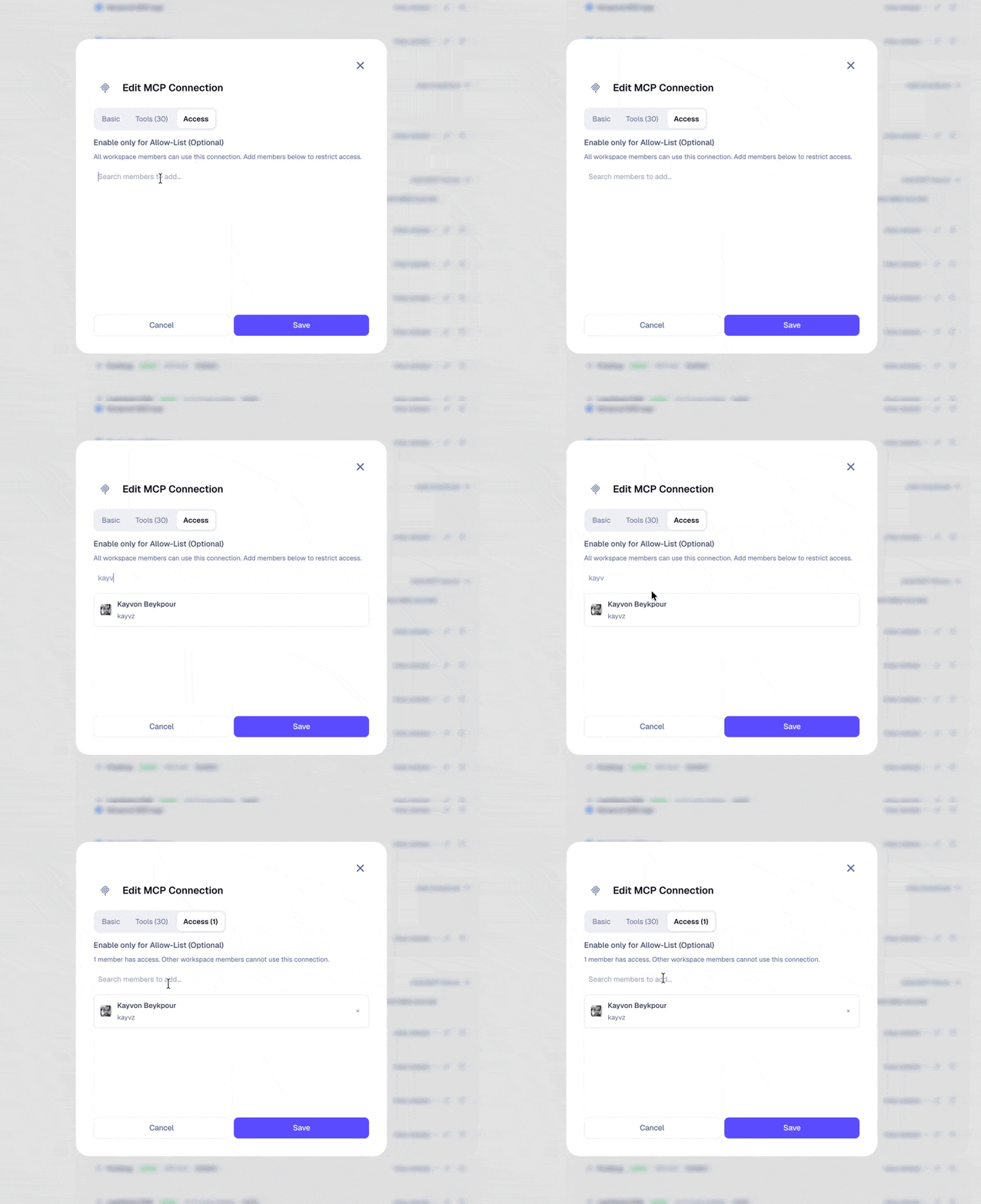
**MCP Connector Access Controls**
MCP connectors now support per-user access controls. When creating or editing an MCP connection, use the **Access** tab to define an allow list of users who can use it. [Learn more about MCP Connectors](/integrations#mcp-connectors).
**Async Agent API Polling**
Webhook-triggered agent jobs now return a `jobToken` and `pollUrl` so integrations can trigger long-running agent jobs and poll for completion, rather than waiting for a synchronous response. [Learn more about the agent API](/api).
**Check Run Agent Tool-Call Visibility**
A Check Run Agent's GitHub check run now includes a "Tool Calls" section in the check details, showing what the agent did during its review. Available for workspaces using [Check Run Agents](/check-run-agents).
**New Code Review Pipeline**
A new code review pipeline is now available, improving overall bug detection by catching 40% more critical issues and 25% more medium severity issues. The tradeoff is slightly lower precision and higher latency, which we've found is a worthwhile tradeoff for teams heavily using coding agents in their PR review process.
Manage Detection Mode from **Settings** under workspace defaults or repository pull request review settings.
**MCP Connector Access Controls**
MCP connectors now support per-user access controls. When creating or editing an MCP connection, use the **Access** tab to define an allow list of users who can use it. [Learn more about MCP Connectors](/integrations#mcp-connectors).
 {/* Screenshot: Feedback metrics page with the review type dropdown open, showing Correctness, Ticket Requirements, and a custom Check Run Agent name as filter options. */}
**Code Review Feedback Analysis**
The Code Review activity log now includes a **Feedback Source** column and filter, so that you can see how feedback was captured:
* **Explicit** feedback covers emoji reactions (i.e. 👍 or 👎) on review comments
* **Inferred** feedback reflects sentiment Macroscope classifies from replies when a PR is closed.
{/* GIF: Activity log showing the Source filter dropdown with Explicit and Inferred options, selecting a filter, and the table updating to show filtered results. */}
**Macro Author Filtering**
Event-triggered Macros now support filtering by author, letting you include or exclude specific authors when defining trigger conditions. [Learn more about Macros](/macros).
{/* GIF: Create/edit macro form showing On New PR trigger selection, Author filter mode dropdown (Include/Exclude), username autocomplete search, and author chips. */}
**Check Run Agent Prerequisite Steps**
Custom Review Agents now support prerequisite CI step gating with the `waitsFor` configuration option. Specify CI checks that must complete before a review agent runs—useful for sequencing reviews after builds, tests, or other checks. Configure per-agent prerequisites with optional custom timeouts, or use `"*"` to wait for all other checks. See [Check Run Agents](/check-run-agents#prerequisite-steps) for details.
**Claude Opus 4.8 for Check Run Agents**
Claude Opus 4.8 (`claude-opus-4-8`) is now available as a model option for Check Run Agents. Set `model: claude-opus-4-8` in your agent's front matter to use the latest Opus generation.
**Code Review Improvements**
We've made improvements to our code review pipeline, resulting in increased recall for TypeScript, Rust, Swift, Kotlin, JavaScript, Python, Java, and Go.
**Exclude GitHub Authors from Commit Processing**
Admins can exclude specific GitHub authors from commit summarization and productivity metrics (i.e. Status features). Manage the list under **Settings** → **Workspace → Excluded Commit Authors**.
**Check Run Cost Visibility**
[Check Run Agents](/check-run-agents) display their billed total directly in the GitHub Checks tab, so you can see the cost of each run.
**Slack Connection Refresh**
Admins can reconnect their Slack workspace from **Settings → Connections** to reauthorize new OAuth scopes. Use this whenever we add new bot capabilities and you want your existing connection to pick them up without uninstalling.
**Code Review Improvements**
We've made improvements to our code review pipeline, resulting in increased precision and recall for Go.
**Macroscope CLI**
You can now run Macroscope code review locally from your terminal, against your branch changes before you push. [Learn more about the CLI](/cli).
**New Models in Check Run Agents**
Check Run Agents now supports four additional models: `claude-sonnet-4-5`, `claude-sonnet-4-6`, `gpt-5-4`, and `gpt-5-5` -- alongside the existing Opus 4.5 / 4.6 / 4.7 and GPT-5.2 options. [Learn more about Check Run Agents](/check-run-agents/models-and-pricing).
**Code Review Improvements**
We've made improvements to our code review pipeline, resulting in increased recall for Python and Elixir.
**Check Run Agents: now GA!**
Check Run Agents are fully customizable AI agents that execute as GitHub Check Runs on your pull requests. For each Check Run Agent, you can define exactly what the agent checks, which files it should/shouldn't review, which tools it can use, what actions it should take, and how it formats its output — all from a markdown file in your `.macroscope/` directory. [Learn more in our docs](/check-run-agents) and [check out our video about it](https://x.com/kayvz/status/2050259933409792386).
**Delegated Admins**
Workspace admins can now delegate admin permissions to other members from **Settings → Macroscope Access → Members**. Delegated admins can manage Macroscope settings on behalf of the workspace. GitHub roles and permissions are unaffected.
**One-Time Credit Purchase**
Admins on usage based billing can make one-time credit purchases from **Settings → Billing**.
**Check Run Agents Can Write Code**
Check Run Agents can now fix the issues they find. Add the `write_code` tool to any agent and it will commit changes directly to the pull request. [Learn more about Check Run Agents in our docs](/check-run-agents).
**Check Run Agents**
Check Run Agents are fully customizable AI agents that execute as GitHub Check Runs on every pull request. They have full access to your codebase, git history, and connected integrations. You can define exactly what an agent checks, which files it reviews, which tools it can use, what actions it can take, and how it formats its output — all from a markdown file in your `.macroscope/` directory. [Learn more in our docs](/check-run-agents).
**Code Review Improvements**
We've made improvements to our code review pipeline, resulting in increased recall for Kotlin and Swift.
**Event-Driven Macros**
Macros can now trigger on new commits and new pull requests, in addition to recurring schedules. Configure repo and branch filters to control which events run your Macro. Results can be delivered to Slack or forwarded to a webhook URL.
**New Integrations**
We've added several new integrations, including Amplitude, Sentry, and GCP Cloud Logging. You can configure your integrations in **Settings → Connections**. [Learn more about supported integrations in our docs](/integrations).
**Image Generation**
The Macroscope Agent can now generate images on demand, including architecture diagrams, flowcharts, and visual explanations.
**Code Review Filter Persistence**
Filters in the Code Review activity log now persist in the URL. Copy the link to share a filtered view with your team.
**New Code Review Settings**
"Review Draft PRs" and "Automatically merge Macroscope's PRs" can now be configured at the workspace and repo level. Admins can set organization-wide defaults and manage settings in batch across repos; contributors can override in their account settings.
**MCP Connector Support**
Macroscope's Agent can now connect to any [MCP (Model Context Protocol)](https://modelcontextprotocol.io/) compatible server, so you can give it access to tools like Datadog, PagerDuty, or your own internal APIs. Macroscope auto-discovers available tools and supports OAuth 2.1 and header-based auth. [Learn more](/integrations#mcp-connectors).
**Webhooks**
You can now trigger Macroscope's Agent programmatically via webhooks. Send a query over HTTP and specify where to deliver the results: a Slack channel or an external URL. Note: using Webhooks requires Status to be enabled. [Learn more](/api).
**Cross-Repo PR Reviews**
Macroscope can now review pull requests where the head branch and base branch are in different repositories. Enable per repo with the new **Review Cross-Repo PRs** toggle in **Settings → Repos**.
**Ask Macroscope Anything: GitHub API + Docs Search**
AMA can now query the GitHub REST API for live data on PRs, issues, check runs, and deployments. Ask "what checks failed on PR #42?" or "show me the latest deployment" and get real-time answers. The agent can also search [Macroscope's help docs](https://docs.macroscope.com) to answer any product questions.
**Code Review Improvements**
We've made improvements to our code review pipeline, resulting in increased recall for Rust and TypeScript.
**Next Scheduled Run for Macros**
Macros now show when they'll next run. The next run time appears in the macro header and as a tooltip on the cadence pill, so you always know when to expect your next scheduled report.
{/* Screenshot: Feedback metrics page with the review type dropdown open, showing Correctness, Ticket Requirements, and a custom Check Run Agent name as filter options. */}
**Code Review Feedback Analysis**
The Code Review activity log now includes a **Feedback Source** column and filter, so that you can see how feedback was captured:
* **Explicit** feedback covers emoji reactions (i.e. 👍 or 👎) on review comments
* **Inferred** feedback reflects sentiment Macroscope classifies from replies when a PR is closed.
{/* GIF: Activity log showing the Source filter dropdown with Explicit and Inferred options, selecting a filter, and the table updating to show filtered results. */}
**Macro Author Filtering**
Event-triggered Macros now support filtering by author, letting you include or exclude specific authors when defining trigger conditions. [Learn more about Macros](/macros).
{/* GIF: Create/edit macro form showing On New PR trigger selection, Author filter mode dropdown (Include/Exclude), username autocomplete search, and author chips. */}
**Check Run Agent Prerequisite Steps**
Custom Review Agents now support prerequisite CI step gating with the `waitsFor` configuration option. Specify CI checks that must complete before a review agent runs—useful for sequencing reviews after builds, tests, or other checks. Configure per-agent prerequisites with optional custom timeouts, or use `"*"` to wait for all other checks. See [Check Run Agents](/check-run-agents#prerequisite-steps) for details.
**Claude Opus 4.8 for Check Run Agents**
Claude Opus 4.8 (`claude-opus-4-8`) is now available as a model option for Check Run Agents. Set `model: claude-opus-4-8` in your agent's front matter to use the latest Opus generation.
**Code Review Improvements**
We've made improvements to our code review pipeline, resulting in increased recall for TypeScript, Rust, Swift, Kotlin, JavaScript, Python, Java, and Go.
**Exclude GitHub Authors from Commit Processing**
Admins can exclude specific GitHub authors from commit summarization and productivity metrics (i.e. Status features). Manage the list under **Settings** → **Workspace → Excluded Commit Authors**.
**Check Run Cost Visibility**
[Check Run Agents](/check-run-agents) display their billed total directly in the GitHub Checks tab, so you can see the cost of each run.
**Slack Connection Refresh**
Admins can reconnect their Slack workspace from **Settings → Connections** to reauthorize new OAuth scopes. Use this whenever we add new bot capabilities and you want your existing connection to pick them up without uninstalling.
**Code Review Improvements**
We've made improvements to our code review pipeline, resulting in increased precision and recall for Go.
**Macroscope CLI**
You can now run Macroscope code review locally from your terminal, against your branch changes before you push. [Learn more about the CLI](/cli).
**New Models in Check Run Agents**
Check Run Agents now supports four additional models: `claude-sonnet-4-5`, `claude-sonnet-4-6`, `gpt-5-4`, and `gpt-5-5` -- alongside the existing Opus 4.5 / 4.6 / 4.7 and GPT-5.2 options. [Learn more about Check Run Agents](/check-run-agents/models-and-pricing).
**Code Review Improvements**
We've made improvements to our code review pipeline, resulting in increased recall for Python and Elixir.
**Check Run Agents: now GA!**
Check Run Agents are fully customizable AI agents that execute as GitHub Check Runs on your pull requests. For each Check Run Agent, you can define exactly what the agent checks, which files it should/shouldn't review, which tools it can use, what actions it should take, and how it formats its output — all from a markdown file in your `.macroscope/` directory. [Learn more in our docs](/check-run-agents) and [check out our video about it](https://x.com/kayvz/status/2050259933409792386).
**Delegated Admins**
Workspace admins can now delegate admin permissions to other members from **Settings → Macroscope Access → Members**. Delegated admins can manage Macroscope settings on behalf of the workspace. GitHub roles and permissions are unaffected.
**One-Time Credit Purchase**
Admins on usage based billing can make one-time credit purchases from **Settings → Billing**.
**Check Run Agents Can Write Code**
Check Run Agents can now fix the issues they find. Add the `write_code` tool to any agent and it will commit changes directly to the pull request. [Learn more about Check Run Agents in our docs](/check-run-agents).
**Check Run Agents**
Check Run Agents are fully customizable AI agents that execute as GitHub Check Runs on every pull request. They have full access to your codebase, git history, and connected integrations. You can define exactly what an agent checks, which files it reviews, which tools it can use, what actions it can take, and how it formats its output — all from a markdown file in your `.macroscope/` directory. [Learn more in our docs](/check-run-agents).
**Code Review Improvements**
We've made improvements to our code review pipeline, resulting in increased recall for Kotlin and Swift.
**Event-Driven Macros**
Macros can now trigger on new commits and new pull requests, in addition to recurring schedules. Configure repo and branch filters to control which events run your Macro. Results can be delivered to Slack or forwarded to a webhook URL.
**New Integrations**
We've added several new integrations, including Amplitude, Sentry, and GCP Cloud Logging. You can configure your integrations in **Settings → Connections**. [Learn more about supported integrations in our docs](/integrations).
**Image Generation**
The Macroscope Agent can now generate images on demand, including architecture diagrams, flowcharts, and visual explanations.
**Code Review Filter Persistence**
Filters in the Code Review activity log now persist in the URL. Copy the link to share a filtered view with your team.
**New Code Review Settings**
"Review Draft PRs" and "Automatically merge Macroscope's PRs" can now be configured at the workspace and repo level. Admins can set organization-wide defaults and manage settings in batch across repos; contributors can override in their account settings.
**MCP Connector Support**
Macroscope's Agent can now connect to any [MCP (Model Context Protocol)](https://modelcontextprotocol.io/) compatible server, so you can give it access to tools like Datadog, PagerDuty, or your own internal APIs. Macroscope auto-discovers available tools and supports OAuth 2.1 and header-based auth. [Learn more](/integrations#mcp-connectors).
**Webhooks**
You can now trigger Macroscope's Agent programmatically via webhooks. Send a query over HTTP and specify where to deliver the results: a Slack channel or an external URL. Note: using Webhooks requires Status to be enabled. [Learn more](/api).
**Cross-Repo PR Reviews**
Macroscope can now review pull requests where the head branch and base branch are in different repositories. Enable per repo with the new **Review Cross-Repo PRs** toggle in **Settings → Repos**.
**Ask Macroscope Anything: GitHub API + Docs Search**
AMA can now query the GitHub REST API for live data on PRs, issues, check runs, and deployments. Ask "what checks failed on PR #42?" or "show me the latest deployment" and get real-time answers. The agent can also search [Macroscope's help docs](https://docs.macroscope.com) to answer any product questions.
**Code Review Improvements**
We've made improvements to our code review pipeline, resulting in increased recall for Rust and TypeScript.
**Next Scheduled Run for Macros**
Macros now show when they'll next run. The next run time appears in the macro header and as a tooltip on the cadence pill, so you always know when to expect your next scheduled report.
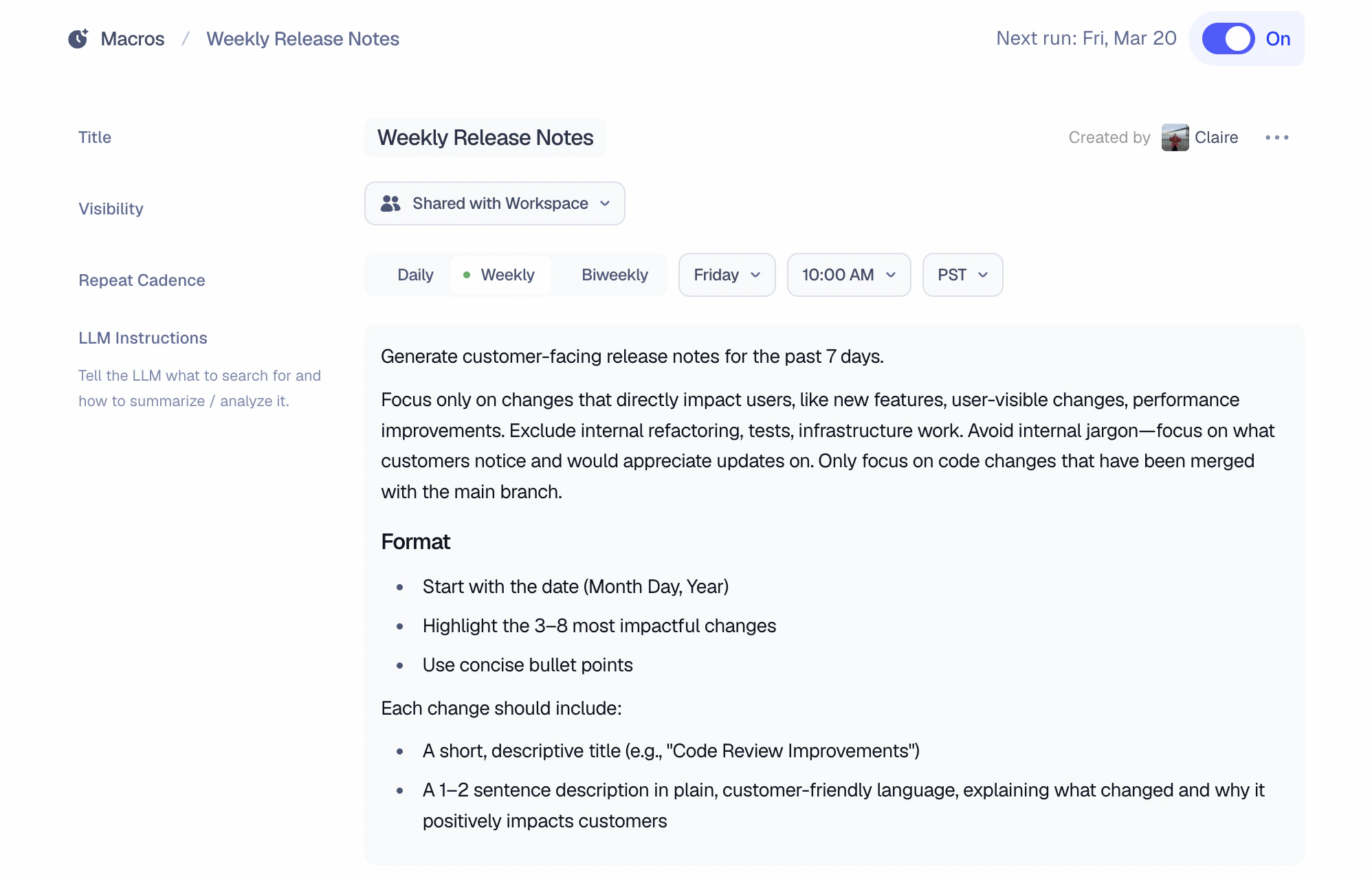 **Approvability — Now Generally Available**
Approvability has graduated from beta and is available to all workspaces. Approvability lets Macroscope automatically approve low-risk PRs from trusted authors when they pass code review with zero issues — freeing engineers from rubber-stamping routine changes. Enable it in **Settings** under the **Code Review** section. [Learn more about Approvability](/approvability).
**Slack Group DMs**
You can now create a Slack group DM that includes Macroscope alongside your teammates, so you can collaborate with Macroscope outside of a channel.
**Ask Macroscope to Add PR Reviewers**
You can ask Macroscope to assign a reviewer to any pull request directly from Slack — just tell it who to add and to which PR.
**Per-File Exclusion Reasons in Check Runs**
Check run details now surface per-file exclusion reasons, showing why specific files were skipped during review.
**Code Review Improvements**
We've made improvements to our code review pipeline, resulting in increases in precision for Elixir, Starlark, and PHP, as well as increased recall for Python, Rust, Java, JavaScript, Swift, Kotlin, and PHP.
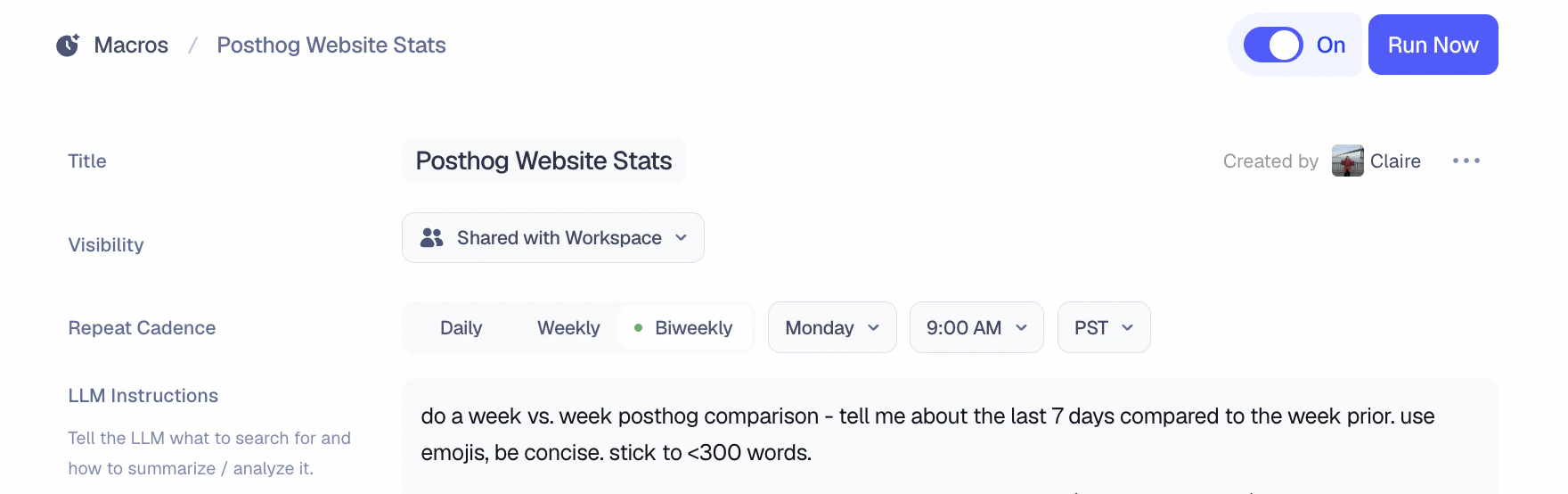
**Biweekly Macro Cadence**
Macros now support a Biweekly schedule (i.e. every other week) in addition to Daily and Weekly.
**Approvability — Now Generally Available**
Approvability has graduated from beta and is available to all workspaces. Approvability lets Macroscope automatically approve low-risk PRs from trusted authors when they pass code review with zero issues — freeing engineers from rubber-stamping routine changes. Enable it in **Settings** under the **Code Review** section. [Learn more about Approvability](/approvability).
**Slack Group DMs**
You can now create a Slack group DM that includes Macroscope alongside your teammates, so you can collaborate with Macroscope outside of a channel.
**Ask Macroscope to Add PR Reviewers**
You can ask Macroscope to assign a reviewer to any pull request directly from Slack — just tell it who to add and to which PR.
**Per-File Exclusion Reasons in Check Runs**
Check run details now surface per-file exclusion reasons, showing why specific files were skipped during review.
**Code Review Improvements**
We've made improvements to our code review pipeline, resulting in increases in precision for Elixir, Starlark, and PHP, as well as increased recall for Python, Rust, Java, JavaScript, Swift, Kotlin, and PHP.
**Biweekly Macro Cadence**
Macros now support a Biweekly schedule (i.e. every other week) in addition to Daily and Weekly.
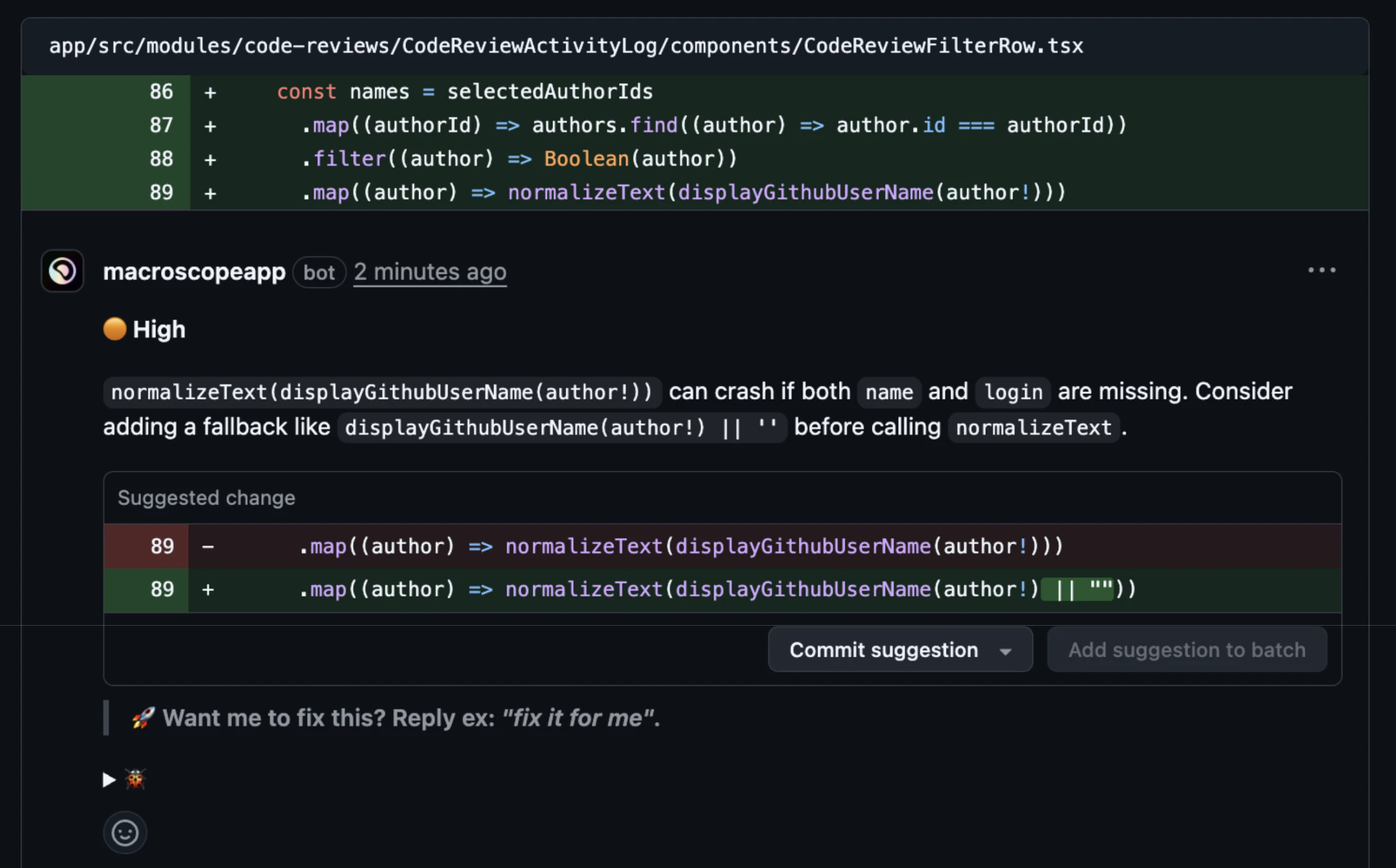
 **PR Description Formatting**
When a PR already contains user-written text, Macroscope's review summary renders as a blockquoted note rather than replacing the content.
**Code Review Improvements**
We've made improvements to our code review pipeline, resulting in increases in precision for Go as well as increased recall for TypeScript and Elixir.
**Webhooks**
You can now trigger Macroscope queries from external services like Zapier, n8n, or your own APIs. Pass in a query and a destination (either a Slack channel ID or forwarding URL), and Macroscope will post the result to the provided destination. You can create webhooks and see detailed instructions in Settings → Connections → Webhooks.
**PostHog Integration**
Macroscope now connects to PostHog as a data source. With this connection, you can query your PostHog event data, run HogQL queries, and explore feature flags directly through Macroscope. Connect PostHog in Settings → Connections → PostHog.
**Always-Review PR Labels**
You can now add "always-review" labels to have Macroscope review any PR, even on repositories where automatic reviews are turned off. This also overrides skip-review labels. Go to Settings → Code Review → Always Review PR Labels to add a label (e.g., `macroscope-review`), then apply it to any PR on GitHub to trigger a review.
**Slack Attachment Support**
Macroscope now reads attachments from all messages in a Slack thread, including images, text documents, and code snippets. For example, you can tag @Macroscope in a thread with a screenshot of a bug and it can parse the attachment and open a PR with a fix.
**Code Review Improvements**
We've made improvements to our code review pipeline, resulting in increased recall for Go, Java, Rust, and TypeScript.
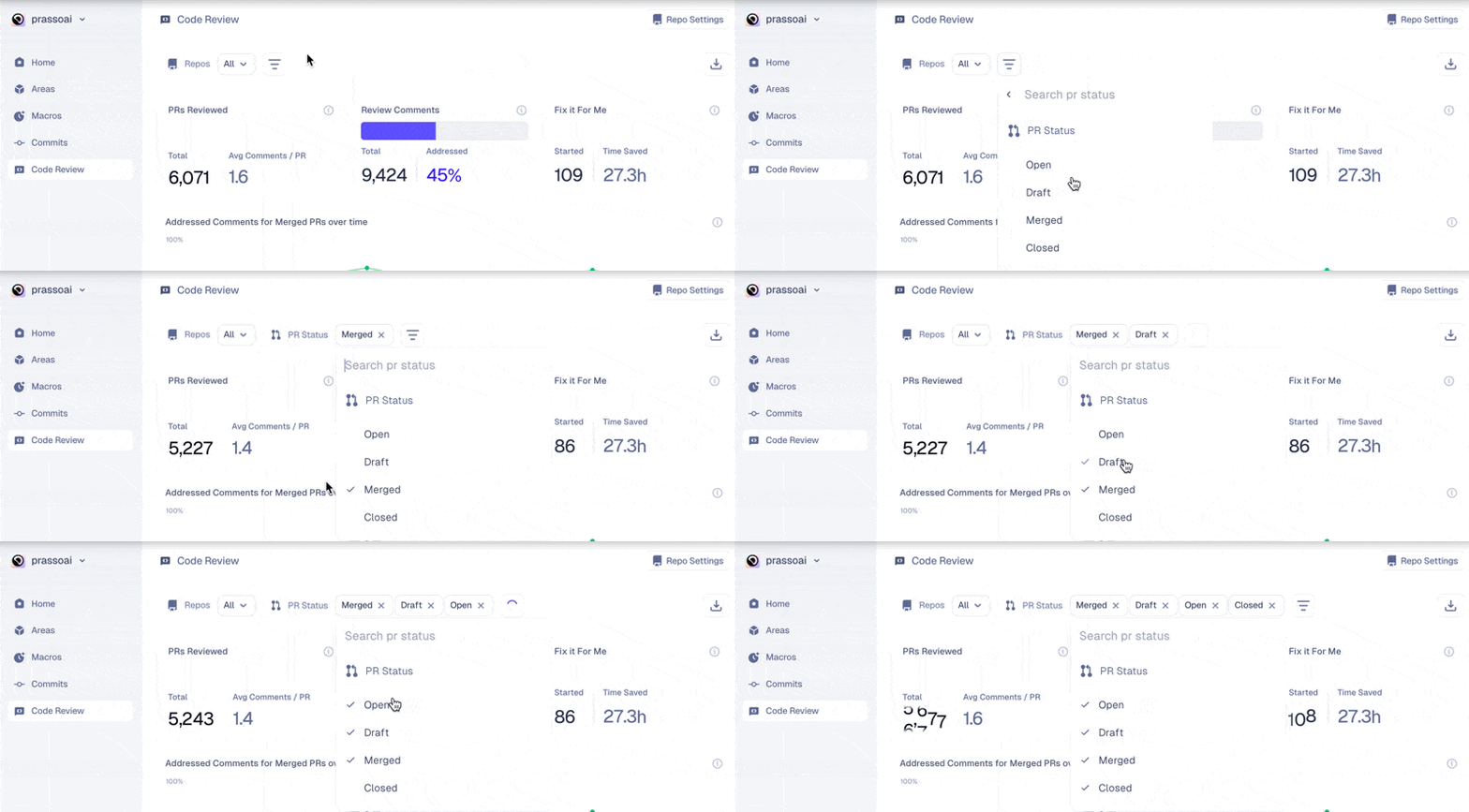
**Filter by PR Status in Code Review Dashboard**
In the Code Review Dashboard, you can now filter code review issues by the status of the pull request (draft, open, merged, or closed), enabling you to see a more focused list of issues and analyze more specific code review stats.
**PR Description Formatting**
When a PR already contains user-written text, Macroscope's review summary renders as a blockquoted note rather than replacing the content.
**Code Review Improvements**
We've made improvements to our code review pipeline, resulting in increases in precision for Go as well as increased recall for TypeScript and Elixir.
**Webhooks**
You can now trigger Macroscope queries from external services like Zapier, n8n, or your own APIs. Pass in a query and a destination (either a Slack channel ID or forwarding URL), and Macroscope will post the result to the provided destination. You can create webhooks and see detailed instructions in Settings → Connections → Webhooks.
**PostHog Integration**
Macroscope now connects to PostHog as a data source. With this connection, you can query your PostHog event data, run HogQL queries, and explore feature flags directly through Macroscope. Connect PostHog in Settings → Connections → PostHog.
**Always-Review PR Labels**
You can now add "always-review" labels to have Macroscope review any PR, even on repositories where automatic reviews are turned off. This also overrides skip-review labels. Go to Settings → Code Review → Always Review PR Labels to add a label (e.g., `macroscope-review`), then apply it to any PR on GitHub to trigger a review.
**Slack Attachment Support**
Macroscope now reads attachments from all messages in a Slack thread, including images, text documents, and code snippets. For example, you can tag @Macroscope in a thread with a screenshot of a bug and it can parse the attachment and open a PR with a fix.
**Code Review Improvements**
We've made improvements to our code review pipeline, resulting in increased recall for Go, Java, Rust, and TypeScript.
**Filter by PR Status in Code Review Dashboard**
In the Code Review Dashboard, you can now filter code review issues by the status of the pull request (draft, open, merged, or closed), enabling you to see a more focused list of issues and analyze more specific code review stats.
 **Code Review Improvements**
We've made improvements to our code review pipeline, resulting in increases in precision for Ruby, Rust, and Starlark, as well as increased recall for Go, Java, and Starlark, Swift.
**V3 Code Review**
We released a new version of Macroscope Code Review. Based on our benchmark, v3 leaves 22% fewer comments overall, with 64% fewer nitpicks in Python and 80% fewer in TypeScript, and demonstrates a step-change improvement in precision from 75% to 98%. [Learn more on our v3 Code Review blog](https://macroscope.com/blog/code-review-v3).
**Approvability \[beta]**
We're launching Approvability, which enables Macroscope to automatically approve PRs when low-risk changes from trusted authors meet safety criteria. When a PR is opened or updated, Macroscope runs two automated checks:
1. **Eligibility**: Do the changes meet your team's criteria for auto-approval? This includes evaluating code ownership as a contextual signal — factoring in `CODEOWNERS`, blame history, and author role.
2. **Correctness** : Does the PR pass Macroscope code review with zero issues?
If both hurdles are cleared, Macroscope will approve the PR automatically.
[Learn more about Approvability in our help docs](/approvability). Reach out to [support@macroscope.com](mailto:support@macroscope.com) if you would like to use this feature.
**Impact Severity on Code Review Comments**
Review comments now display impact severity (Critical / High / Medium / Low) so you can quickly triage which issues need immediate attention.
**Code Review Improvements**
We've made improvements to our code review pipeline, resulting in increases in precision for Ruby, Rust, and Starlark, as well as increased recall for Go, Java, and Starlark, Swift.
**V3 Code Review**
We released a new version of Macroscope Code Review. Based on our benchmark, v3 leaves 22% fewer comments overall, with 64% fewer nitpicks in Python and 80% fewer in TypeScript, and demonstrates a step-change improvement in precision from 75% to 98%. [Learn more on our v3 Code Review blog](https://macroscope.com/blog/code-review-v3).
**Approvability \[beta]**
We're launching Approvability, which enables Macroscope to automatically approve PRs when low-risk changes from trusted authors meet safety criteria. When a PR is opened or updated, Macroscope runs two automated checks:
1. **Eligibility**: Do the changes meet your team's criteria for auto-approval? This includes evaluating code ownership as a contextual signal — factoring in `CODEOWNERS`, blame history, and author role.
2. **Correctness** : Does the PR pass Macroscope code review with zero issues?
If both hurdles are cleared, Macroscope will approve the PR automatically.
[Learn more about Approvability in our help docs](/approvability). Reach out to [support@macroscope.com](mailto:support@macroscope.com) if you would like to use this feature.
**Impact Severity on Code Review Comments**
Review comments now display impact severity (Critical / High / Medium / Low) so you can quickly triage which issues need immediate attention.
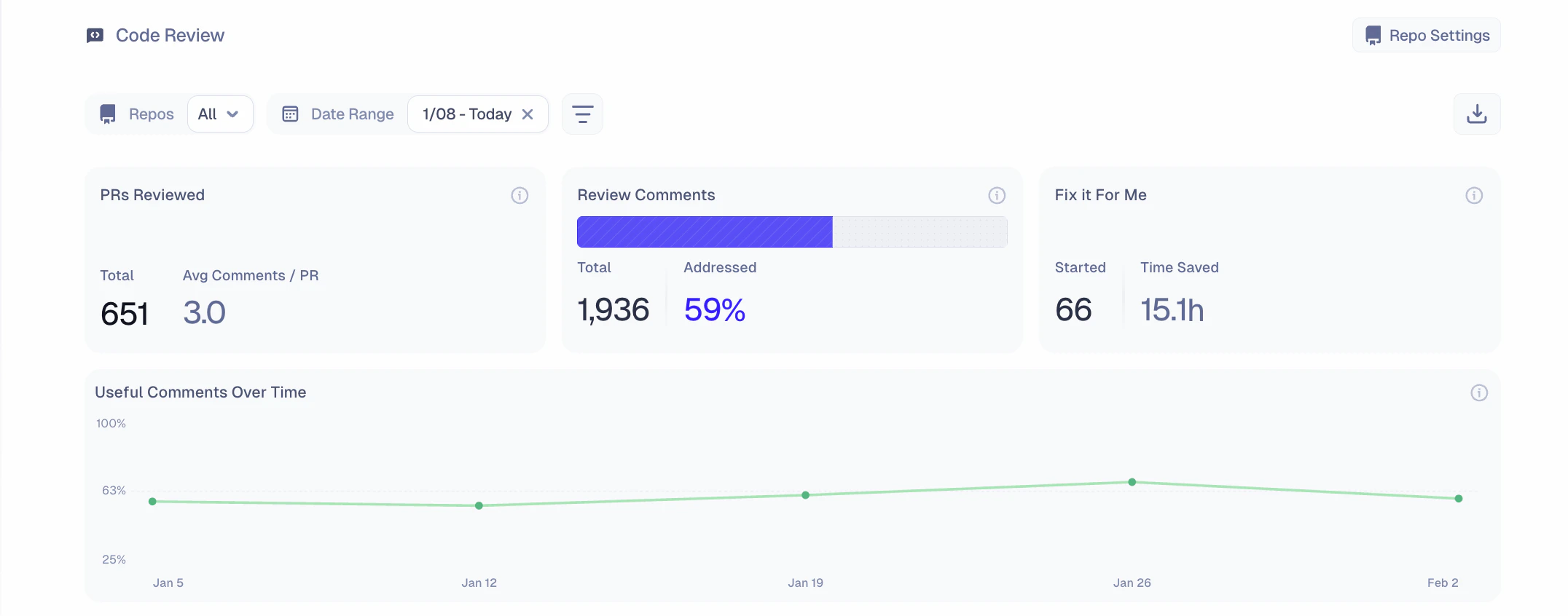
 **Updates to Code Review Dashboard**
We've released several updates to the Code Review dashboard, including:
* Filter comments by author, date, feedback reaction (or ), and addressed status (whether a review comment has been resolved).
* View high-level stats, including total PRs reviewed, average issues per PR, total comments left, % comments addressed, fix-it-for-me tasks started, and time saved resulting from fix-it-for-me.
* "Useful Comments Over Time" chart shows the % of review comments that were addressed by PR close or that received positive feedback (from a reaction or a reply).
* Download your code review history as a CSV.
**Updates to Code Review Dashboard**
We've released several updates to the Code Review dashboard, including:
* Filter comments by author, date, feedback reaction (or ), and addressed status (whether a review comment has been resolved).
* View high-level stats, including total PRs reviewed, average issues per PR, total comments left, % comments addressed, fix-it-for-me tasks started, and time saved resulting from fix-it-for-me.
* "Useful Comments Over Time" chart shows the % of review comments that were addressed by PR close or that received positive feedback (from a reaction or a reply).
* Download your code review history as a CSV.
 **Universal File Support**
Previously, Macroscope code review only reviewed files in languages with native AST-parsing. Now, every file in your PR gets reviewed.
**Linked Issues in Slack Commit Summaries**
Commit summary notifications in Slack now display linked Linear and Jira tickets when available. You'll see a "Linked Issues" section with ticket IDs linked to their URLs, making it easier to trace commits back to the work they address.
**PR Closed Notifications**
Macroscope now sends PR closed notifications even when a PR is closed without merging.
**Code Review Improvements**
We've made improvements to our code review pipeline, resulting in measurable increases in precision for Java, Kotlin, and Swift, as well as increased recall for Python.
**Custom AMA Instructions**
You can customize how Macroscope responds to questions about your codebase. Go to **Workspace Settings → Custom AMA Instructions** to add your instructions, such as preferred response tone, domain-specific context, or output format preferences. You can also define person-specific instructions, like: “customer success teammates should get less technical responses.”
**Code Review Improvements**
We've made several improvements to our code review pipeline, resulting in measurable increases in precision for TypeScript, Python, Go, Java, Ruby, and Kotlin, as well as increased recall for Java and Elixir.
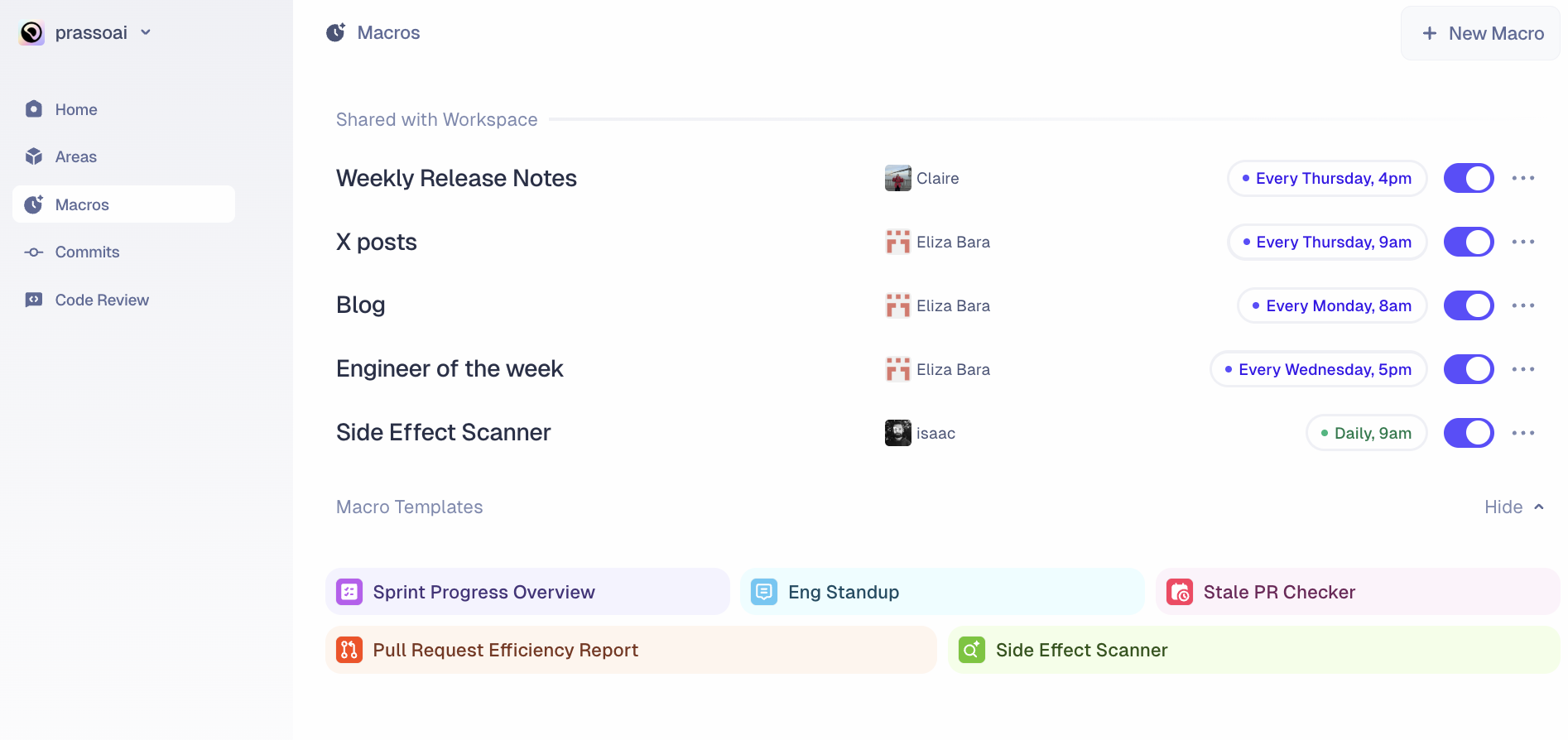
**Pre-Configured Macro Templates**
You can now create Macros from pre-built templates. Browse templates on the Macros page and click any template to create a new Macro that you can customize or use as-is.
**Universal File Support**
Previously, Macroscope code review only reviewed files in languages with native AST-parsing. Now, every file in your PR gets reviewed.
**Linked Issues in Slack Commit Summaries**
Commit summary notifications in Slack now display linked Linear and Jira tickets when available. You'll see a "Linked Issues" section with ticket IDs linked to their URLs, making it easier to trace commits back to the work they address.
**PR Closed Notifications**
Macroscope now sends PR closed notifications even when a PR is closed without merging.
**Code Review Improvements**
We've made improvements to our code review pipeline, resulting in measurable increases in precision for Java, Kotlin, and Swift, as well as increased recall for Python.
**Custom AMA Instructions**
You can customize how Macroscope responds to questions about your codebase. Go to **Workspace Settings → Custom AMA Instructions** to add your instructions, such as preferred response tone, domain-specific context, or output format preferences. You can also define person-specific instructions, like: “customer success teammates should get less technical responses.”
**Code Review Improvements**
We've made several improvements to our code review pipeline, resulting in measurable increases in precision for TypeScript, Python, Go, Java, Ruby, and Kotlin, as well as increased recall for Java and Elixir.
**Pre-Configured Macro Templates**
You can now create Macros from pre-built templates. Browse templates on the Macros page and click any template to create a new Macro that you can customize or use as-is.
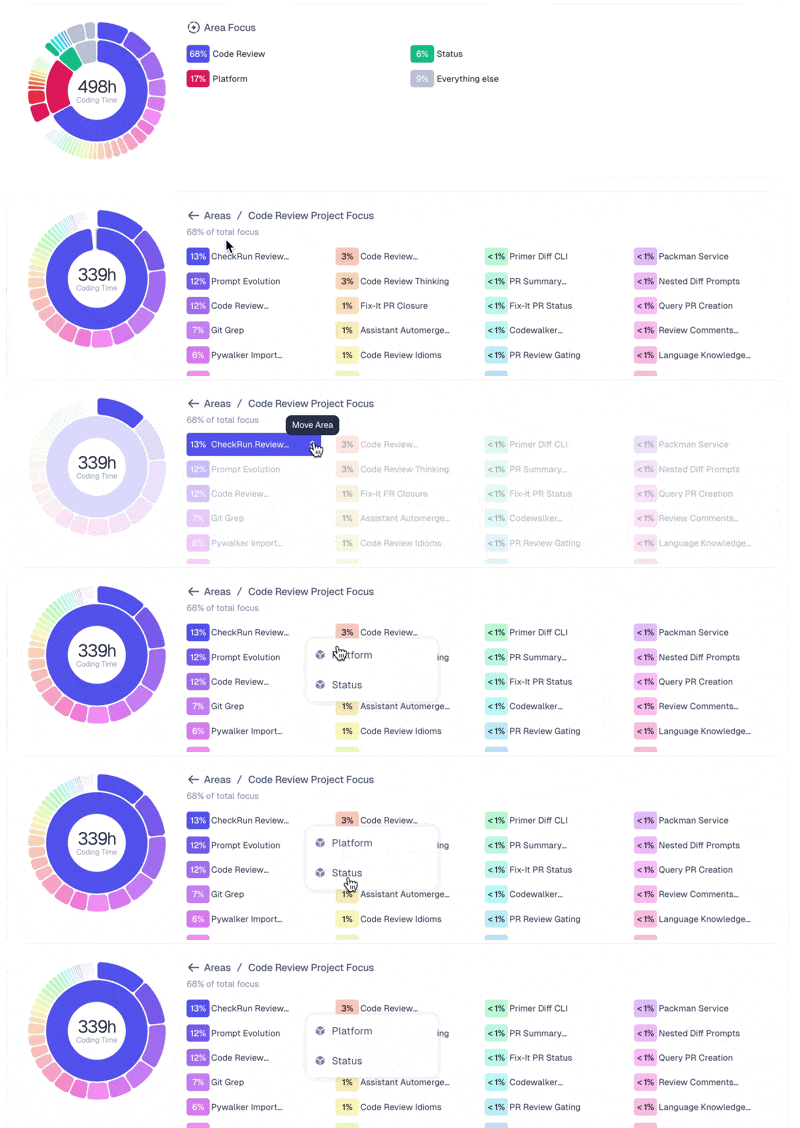
 **Reassign Project Areas from Breakdown Chart**
When hovering over a Project in the Project Focus Breakdown chart, you can click the “Move Area” button to reassign the Project to a different Area.
**Reassign Project Areas from Breakdown Chart**
When hovering over a Project in the Project Focus Breakdown chart, you can click the “Move Area” button to reassign the Project to a different Area.
 **Skip Labels Now Work for PR Summaries**
Labels configured to skip code review now also skip PR summary posting. Add your configured skip label to any PR to disable both features at once.
**Improvements to Code Review**
Better handling of language-specific patterns and reduced noise from non-actionable issues.
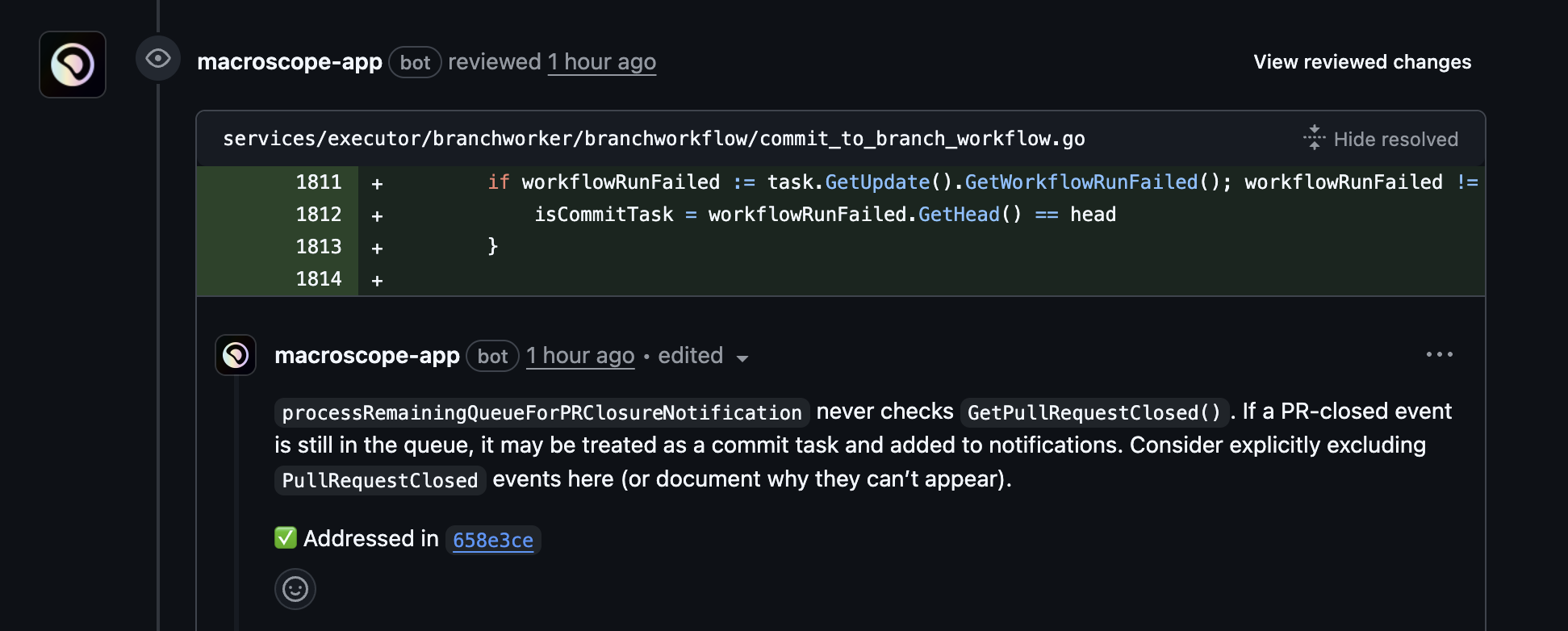
**Comment Resolution Tracking**
Code review comments now link to the commit where they were resolved and indicate if feedback has been addressed. Macroscope automatically evaluates and updates comments when new code is pushed to a PR.
**Skip Labels Now Work for PR Summaries**
Labels configured to skip code review now also skip PR summary posting. Add your configured skip label to any PR to disable both features at once.
**Improvements to Code Review**
Better handling of language-specific patterns and reduced noise from non-actionable issues.
**Comment Resolution Tracking**
Code review comments now link to the commit where they were resolved and indicate if feedback has been addressed. Macroscope automatically evaluates and updates comments when new code is pushed to a PR.
 **Per-PR Auto-Merge Control**
You can override your default auto-merge settings when asking Macroscope to fix an issue by adding instructions like “Fix it for me and auto-merge” or “Fix it but don't auto-merge.”
**Timezone-Aware Date Selection**
Date presets (e.g. “Yesterday”, “This Month”) in the Macroscope web app now automatically align with your local timezone.
**Neutral Check Run Status**
When Macroscope reviews your code and posts comments with issues that need addressing, check runs now complete with `NEUTRAL` status instead of `SUCCESS`, so it's clear when there's pending feedback to address.
**Explanations for Blocked Auto-Merges**
When you use Macroscope's coding agent to automatically fix issues on a feature branch, the agent creates a pull request with the fixes and attempts to auto-merge it back to your base branch (if you have auto-merge enabled).
If auto-merge is blocked, Macroscope now posts a comment explaining the specific GitHub requirement preventing the merge (e.g. missing reviews, merge conflicts, failed checks).
**Flexible @Mention Support in GitHub**
Macroscope now responds to both `@macroscope` and `@macroscope-app`.
**Fix It For Me**
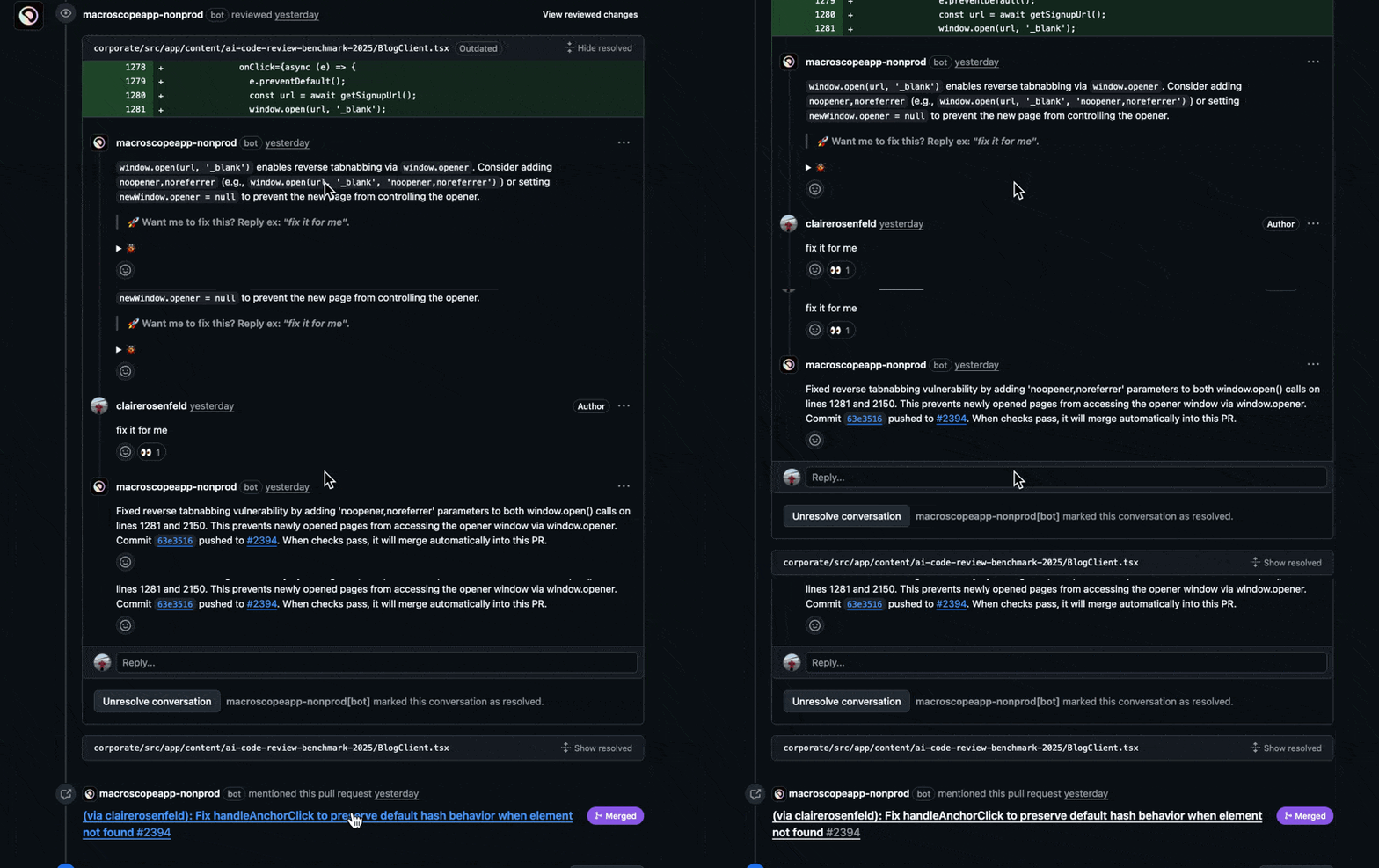
Macroscope can directly fix issues found during code review. Just reply to a GitHub review comment and ask Macroscope to fix it. Macroscope will create a branch, push commits, open a PR, and merge it back into your working branch. [See help docs for more details](/fix-it-for-me).
**Per-PR Auto-Merge Control**
You can override your default auto-merge settings when asking Macroscope to fix an issue by adding instructions like “Fix it for me and auto-merge” or “Fix it but don't auto-merge.”
**Timezone-Aware Date Selection**
Date presets (e.g. “Yesterday”, “This Month”) in the Macroscope web app now automatically align with your local timezone.
**Neutral Check Run Status**
When Macroscope reviews your code and posts comments with issues that need addressing, check runs now complete with `NEUTRAL` status instead of `SUCCESS`, so it's clear when there's pending feedback to address.
**Explanations for Blocked Auto-Merges**
When you use Macroscope's coding agent to automatically fix issues on a feature branch, the agent creates a pull request with the fixes and attempts to auto-merge it back to your base branch (if you have auto-merge enabled).
If auto-merge is blocked, Macroscope now posts a comment explaining the specific GitHub requirement preventing the merge (e.g. missing reviews, merge conflicts, failed checks).
**Flexible @Mention Support in GitHub**
Macroscope now responds to both `@macroscope` and `@macroscope-app`.
**Fix It For Me**
Macroscope can directly fix issues found during code review. Just reply to a GitHub review comment and ask Macroscope to fix it. Macroscope will create a branch, push commits, open a PR, and merge it back into your working branch. [See help docs for more details](/fix-it-for-me).
 **Updated Check Run Labels**
GitHub Check Runs now display as "Macroscope - Correctness Check" and "Macroscope - Custom Rules Check" (previously "Review for correctness" and "Review custom rules").
**Pull Request Closure Messages**
When someone manually closes a PR, Macroscope now posts a comment identifying who closed it and whether it was merged.
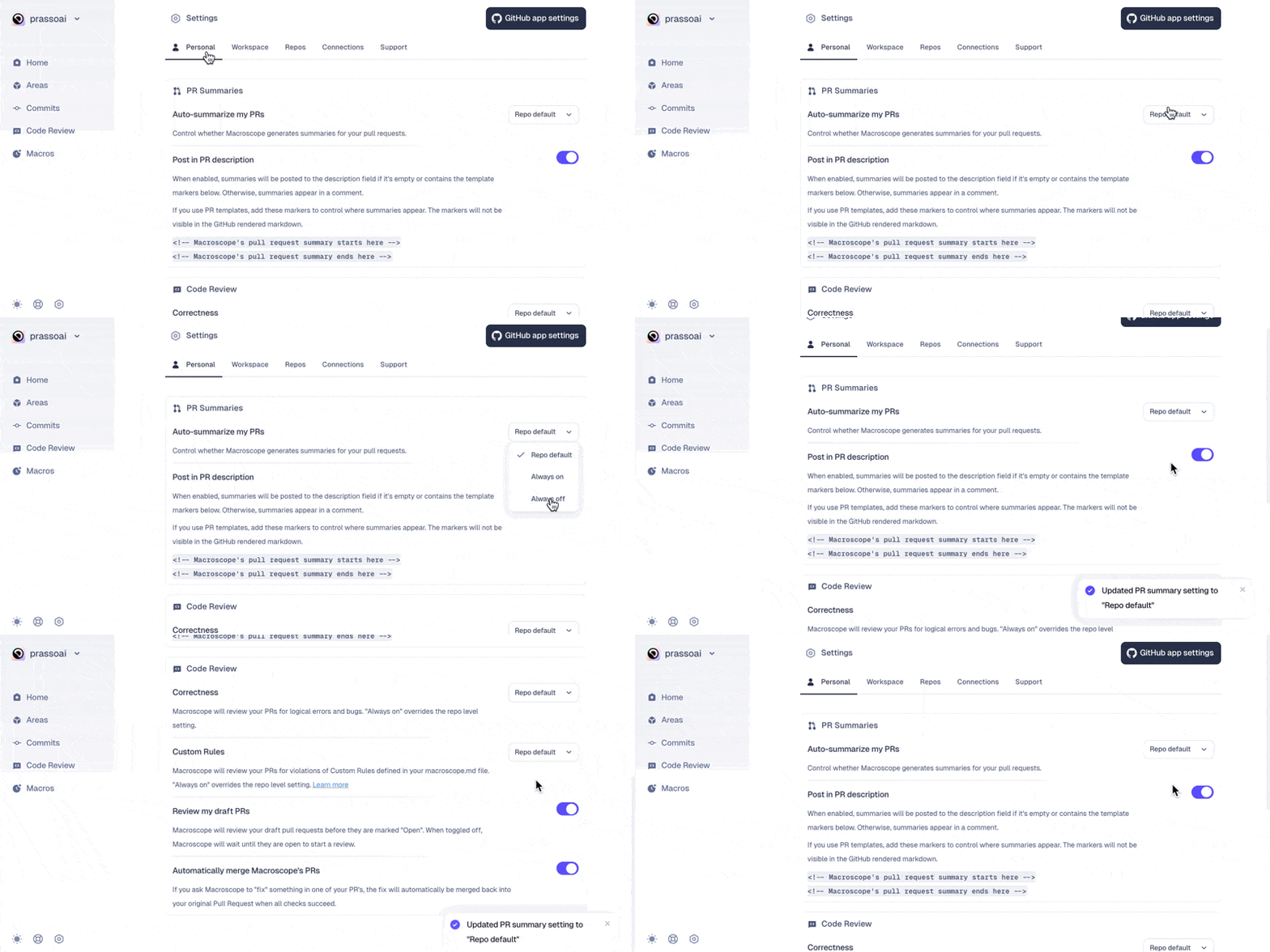
**Personal Code Review Settings**
Individuals can now customize their individual preferences for PR Summaries and Code Review that override their workspace defaults. Select "Repo Default" to inherit preferences from the repository level.
**Updated Check Run Labels**
GitHub Check Runs now display as "Macroscope - Correctness Check" and "Macroscope - Custom Rules Check" (previously "Review for correctness" and "Review custom rules").
**Pull Request Closure Messages**
When someone manually closes a PR, Macroscope now posts a comment identifying who closed it and whether it was merged.
**Personal Code Review Settings**
Individuals can now customize their individual preferences for PR Summaries and Code Review that override their workspace defaults. Select "Repo Default" to inherit preferences from the repository level.
 **Timezone Support in AMA**
When asking Macroscope questions, the query agent now automatically uses your timezone to interpret dates and times. This means you get more accurate results when asking about "yesterday," "this week," or specific dates.
**v2 Code Review by Opus 4.5**
We released a new version of Code Review powered exclusively by Claude Opus 4.5. Compared to our previous code review pipeline, the new pipeline has 40% higher recall and generates 10% fewer false positives. [Learn more in our blog post](https://blog.macroscope.com/blog/opus-4.5-code-review).
**Invoking Macroscope in PR Discussions**
Macroscope can now respond to your comments in the main PR discussion thread, not just inline code comments. When you mention @macroscope-app in a comment, Macroscope will react with 👀 to acknowledge it’s thinking about your question and then respond in the main discussion thread.
**Ignoring Bot Comments in GitHub**
@macroscope-app no longer responds to comments authored by other bots in GitHub.
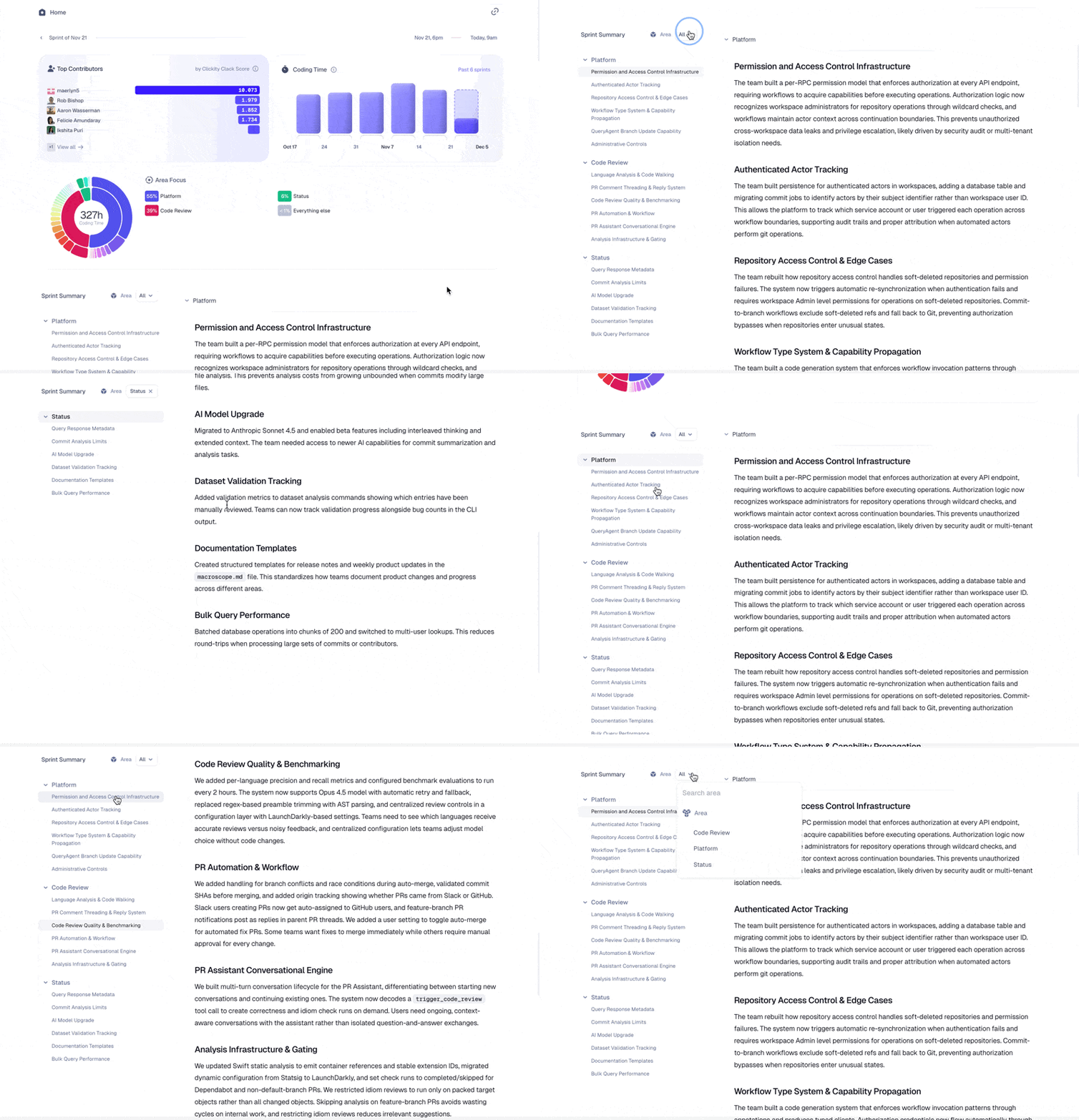
**Improved Executive Summaries**
We’ve simplified summaries on the home page. Summaries are organized by [Areas](/areas) and have collapsible sections, so you can easily see a high level view of what’s changed in your codebase this sprint.
**Timezone Support in AMA**
When asking Macroscope questions, the query agent now automatically uses your timezone to interpret dates and times. This means you get more accurate results when asking about "yesterday," "this week," or specific dates.
**v2 Code Review by Opus 4.5**
We released a new version of Code Review powered exclusively by Claude Opus 4.5. Compared to our previous code review pipeline, the new pipeline has 40% higher recall and generates 10% fewer false positives. [Learn more in our blog post](https://blog.macroscope.com/blog/opus-4.5-code-review).
**Invoking Macroscope in PR Discussions**
Macroscope can now respond to your comments in the main PR discussion thread, not just inline code comments. When you mention @macroscope-app in a comment, Macroscope will react with 👀 to acknowledge it’s thinking about your question and then respond in the main discussion thread.
**Ignoring Bot Comments in GitHub**
@macroscope-app no longer responds to comments authored by other bots in GitHub.
**Improved Executive Summaries**
We’ve simplified summaries on the home page. Summaries are organized by [Areas](/areas) and have collapsible sections, so you can easily see a high level view of what’s changed in your codebase this sprint.
 **@mentions in Slack**
Users can configure whether or not Macroscope can @mention them directly in Slack. When enabled, Macroscope will @mention them when relevant, such as when they are assigned as a reviewer on a PR. When disabled, Macroscope will reference the user’s Slack name instead of @mentioning them directly. This setting is configurable per user in Settings → Account.
**Language Support for Elixir and Starlark**
Macroscope code review now supports Elixir (.ex, .exs files) and Starlark (.star, Tiltfile, BUILD files).
**Login Improvements for Enterprise/SAML Customers**
For customers using SAML login alongside GitHub Enterprise Managed Users, Macroscope’s login flow should be smoother and smarter about automatically detecting expired tokens.
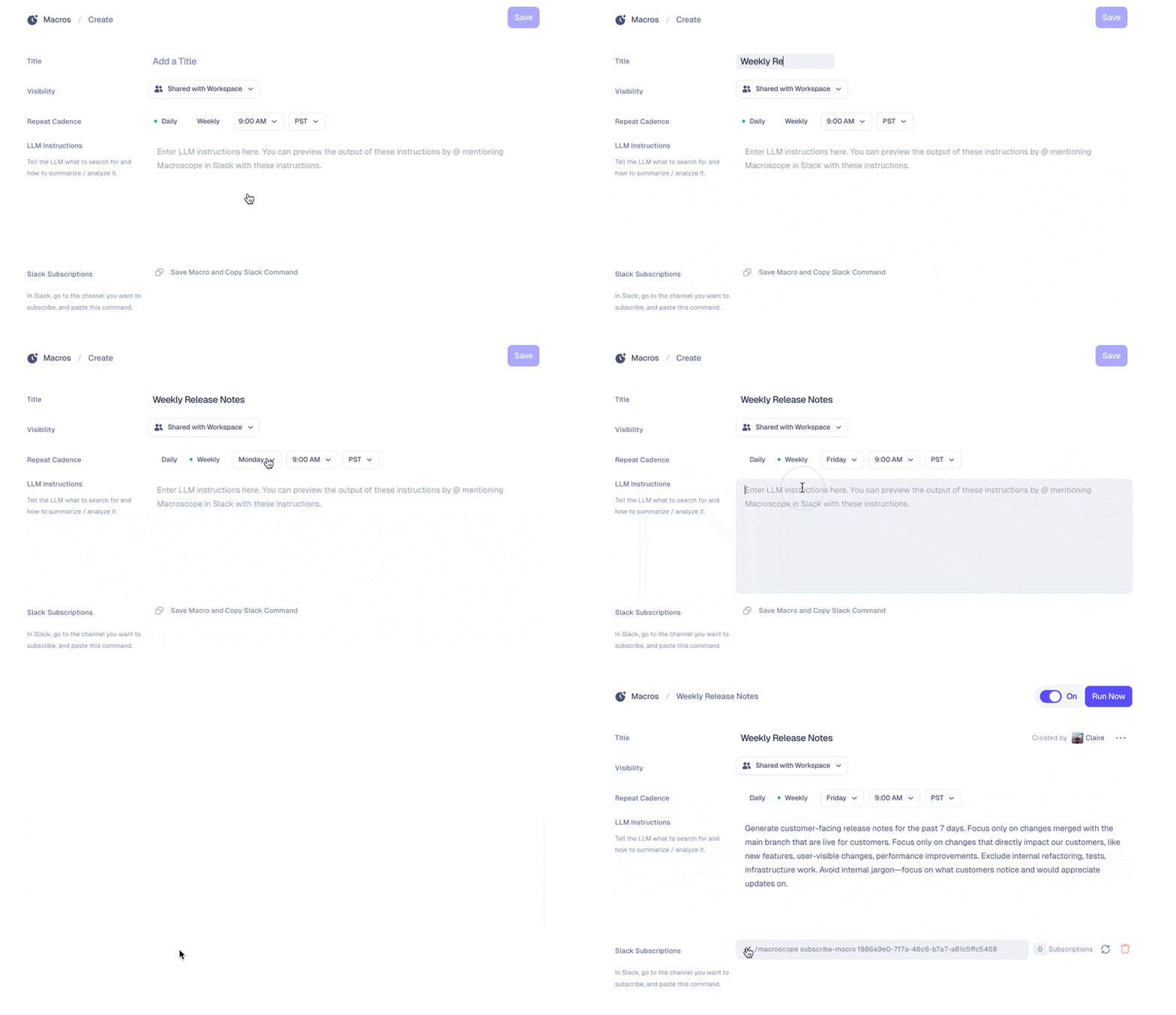
**Streamlined Macros Scheduling**
Scheduling regular reports with Macros is now even easier. After you set your daily/weekly cadence and write your prompt, all you need to do is copy/paste the generated Slack command into any Slack channel(s) you want to subscribe to the Macro. [Learn more about Macros in our help docs](/macros).
**@mentions in Slack**
Users can configure whether or not Macroscope can @mention them directly in Slack. When enabled, Macroscope will @mention them when relevant, such as when they are assigned as a reviewer on a PR. When disabled, Macroscope will reference the user’s Slack name instead of @mentioning them directly. This setting is configurable per user in Settings → Account.
**Language Support for Elixir and Starlark**
Macroscope code review now supports Elixir (.ex, .exs files) and Starlark (.star, Tiltfile, BUILD files).
**Login Improvements for Enterprise/SAML Customers**
For customers using SAML login alongside GitHub Enterprise Managed Users, Macroscope’s login flow should be smoother and smarter about automatically detecting expired tokens.
**Streamlined Macros Scheduling**
Scheduling regular reports with Macros is now even easier. After you set your daily/weekly cadence and write your prompt, all you need to do is copy/paste the generated Slack command into any Slack channel(s) you want to subscribe to the Macro. [Learn more about Macros in our help docs](/macros).
 **Manually Trigger Code Review in GitHub**
You can now manually trigger a code review on a PR in GitHub by commenting `@macroscope-app review`, regardless of whether Macroscope code review is enabled for the repository. Macroscope will acknowledge your comment with a thumbs-up reaction and run a code review on the PR. This is useful when you want Macroscope to run another review after making changes, or when automatic reviews are disabled for a repo.
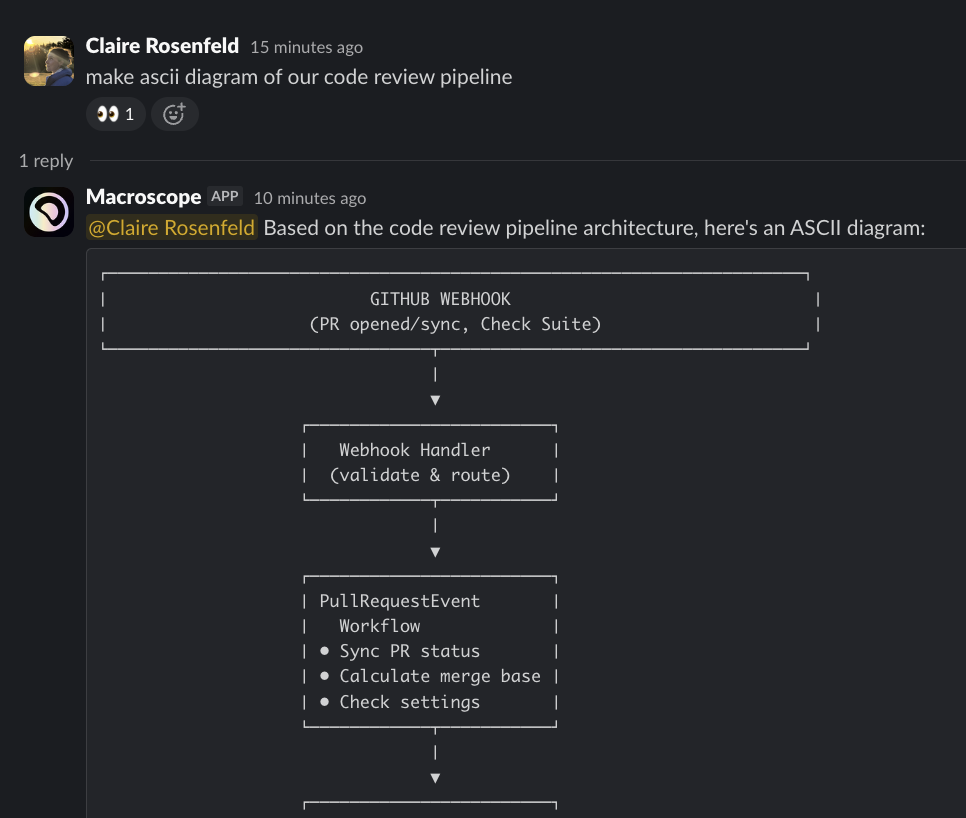
**Visualize Your Code in Slack**
Want to see how tables are connected in a database? Map a diagram of a workflow’s lifecycle? You can ask @Macroscope to generate ASCII diagrams of anything related to your code.
**Manually Trigger Code Review in GitHub**
You can now manually trigger a code review on a PR in GitHub by commenting `@macroscope-app review`, regardless of whether Macroscope code review is enabled for the repository. Macroscope will acknowledge your comment with a thumbs-up reaction and run a code review on the PR. This is useful when you want Macroscope to run another review after making changes, or when automatic reviews are disabled for a repo.
**Visualize Your Code in Slack**
Want to see how tables are connected in a database? Map a diagram of a workflow’s lifecycle? You can ask @Macroscope to generate ASCII diagrams of anything related to your code.
 **Updates to Query Agent (a.k.a. Ask Macroscope Anything)**
* **Smarter Guidance** - Query Agent can provide guidance when you explicitly request help, even for tasks outside its direct capabilities.
* **Adaptive Tone** - Macroscope adapts to your communication style. If you use humor or casual language, Query Agent will respond in kind while maintaining accurate and factual responses.
* **Content for External Stakeholders** - When you need content for external audiences, Query Agent can format responses and links appropriately for sharing outside your organization. Just request externally-facing content when preparing materials.
* **More Flexibility** - Under the hood, Query Agent's underlying prompt system supports broader interaction patterns, allowing it to handle a wider variety of interactions with users.
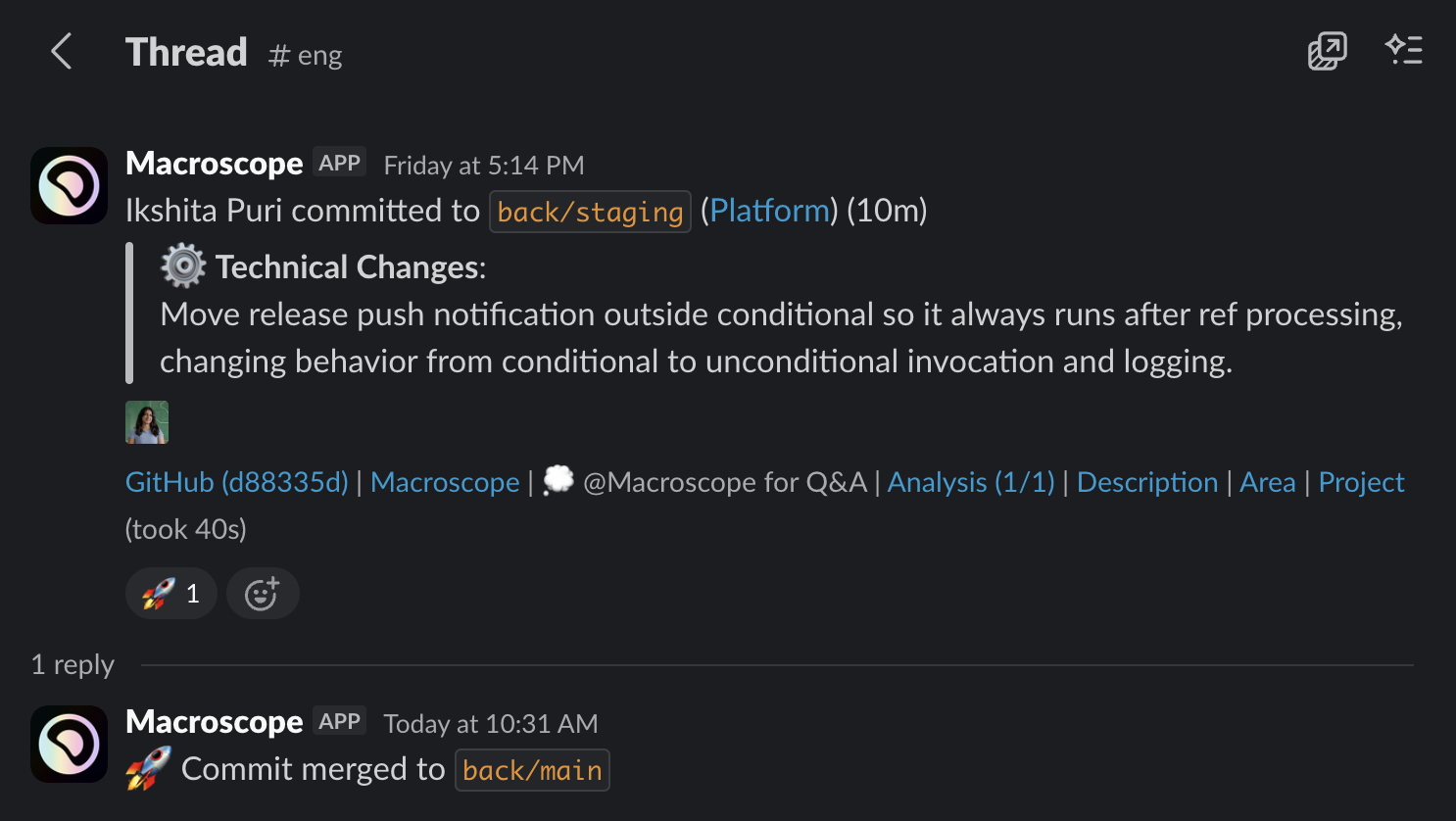
**Merge Notifications in Slack**
Macroscope now notifies you in Slack in real-time when commits are merged to release branches. When a merge occurs, Macroscope reacts to the original PR summary message with a 🚀 emoji and posts a reply in the message thread. This works for all merge types, including squash, rebase, and fast-forward merges.
Note: this requires subscribing to commit notifications in a Slack channel with the `/macroscope subscribe-commits` command.
**Updates to Query Agent (a.k.a. Ask Macroscope Anything)**
* **Smarter Guidance** - Query Agent can provide guidance when you explicitly request help, even for tasks outside its direct capabilities.
* **Adaptive Tone** - Macroscope adapts to your communication style. If you use humor or casual language, Query Agent will respond in kind while maintaining accurate and factual responses.
* **Content for External Stakeholders** - When you need content for external audiences, Query Agent can format responses and links appropriately for sharing outside your organization. Just request externally-facing content when preparing materials.
* **More Flexibility** - Under the hood, Query Agent's underlying prompt system supports broader interaction patterns, allowing it to handle a wider variety of interactions with users.
**Merge Notifications in Slack**
Macroscope now notifies you in Slack in real-time when commits are merged to release branches. When a merge occurs, Macroscope reacts to the original PR summary message with a 🚀 emoji and posts a reply in the message thread. This works for all merge types, including squash, rebase, and fast-forward merges.
Note: this requires subscribing to commit notifications in a Slack channel with the `/macroscope subscribe-commits` command.
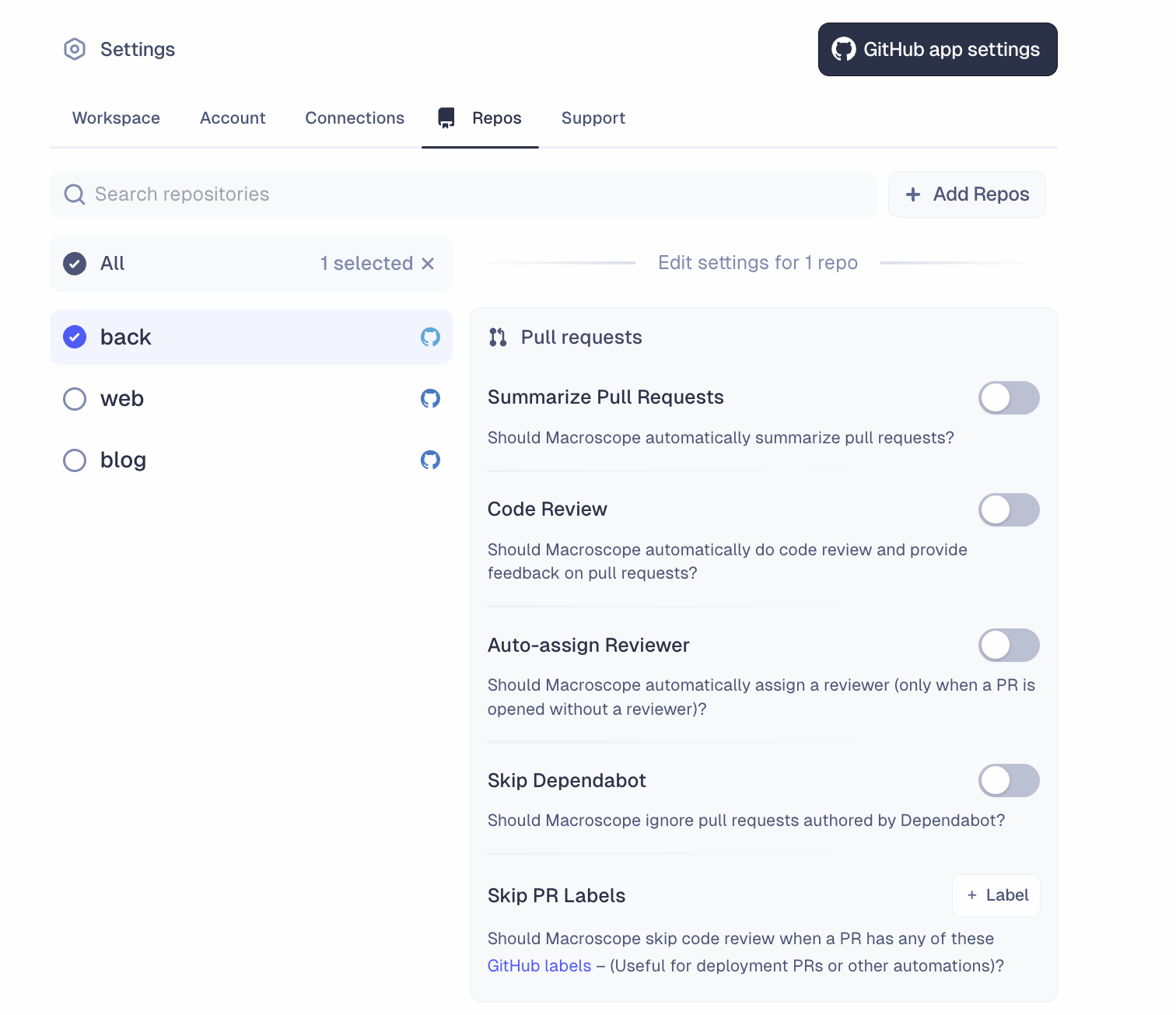
 **Skip Code Review with GitHub Labels**
You can now tell Macroscope to skip code review on PRs tagged with specific [GitHub labels](https://docs.github.com/en/issues/using-labels-and-milestones-to-track-work/managing-labels). In Settings → Repos → Skip PR Labels, you can specify which GitHub labels that you want Macroscope to ignore during code review (e.g. “docs-only”). When you apply any of these designated labels to a PR, Macroscope will automatically skip the code review process for that PR.
**Skip Code Review with GitHub Labels**
You can now tell Macroscope to skip code review on PRs tagged with specific [GitHub labels](https://docs.github.com/en/issues/using-labels-and-milestones-to-track-work/managing-labels). In Settings → Repos → Skip PR Labels, you can specify which GitHub labels that you want Macroscope to ignore during code review (e.g. “docs-only”). When you apply any of these designated labels to a PR, Macroscope will automatically skip the code review process for that PR.
 **New Rendering Modes for Suggested Fixes in Review Comments**
Macroscope now automatically selects the best format for displaying suggested code fixes in review comments. Depending on the context, Macroscope chooses between three options:
* GitHub’s native inline suggestion block (i.e. “accept diff”)
* Unified diff blocks (i.e. static code diff)
* No diff (i.e. text-only explanations)
**Code Review Latency**
We significantly improved code review latency in the case where you push multiple commits to a PR in quick succession.
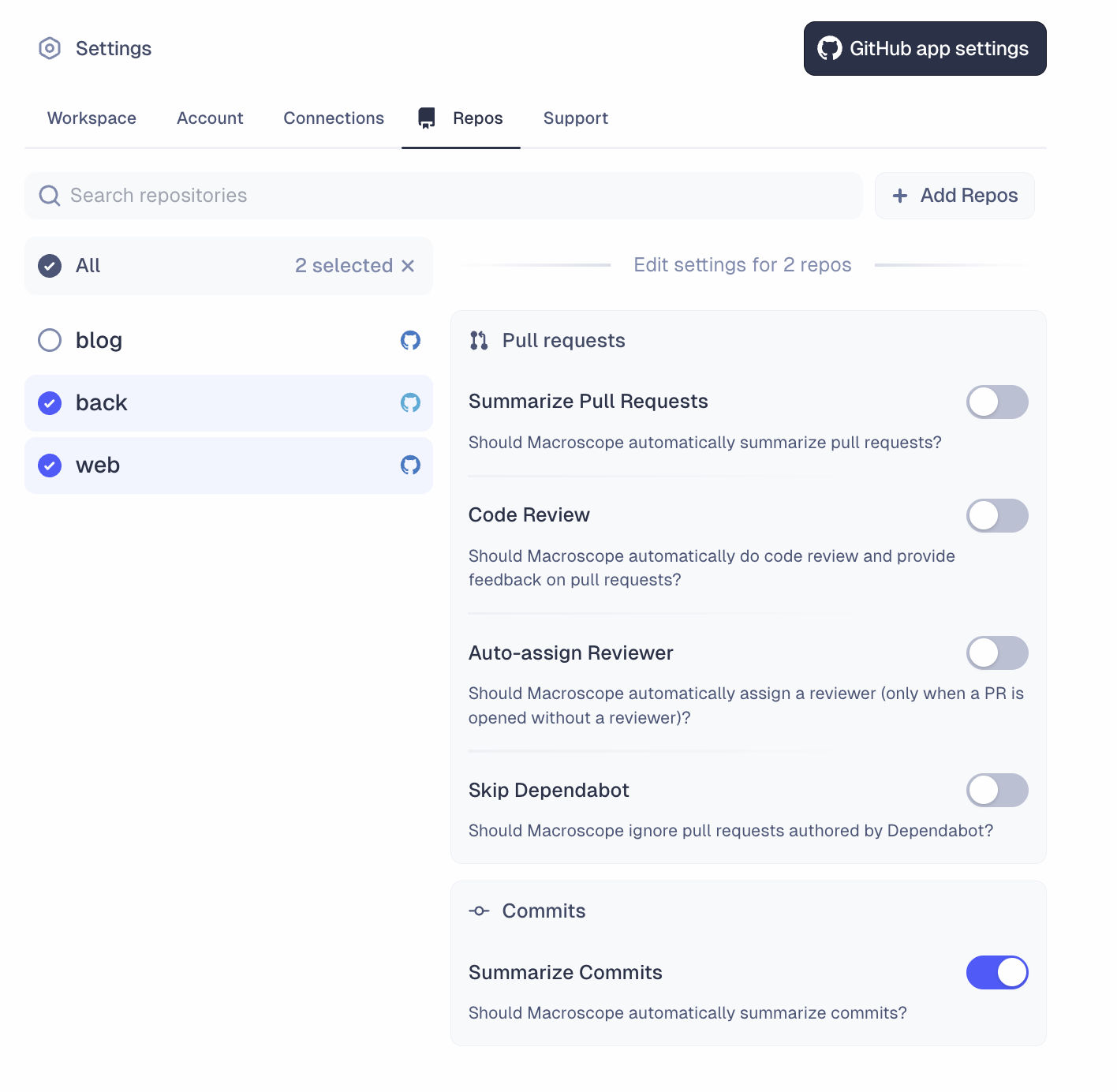
**Batch Repository Settings**
You can now configure settings for multiple repositories at once. The new interface, found in Settings → Repos, allows you to search repos, select multiple repos, and apply settings across multiple repos simultaneously.
**New Rendering Modes for Suggested Fixes in Review Comments**
Macroscope now automatically selects the best format for displaying suggested code fixes in review comments. Depending on the context, Macroscope chooses between three options:
* GitHub’s native inline suggestion block (i.e. “accept diff”)
* Unified diff blocks (i.e. static code diff)
* No diff (i.e. text-only explanations)
**Code Review Latency**
We significantly improved code review latency in the case where you push multiple commits to a PR in quick succession.
**Batch Repository Settings**
You can now configure settings for multiple repositories at once. The new interface, found in Settings → Repos, allows you to search repos, select multiple repos, and apply settings across multiple repos simultaneously.
 **AMA for Repos with Summaries Disabled**
Macroscope’s Slackbot can answer questions about any repository you’ve linked to Macroscope, even if PR summaries are disabled. Based on customer feedback, we changed the PR summary setting so that it only controls whether generated summaries are posted to GitHub. This allows your Slack users to @ mention Macroscope with questions about PRs in repos where the PR summary posting feature is disabled.
**Shorter Code Review Comments**
We’ve adjusted Macroscope code review comments to be more succinct.
**Path-Based Filters for Slack Subscriptions**
With path-based filters, you can limit code activity subscriptions to specific parts of a repository. Any activity that modifies files matching the specified path filter(s) will trigger a Slack notification in the subscribed Slack channel. To create a code activity subscription that is filtered by file path, add the`--paths=` flag to the end of a `/macroscope` subscription command, and specify which file path(s) you want to filter by. [Learn more about path-based filters in our help docs](/slack-subscriptions#path-based-filters).
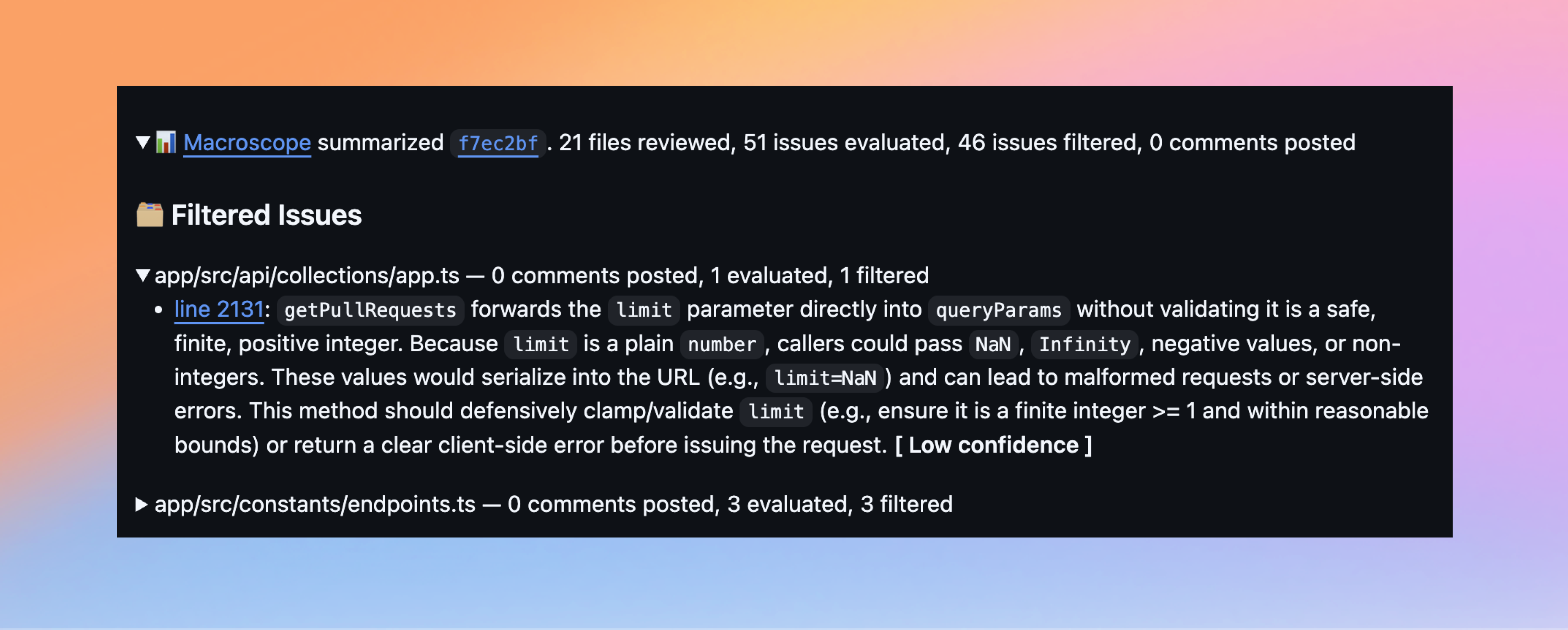
**Filtered Issues in Code Review**
If you’ve been curious which comments Macroscope considered leaving on your pull request but didn’t, you can now see them. By default, these lower-signal comments are hidden to keep reviews focused. However, you can expand the “Filtered Issues” section at the bottom of the PR description to see which comments were excluded, by file, and expand each file to view the specific comment(s) identified.
**AMA for Repos with Summaries Disabled**
Macroscope’s Slackbot can answer questions about any repository you’ve linked to Macroscope, even if PR summaries are disabled. Based on customer feedback, we changed the PR summary setting so that it only controls whether generated summaries are posted to GitHub. This allows your Slack users to @ mention Macroscope with questions about PRs in repos where the PR summary posting feature is disabled.
**Shorter Code Review Comments**
We’ve adjusted Macroscope code review comments to be more succinct.
**Path-Based Filters for Slack Subscriptions**
With path-based filters, you can limit code activity subscriptions to specific parts of a repository. Any activity that modifies files matching the specified path filter(s) will trigger a Slack notification in the subscribed Slack channel. To create a code activity subscription that is filtered by file path, add the`--paths=` flag to the end of a `/macroscope` subscription command, and specify which file path(s) you want to filter by. [Learn more about path-based filters in our help docs](/slack-subscriptions#path-based-filters).
**Filtered Issues in Code Review**
If you’ve been curious which comments Macroscope considered leaving on your pull request but didn’t, you can now see them. By default, these lower-signal comments are hidden to keep reviews focused. However, you can expand the “Filtered Issues” section at the bottom of the PR description to see which comments were excluded, by file, and expand each file to view the specific comment(s) identified.
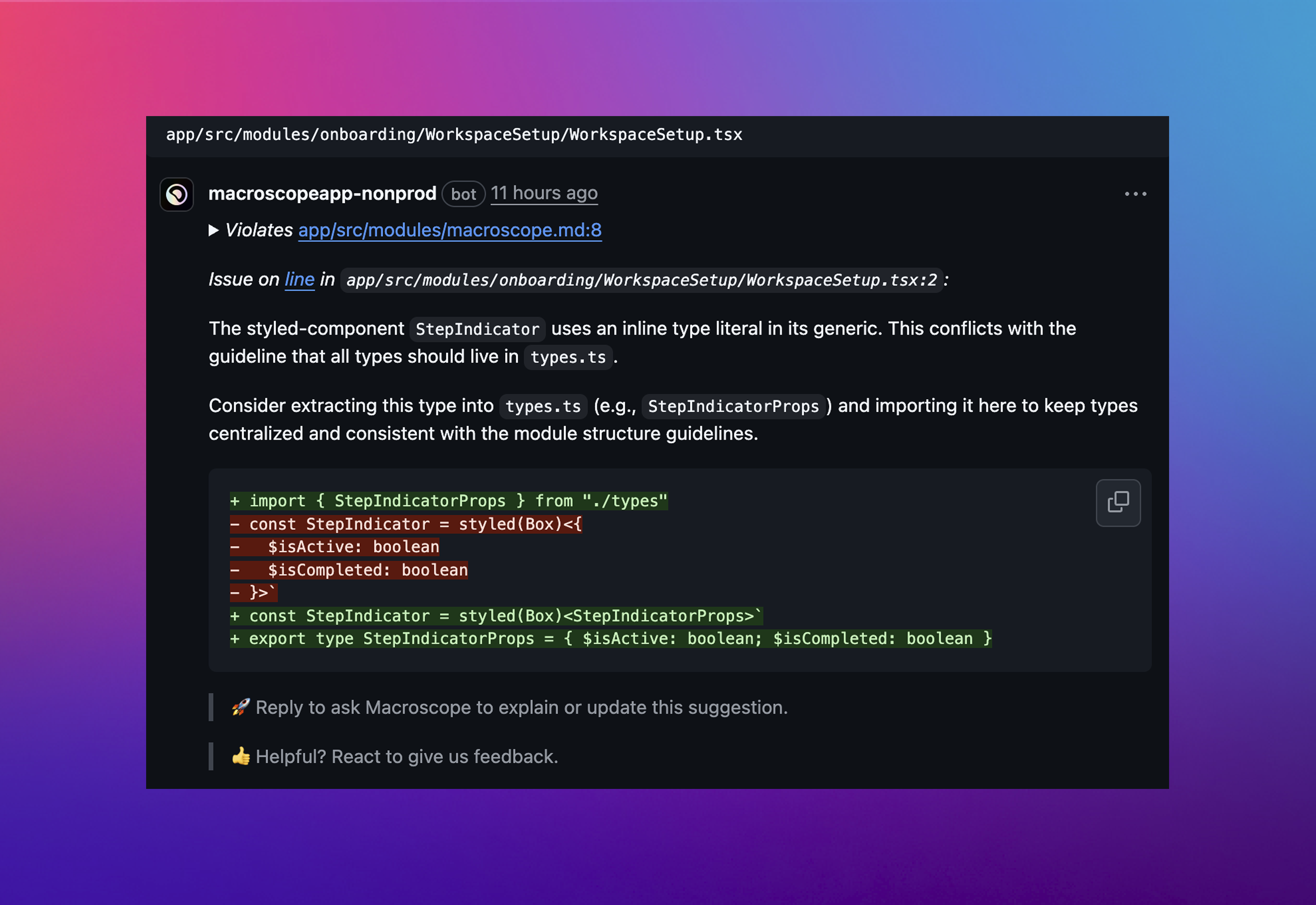
 **Custom Rules \[deprecated for [Check Run Agents](/check-run-agents)]**
We’re introducing the ability for Macroscope to run an independent code review focused on your team’s best practices, based on custom rules you define. In `macroscope.md` files throughout your codebase, you can define your team’s best practices (i.e. anything that’s idiomatic of how you want code to be written). During reviews, Macroscope will run a separate CheckRun that flags violations and leaves inline comments that reference the relevant rule.
**Custom Rules \[deprecated for [Check Run Agents](/check-run-agents)]**
We’re introducing the ability for Macroscope to run an independent code review focused on your team’s best practices, based on custom rules you define. In `macroscope.md` files throughout your codebase, you can define your team’s best practices (i.e. anything that’s idiomatic of how you want code to be written). During reviews, Macroscope will run a separate CheckRun that flags violations and leaves inline comments that reference the relevant rule.
 **AI Web Research in Code Review**
Code review now has web research capabilities, meaning that Macroscope can search the web for external knowledge sources. When reviewing your code, Macroscope uses [Parallel](https://www.parallel.ai/)’s search API to find the latest documentation, so that code reviews take into account every library and package you use.
**AI Web Research in Code Review**
Code review now has web research capabilities, meaning that Macroscope can search the web for external knowledge sources. When reviewing your code, Macroscope uses [Parallel](https://www.parallel.ai/)’s search API to find the latest documentation, so that code reviews take into account every library and package you use.
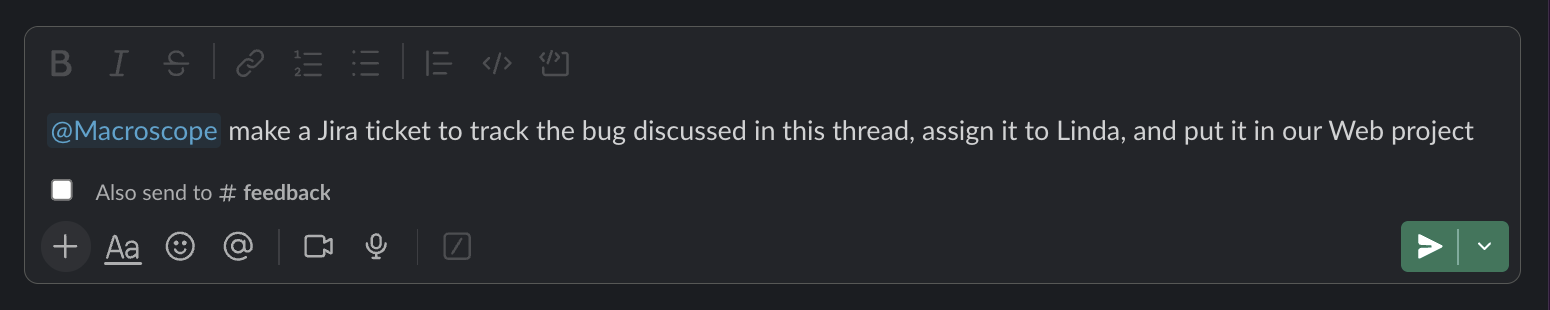
 **Ticket Creation in Slack**
You can now ask the Macroscope Slackbot to create Jira and Linear tickets. Ask @Macroscope to create a ticket and Macroscope will use the context provided to generate a ticket on your behalf. To enable this, you will need to re-authorize your Jira / Linear integrations in Settings → Connections. [Learn more about our Jira / Linear integrations here](/issue-management-integrations).
**Ticket Creation in Slack**
You can now ask the Macroscope Slackbot to create Jira and Linear tickets. Ask @Macroscope to create a ticket and Macroscope will use the context provided to generate a ticket on your behalf. To enable this, you will need to re-authorize your Jira / Linear integrations in Settings → Connections. [Learn more about our Jira / Linear integrations here](/issue-management-integrations).
 **Displaying Teammate Names**
The web app now shows contributors’ GitHub display names (instead of their GitHub usernames) across commits, contributors, and team views, making it easier to identify team members.
**Contributor Metrics in AMA**
Macroscope AMA now has access to Contributor Productivity Metrics (e.g. # commits, # PR, coding time), so you can ask questions like “@Macroscope how many PRs were opened in the last 2 days?”. Macroscope’s agent can retrieve any metrics that are visible on the Macroscope website, across any time range.
**Linear Integration v2**
Macroscope is now using Linear's new "Agents" framework. Soon, Macroscope will be able to take actions on behalf of users in Linear. Existing customers will need to unlink and re-link their Linear application in their Macroscope settings in order to authorize fresh permissions.
**Jira Integration v2**
We are building a deeper Jira integration in Macroscope AMA. Soon, Macroscope will be able to create Jira issues and answer questions about your Jira projects and issues.
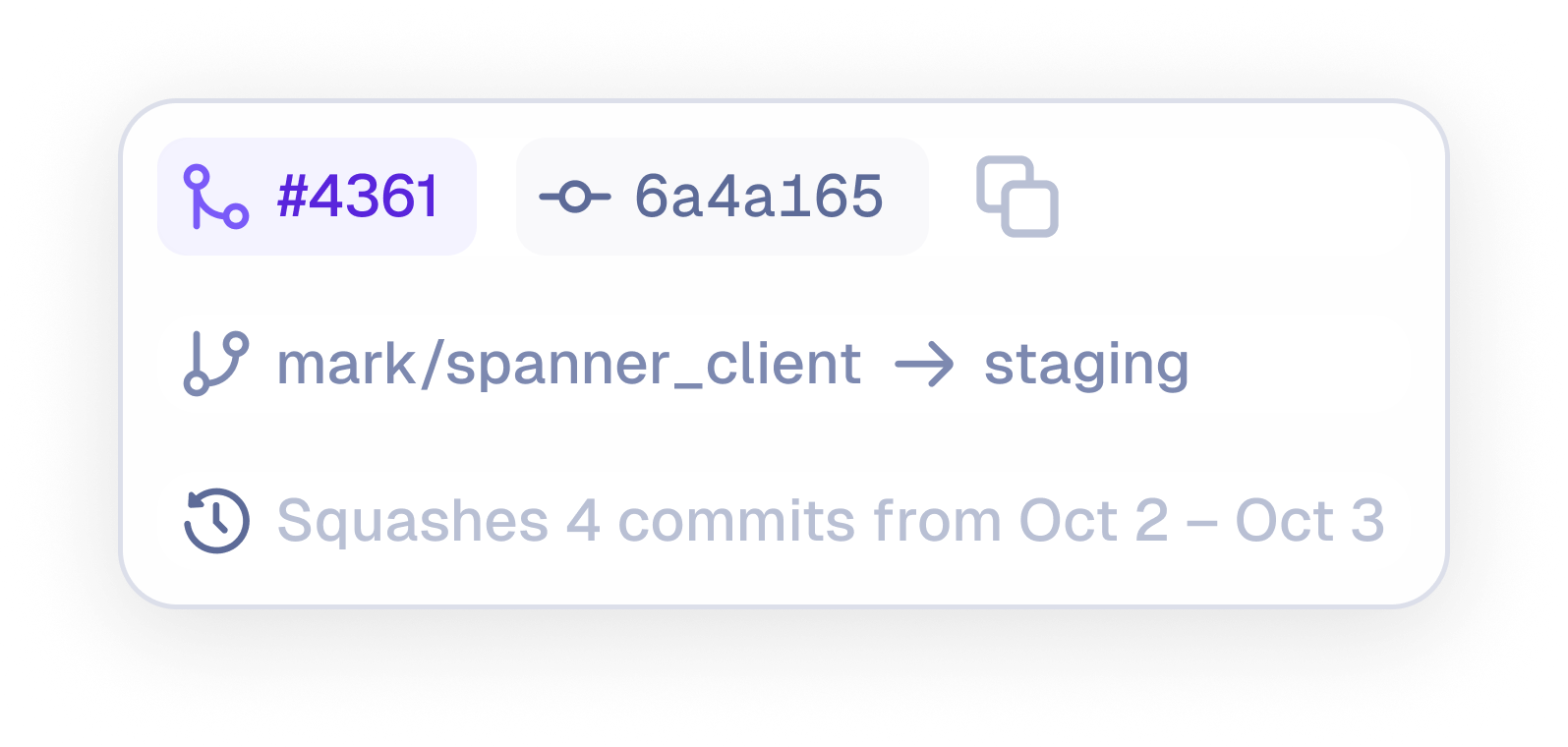
**Squash Merge Summaries**
The Commits page now displays summaries for squash merges. Users can hover over a branch’s release details to view the summary, which shows the number of commits squashed and the date range covered.
**Displaying Teammate Names**
The web app now shows contributors’ GitHub display names (instead of their GitHub usernames) across commits, contributors, and team views, making it easier to identify team members.
**Contributor Metrics in AMA**
Macroscope AMA now has access to Contributor Productivity Metrics (e.g. # commits, # PR, coding time), so you can ask questions like “@Macroscope how many PRs were opened in the last 2 days?”. Macroscope’s agent can retrieve any metrics that are visible on the Macroscope website, across any time range.
**Linear Integration v2**
Macroscope is now using Linear's new "Agents" framework. Soon, Macroscope will be able to take actions on behalf of users in Linear. Existing customers will need to unlink and re-link their Linear application in their Macroscope settings in order to authorize fresh permissions.
**Jira Integration v2**
We are building a deeper Jira integration in Macroscope AMA. Soon, Macroscope will be able to create Jira issues and answer questions about your Jira projects and issues.
**Squash Merge Summaries**
The Commits page now displays summaries for squash merges. Users can hover over a branch’s release details to view the summary, which shows the number of commits squashed and the date range covered.
 **Support for GitHub PR Templates**
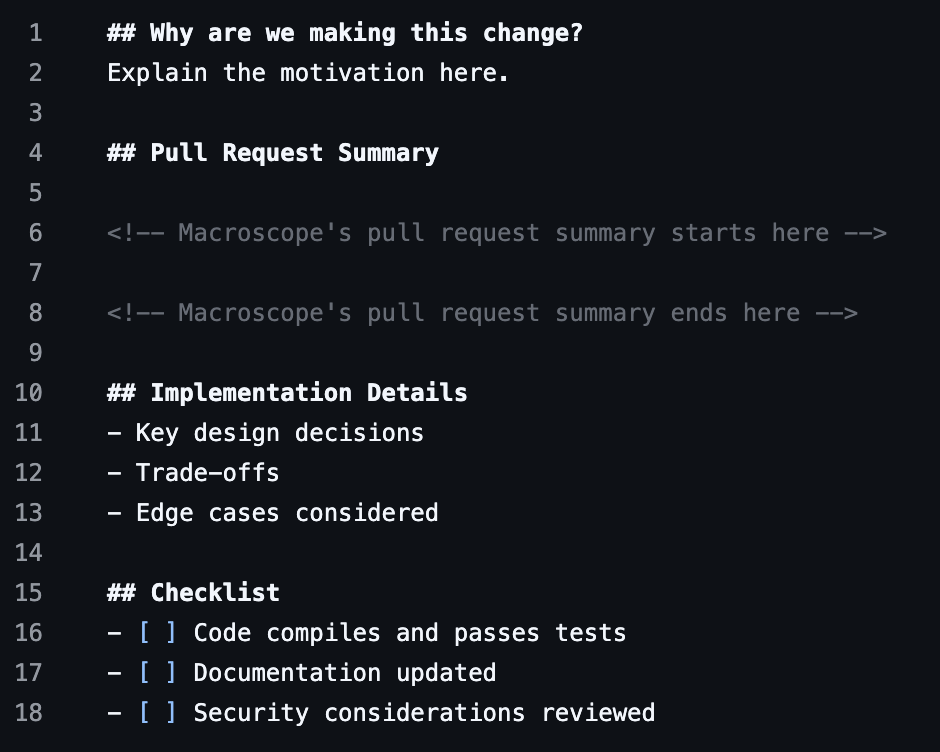
You can now add Macroscope summaries directly into a PR template by placing special markers where you want the summary to appear. [Learn more in our help center.](https://docs.macroscope.com/pull-request-descriptions#inserting-macroscope-summaries-into-your-pr-templates)
**Support for GitHub PR Templates**
You can now add Macroscope summaries directly into a PR template by placing special markers where you want the summary to appear. [Learn more in our help center.](https://docs.macroscope.com/pull-request-descriptions#inserting-macroscope-summaries-into-your-pr-templates)
 **Exportable Contributor Stats across Custom Time Ranges**
The Contributors page shows engineering productivity metrics grouped by individual contributors or by GitHub Team. This page now includes total opened PRs, in addition to Commits and Coding Time. Metrics can be filtered across any custom date range and exported as a CSV.
**Exportable Contributor Stats across Custom Time Ranges**
The Contributors page shows engineering productivity metrics grouped by individual contributors or by GitHub Team. This page now includes total opened PRs, in addition to Commits and Coding Time. Metrics can be filtered across any custom date range and exported as a CSV.
 **Smarter, Faster “PR Assistant”**
We made our PR bot smarter and faster by ensuring it retains all the context of the code research it collected while reviewing your code. This means that when you’re asking clarifying questions or debating implementation details within a Pull Request review comment, Macroscope will have better informed responses and lower latency.
**Better Code Review**
We have made several improvements to code review that increase bug detection rate while reducing false positives.
**Slack Messages**
We have improved the formatting of code activity updates in Slack so that messages are easier to scan and understand.
**We’re Live!**
As of September 17, we’re officially out of private beta.
**Coding Time Estimates**
Improved our Coding Time estimate algorithm to provide more accurate estimations based on the complexity of code changes.
**Code Review Improvements**
Optimized our code review pipeline to reduce the likelihood of false positives. In our testing, this results in \~30% lower comment volume without a meaningful impact to overall bug detection rate.
**Deployment Tracking for Commits**
Commits now display a "Released to" indicator with a rocket icon and linked branch tag when released to a specific branch, making it easier to track deployment status.
**Slackbot Resilience**
Improved reliability and resilience of responses from Macroscope’s Slackbot. Sometimes, when users asked code research questions, the Slackbot would struggle to respond when the response included emojis due to Slack API compatibility issues. Now, the Slackbot responds without failure.
**Mobile Viewing**
Better viewing on tablets and larger mobile devices, plus improved chart displays.
**Resynchronize with GitHub**
In the rare event your repositories or related data in Macroscope ever fall out of sync with GitHub, you can click the "Resynchronize Now” button in Settings → Support to manually trigger a resynchronization.
**Code Review Improvements**
Improved bug detection across the 8 languages Macroscope code review supports. Our new pipeline will identify many more potential issues than before. In testing, we observed a significant improvement in detection rates with only a marginal increase in disapproval rates.
**Status for “Run Now” Macros**
When clicked, the “Run Now” button on the Macros Page shows live status, so users know when a Macro is executing and that the results will be posted to Slack soon.
**Project Focus Breakdown Chart Tooltips**
Tooltips in the Project Focus Breakdown chart on the Productivity Page have been improved for readability.
**Account Settings Code Review Toggle**
Users now have the flexibility to turn off correctness code reviews for their own PRs at the account level. This toggle is available in Settings → Account and gives each user more control over their review experience.
**Mobile Experience Improvements**
Improved scrolling behavior and updated UI for a smoother, more consistent experience on mobile.
**Smarter, Faster “PR Assistant”**
We made our PR bot smarter and faster by ensuring it retains all the context of the code research it collected while reviewing your code. This means that when you’re asking clarifying questions or debating implementation details within a Pull Request review comment, Macroscope will have better informed responses and lower latency.
**Better Code Review**
We have made several improvements to code review that increase bug detection rate while reducing false positives.
**Slack Messages**
We have improved the formatting of code activity updates in Slack so that messages are easier to scan and understand.
**We’re Live!**
As of September 17, we’re officially out of private beta.
**Coding Time Estimates**
Improved our Coding Time estimate algorithm to provide more accurate estimations based on the complexity of code changes.
**Code Review Improvements**
Optimized our code review pipeline to reduce the likelihood of false positives. In our testing, this results in \~30% lower comment volume without a meaningful impact to overall bug detection rate.
**Deployment Tracking for Commits**
Commits now display a "Released to" indicator with a rocket icon and linked branch tag when released to a specific branch, making it easier to track deployment status.
**Slackbot Resilience**
Improved reliability and resilience of responses from Macroscope’s Slackbot. Sometimes, when users asked code research questions, the Slackbot would struggle to respond when the response included emojis due to Slack API compatibility issues. Now, the Slackbot responds without failure.
**Mobile Viewing**
Better viewing on tablets and larger mobile devices, plus improved chart displays.
**Resynchronize with GitHub**
In the rare event your repositories or related data in Macroscope ever fall out of sync with GitHub, you can click the "Resynchronize Now” button in Settings → Support to manually trigger a resynchronization.
**Code Review Improvements**
Improved bug detection across the 8 languages Macroscope code review supports. Our new pipeline will identify many more potential issues than before. In testing, we observed a significant improvement in detection rates with only a marginal increase in disapproval rates.
**Status for “Run Now” Macros**
When clicked, the “Run Now” button on the Macros Page shows live status, so users know when a Macro is executing and that the results will be posted to Slack soon.
**Project Focus Breakdown Chart Tooltips**
Tooltips in the Project Focus Breakdown chart on the Productivity Page have been improved for readability.
**Account Settings Code Review Toggle**
Users now have the flexibility to turn off correctness code reviews for their own PRs at the account level. This toggle is available in Settings → Account and gives each user more control over their review experience.
**Mobile Experience Improvements**
Improved scrolling behavior and updated UI for a smoother, more consistent experience on mobile.