> ## Documentation Index
> Fetch the complete documentation index at: https://docs.macroscope.com/llms.txt
> Use this file to discover all available pages before exploring further.
# Check Run Agents
> Custom agentic check runs that enforce your rules and take action on every PR
Check Run Agents are fully customizable AI agents that trigger on every pull request open, push, and manual check rerun. They have access to your codebase, git history, and connected integrations. You define what to check, how to format the output, and what actions to take.
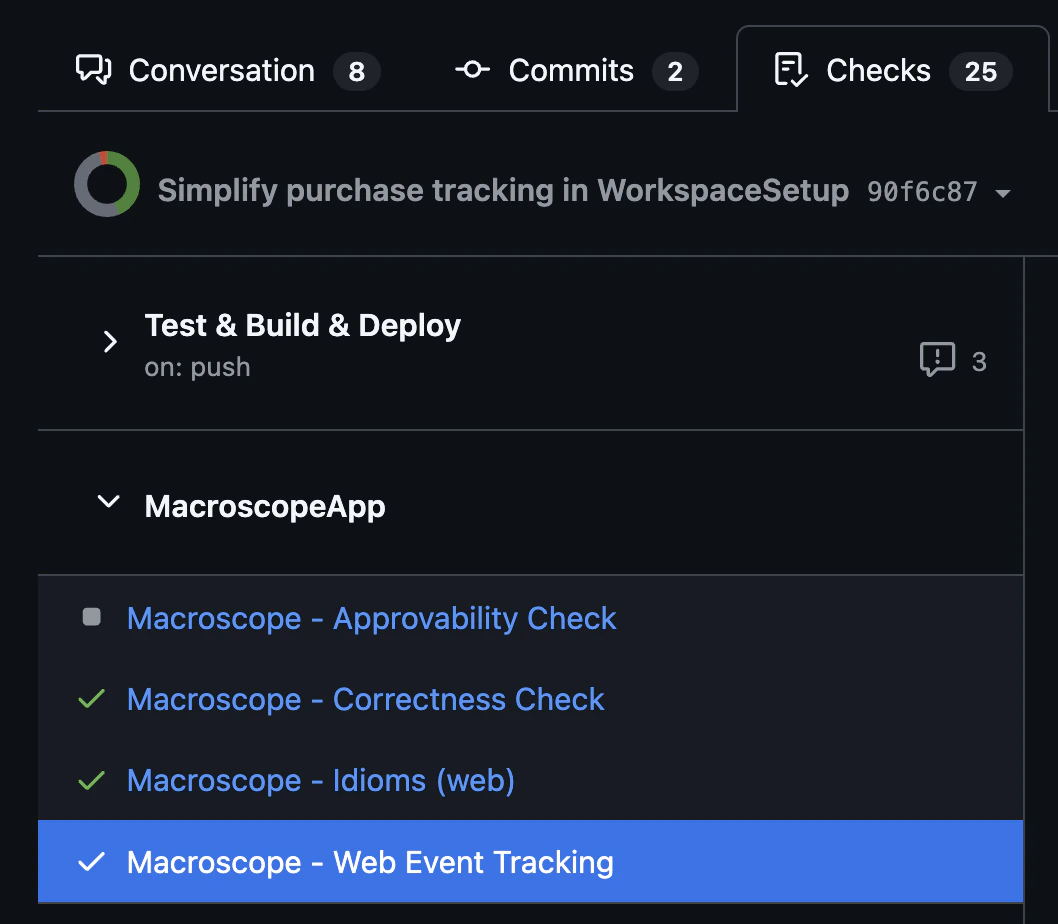
Macroscope automatically runs two built-in check runs on every PR: [**Correctness**](/bug-detection-and-fixes) (catches runtime bugs and logic errors) and [**Approvability**](/approvability) (evaluates merge readiness). Your custom agents appear alongside them in the Checks tab.
## Getting Started
1. Create a `.md` file in `.macroscope/check-run-agents/` in your repo root (e.g. `.macroscope/check-run-agents/web-review.md`)
2. Configure the frontmatter fields you need (all optional) and write your instructions:
```md theme={null}
---
title: Security Review # Name in GitHub Checks UI (max 60 chars)
model: claude-opus-4-6 # See Models section below
reasoning: low # off, low, medium, high
effort: low # low, medium, high
input: full_diff # full_diff or code_object
tools: # Omit to use defaults
- browse_code
- git_tools
include: # Glob patterns for files to review
- "src/**"
conclusion: neutral # neutral (non-blocking) or failure (blocking)
---
Your instructions here.
```
3. Commit and push to your default branch.
Macroscope reads check run agent files from your default branch. Changes won't take effect on new PRs until they're merged.
## Scope and Organization
Each `.md` file in `.macroscope/check-run-agents/` becomes its own agent, scoped to the repo it lives in. We recommend starting with one file and splitting only when you need different configurations (e.g. different tools or input modes).
A typical repo structure:
```text theme={null}
.macroscope/
├── check-run-agents/
│ ├── security-review.md
│ └── web-review.md
├── approvability.md
└── ignore.md
```
Subdirectories inside `check-run-agents/` are walked recursively, so you can group agents by team or service in a monorepo:
```text theme={null}
.macroscope/
└── check-run-agents/
├── security-review.md
├── backend/
│ └── db-review.md
└── frontend/
└── accessibility-review.md
```
Nesting is purely organizational — an agent behaves the same wherever it lives. Only `*.md` files are read; other files (and `README.md`) are ignored. Each agent's `title` must still be unique across all subdirectories; duplicates are automatically suffixed with a number.
The filenames `approvability.md` and `ignore.md` are **reserved** — they cannot be used as check run agent definitions. [`approvability.md`](/approvability#custom-eligibility-rules) configures custom approvability rules, and [`ignore.md`](/bug-detection-and-fixes#macroscope-ignore) controls which files are excluded from code review and Check Run Agents. These files always live in the `.macroscope/` root, not in the `check-run-agents/` subfolder.
**Existing setup?** If your check run agent files are in `.macroscope/` instead of `.macroscope/check-run-agents/`, they will continue to work. We recommend moving them to the subfolder when convenient — the root location will stop being read in a future release. See [Migrating to the subfolder](#migrating-to-the-subfolder) for a one-line move.
If you already use a `CLAUDE.md` to guide how AI writes code, you can reference it from your check run agent's instructions to keep coding conventions and review standards in sync.
## File Format
The file has two parts: an optional YAML frontmatter block for settings and a markdown body with your instructions. Every frontmatter field is optional. If you omit frontmatter entirely, defaults apply and the filename becomes the title.
| Field | Default | Options | Description |
| ----------------- | ----------------------------------------------------------- | -------------------------------------------- | ---------------------------------------------------------------------------------------------------------- |
| `title` | Derived from filename | Any string (max 60 chars) | Name in GitHub Checks UI |
| `model` | `claude-opus-4-6` | See [Model options](#models) | Which model powers the agent |
| `reasoning` | `low` | `off`, `low`, `medium`, `high` | Extended thinking depth |
| `effort` | `low` | `low`, `medium`, `high` | How deep the agent digs |
| `input` | `full_diff` | `full_diff`, `code_object` | How the PR diff is fed to the agent |
| `tools` | `[browse_code, git_tools, github_api_read_only, modify_pr]` | See [Tools](#tools) | Which tools the agent can use |
| `include` | none | Glob patterns | Only review files matching these patterns (e.g. `"*.go"`, `"src/**"`) |
| `exclude` | none | Glob patterns | Files to skip (e.g. `"*.lock"`, `"vendor/**"`) |
| `labels` | none | List of label names | Only run if the PR has one of these labels. See [Applicability Filters](#applicability-filters) |
| `authors` | none | List of GitHub logins | Only run if the PR is by one of these authors. See [Applicability Filters](#applicability-filters) |
| `targets` | none | List of branch names / `only_default_branch` | Only run if the PR targets one of these branches. See [Applicability Filters](#applicability-filters) |
| `conclusion` | `neutral` | `neutral`, `failure` | Maximum severity the agent can report |
| `showToolCalls` | `true` | `true`, `false` | Show an ordered log of the agent's tool calls (tool name and description) on the check run conclusion page |
| `waitsFor` | none | Check run names or `["*"]` | CI steps that must complete before this agent runs. See [Prerequisite Steps](#prerequisite-steps) |
| `waitsForTimeout` | `20` | `1`–`60` (minutes) | How long to wait for prerequisites before skipping |
### `include` and `exclude`: Scoping by File
Use `include` to review **only** files matching your patterns, `exclude` to skip files you don't care about, or both together — `include` narrows the universe first, then `exclude` carves out exceptions.
| Configuration | Behavior |
| -------------- | -------------------------------------------------------------------------------------------------------------------------------- |
| Neither set | All changed files are reviewed |
| Only `include` | Only files matching at least one pattern are reviewed |
| Only `exclude` | All files except those matching a pattern are reviewed |
| Both set | Pipeline: `include` narrows the universe first, then `exclude` carves out exceptions. Both are active — exclude wins on overlap. |
When both are set, the agent sees only files that **match at least one `include` pattern** and **do not match any `exclude` pattern**. For example, `include: ["src/**"]` + `exclude: ["src/gen/**"]` reviews all `src/` files except generated ones.
Both fields accept the same glob syntax: `"*.go"`, `"src/**"`, `"services/auth/**/*.go"`, etc.
`.macroscope/ignore.md`: Repository-Wide Exclusions
To exclude files from all check runs at once — not just a single agent — add patterns to your repository's [`.macroscope/ignore.md`](/bug-detection-and-fixes#macroscope-ignore) file. These patterns are additive with `include`/`exclude`: a file is out of scope if it matches either the agent's front matter patterns **or** the repository-wide ignore patterns.
**How filtering behaves when every changed file is excluded:**
| Filtering source | Behavior |
| ---------------------------- | ------------------------------------------------------------ |
| `include` / `exclude` only | Check run is **not created** (invisible in Checks tab) |
| `.macroscope/ignore.md` only | Check run is **created but skipped** (visible in Checks tab) |
| Both combined | Check run is **created but skipped** |
When some files are in scope and the agent runs, both pattern sets shape what happens:
* In **`full_diff` mode**, the agent sees the entire PR diff for context. It is instructed to respect `include`/`exclude` and `.macroscope/ignore.md` patterns when posting comments or reporting issues — it won't flag out-of-scope files unless your instructions explicitly override this.
* In **`code_object` mode**, out-of-scope code objects are filtered out before the agent runs — the agent never sees them.
Use `include`/`exclude` for per-agent scoping (e.g. "only Go files") and `.macroscope/ignore.md` for repo-wide exclusions that apply to all checks (e.g. generated code, vendored dependencies).
### `input`: Full Diff vs Code Object
| Mode | What happens | When to use | Cost |
| --------------------- | -------------------------------------------------------- | ---------------------------------------------------------------------------- | ------ |
| `full_diff` (default) | One agent processes the entire PR diff | Enforcement that needs PR-level context ("new function added without tests") | Lower |
| `code_object` | Up to 20 agents in parallel, one per changed code object | Per-unit enforcement ("don't log PII in any changed file") | Higher |
### `conclusion`: Blocking vs Non-Blocking
By default, the conclusion is capped at `neutral`: issues show up in the Checks tab but never block merging. Set `conclusion: failure` to let the agent block PRs when it finds issues.
Even with `failure`, the check still reports success when nothing is wrong. The setting only raises the ceiling on severity, not the floor.
See [`.macroscope/ignore.md`: Repository-Wide Exclusions](#macroscope-ignore) for details on how `include`/`exclude` and `.macroscope/ignore.md` interact when all files are filtered out.
Applicability Filters
`labels`, `authors`, and `targets` decide **whether** an agent runs for a PR based on the PR's metadata — they are peers of `include`/`exclude`, which decide **which files** it reviews. Each is an **inclusion filter**: when set, the PR must match at least one entry. Omitting an axis imposes no constraint on it. Axes combine with AND — every configured axis must match for the agent to run.
```yaml theme={null}
---
title: Dependency Review
include:
- "src/**"
labels:
- dependencies
authors:
- dependabot
- renovate
targets:
- only_default_branch
---
Review dependency bumps for breaking changes...
```
| Axis | Effect |
| --------- | ------------------------------------------------------------------------------ |
| `labels` | Run only if the PR carries at least one of these labels (case-insensitive) |
| `authors` | Run only if the PR was opened by one of these GitHub logins (case-insensitive) |
| `targets` | Run only if the PR targets one of these branches (see below) |
**`targets`** is a list of branch names, and supports a special sentinel value:
* Omitted → runs regardless of target branch (default).
* `only_default_branch` → runs only when the PR targets the repository's default branch. This is the common case for agents that should only gate merges into `main`.
* One or more branch names → runs only when the PR targets one of them, e.g. `targets: [main, release/v1]`.
**Always enforced.** Like `include`/`exclude`, these filters apply on every trigger, including manual `@macroscope` mentions. A filtered-out agent is **not created** — it never appears in the PR's Checks tab.
**Overriding repository skip settings.** A configured axis is authoritative for that agent and overrides the matching repository-level **Skip PRs by Author / Label / Target** setting. For example, if your repo globally skips PRs by `dependabot`, an agent with `authors: [dependabot]` still runs for dependabot PRs. An omitted axis leaves the repository skip setting in force, so agents without these filters behave exactly as before.
Blank entries are ignored and duplicates are removed automatically.
`waitsFor`: Prerequisite Steps
Use `waitsFor` to delay a Check Run Agent until other CI steps finish. The agent shows as "in progress" on GitHub while it waits, then runs once all prerequisites have completed.
This is useful when your agent needs to read results from another check (e.g. summarizing the Correctness check), or when it should run last after all CI has finished.
#### Named prerequisites
List the exact check run names your agent depends on, as they appear on the PR's Checks tab:
```yaml theme={null}
---
title: Annotate Correctness
waitsFor:
- "Macroscope - Correctness Check" # a Macroscope check
- "lint" # a job with an explicit name: field
- "ci / test" # a job with no name: field (workflow / job id)
tools:
- browse_code
- modify_pr
---
Read the review comments left by the Correctness check and add annotations...
```
See [Name matching](#name-matching) for how GitHub derives each of these names.
#### Wildcard: run after everything else
Use `"*"` to wait for all other check runs on the commit to complete before running:
```yaml theme={null}
---
title: PR Summary
waitsFor:
- "*"
---
Summarize the results of all CI checks on this PR...
```
#### Custom timeout
The default wait is 20 minutes. Set `waitsForTimeout` to change it (1–60 minutes):
```yaml theme={null}
---
title: Post-Deploy Check
waitsFor:
- "deploy-to-staging"
waitsForTimeout: 45
---
Verify the staging deployment succeeded...
```
#### Behavior
| Scenario | What happens |
| -------------------------------------------------- | ------------------------------------------------------------------------------------------------------- |
| Prerequisites complete | Agent runs normally. Prerequisite outcomes (success, failure, etc.) are passed to the agent as context. |
| Prerequisite not found after 60 seconds | Agent is skipped with a "not found" message. Check that the name in `waitsFor` matches exactly. |
| Prerequisite doesn't complete within timeout | Agent is skipped with a "timed out" message. Increase `waitsForTimeout` if the step is slow. |
| Circular dependency (A waits for B, B waits for A) | Detected at parse time. Both agents skip immediately with an error naming the cycle. |
#### Name matching
Names are matched **exactly, case-insensitive** against the check run name as it appears on GitHub.
The easiest way to find the correct name is to open the PR's **Checks** tab on GitHub and copy the check run name exactly as it appears there. That string is what you put in `waitsFor` — no guessing required.
**Macroscope checks** use the prefix `Macroscope - `, e.g. `"Macroscope - Correctness Check"`.
**GitHub Actions jobs** appear as individual check runs, and GitHub derives the check run name in one of two ways depending on whether the job declares an explicit `name:` field in the workflow YAML:
1. **Job has an explicit `name:` field** → the check run name is exactly that `name:` value (the workflow name is *not* prepended).
```yaml theme={null}
name: ci
jobs:
lint:
name: lint # check run name = "lint"
```
Here you would use `waitsFor: ["lint"]`.
2. **Job has no `name:` field** → GitHub falls back to the composite format `workflow_name / job_id`.
```yaml theme={null}
name: ci
jobs:
lint: # no name: field → check run name = "ci / lint"
```
Here you would use `waitsFor: ["ci / lint"]`.
In both examples the job's id (the YAML key) is `lint`. The difference is solely whether a `name:` field is present. When in doubt, trust the Checks tab — it shows the exact string GitHub computed.
`waitsFor` matches individual **jobs** (check runs), not entire **workflows** (check suites). To wait for all jobs in a multi-job workflow, list each job's check run name, or use `waitsFor: ["*"]` to wait for everything.
#### Wildcard mode details
When `waitsFor: ["*"]` is set, the agent waits for every check run on the commit except:
* **Itself** — the agent never waits for its own check run.
* **Other wildcard agents** — if multiple agents use `waitsFor: ["*"]`, they exclude each other and run in parallel once all non-wildcard checks finish.
This means you can have multiple "go last" agents without deadlock.
#### Prerequisite conclusions
The agent receives a Markdown table of prerequisite outcomes in its prompt context, so your instructions can branch on pass/fail:
```text theme={null}
## Prerequisite Results
| Check Run | Conclusion |
|-----------|------------|
| Macroscope - Correctness Check | success |
| CI / lint | failure |
```
Any conclusion (success, failure, neutral, etc.) satisfies the dependency — `waitsFor` controls ordering, not gating on success.
#### Circular dependencies
If two or more agents form a dependency cycle (e.g. A waits for B, B waits for A), the cycle is detected when Macroscope parses your config files. All agents in the cycle skip immediately with an error message naming the cycle, so you get fast feedback instead of a silent timeout.
## Tools
### Included by Default
| Tool | What it does |
| ---------------------- | ------------------------------------------------------------------------------------------------------------------------------------------------------------------- |
| `browse_code` | Explore the file tree, read files, search by filename or content |
| `git_tools` | Git log, blame, diff, grep |
| `github_api_read_only` | Read-only GitHub API: issues, labels, PR metadata, commit statuses |
| `modify_pr` | Update the PR (title, description, labels, assignees, reviewers) and post line-level review comments |
| `showToolCalls` | Include an ordered log of the agent's tool calls (tool name and description) on the check run conclusion page. Set `showToolCalls: false` in frontmatter to hide it |
Specifying `tools:` in frontmatter overrides the defaults. To keep defaults and add more, list them all.
### Additional Tools
| Tool | Requires | What it does |
| ---------------------- | ------------------------ | -------------------------------------------------------------------- |
| `web_tools` | No connection needed | Search the web, fetch URLs |
| `slack` | Slack connected | Post messages to channels, look up users |
| `sentry` | Sentry connected | Search error issues, view event history |
| `posthog` | PostHog connected | Query analytics, feature flags, session recordings |
| `launchdarkly` | LaunchDarkly connected | Query feature flags, targeting rules |
| `bigquery` | BigQuery connected | Run read-only SQL queries |
| `amplitude` | Amplitude connected | Event segmentation, funnels, retention |
| `gcp_cloud_logging` | GCP connected | Query log entries by severity, resource, timestamp |
| `issue_tracking_tools` | Jira or Linear connected | Read issues and projects |
| `image_gen` | No connection needed | Generate images from text prompts and upload them to GitHub or Slack |
| `mcp` | MCP server connected | Invoke tools from any connected MCP server |
Connected tools require the integration in **Settings > Connections**. Missing connections are silently disabled.
## Models
Set `model:` in your front matter to choose which model powers the agent.
The default model is `claude-opus-4-6`.
If you set `model:` to a value Macroscope doesn't recognize, the agent falls back to the default (`claude-opus-4-6`) and surfaces a warning on the check run details page.
### Anthropic
All Claude models support `effort` and some support `reasoning` — see [Reasoning and Effort](#reasoning-and-effort) for specifics.
| Model | Notes |
| --------------------------- | ---------------------------------------------------------------------------------- |
| `claude-opus-4-5` | Earlier Opus generation. Smaller context window — best for short, targeted checks. |
| `claude-opus-4-6` (default) | Strongest general-purpose option. Large context window. |
| `claude-opus-4-7` | Large context window. |
| `claude-opus-4-8` | Latest Opus. Large context window. |
| `claude-sonnet-4-5` | Faster and cheaper than Opus. Smaller context window. |
| `claude-sonnet-4-6` | Faster and cheaper than Opus, with a large context window. |
| `claude-sonnet-5` | Latest Sonnet. Faster and cheaper than Opus, with a large context window. |
| `claude-fable-5` | Highest intelligence, highest cost. Best for hard tasks. |
### OpenAI
GPT models support `reasoning` only.
| Model | Notes |
| --------- | -------- |
| `gpt-5-2` | GPT 5.2. |
| `gpt-5-4` | GPT 5.4. |
| `gpt-5-5` | GPT 5.5. |
### Reasoning and Effort
Both `reasoning` and `effort` accept `low | medium | high`.
For Anthropic models, `reasoning` maps to "extended thinking" — [learn how it works and see which models support it](https://platform.claude.com/docs/en/build-with-claude/extended-thinking#supported-models). Newer Anthropic models only use `effort`: if you set the `reasoning` parameter with those models, it's ignored.
For example:
```md theme={null}
---
title: Security Review
model: claude-opus-4.5
reasoning: high
effort: medium
---
Your instructions here.
```
## Output and Instructions
### Where Results Appear
Results appear in three places:
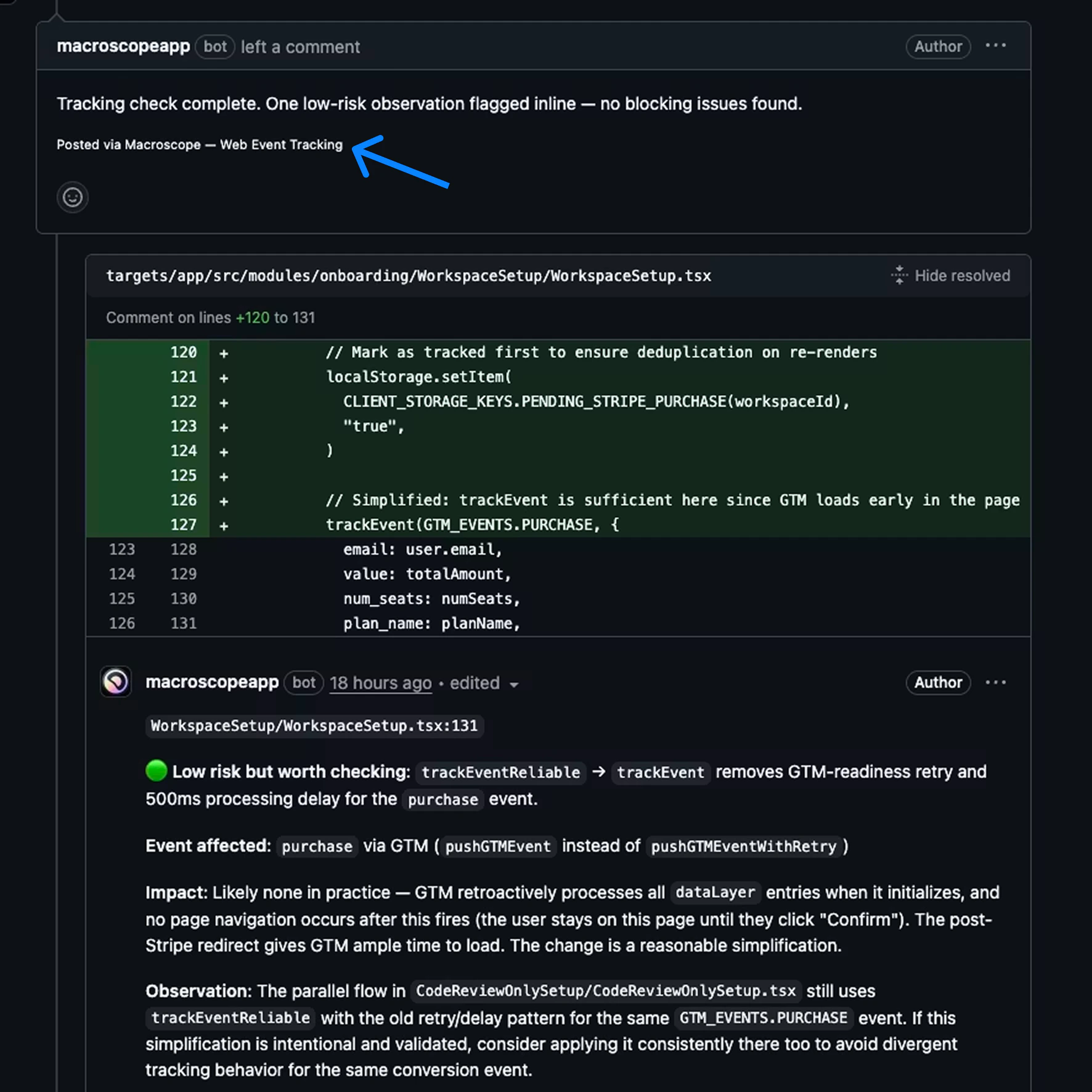
1. **Check run details.** Click into the check in the Checks tab to see the full report: title, summary, and detailed findings. Your instructions influence how this output is structured and formatted.
2. **Inline PR comments.** The agent posts comments directly on specific lines in the PR diff, attributed to the check name.
3. **Issue comments.** The agent can also post top-level comments on the PR itself for broader findings or summaries.
 ### Controlling Output Format
You can control formatting in your instructions. Some examples:
* "Use a markdown table with columns: file, line, issue, severity"
* "Group findings by priority, critical first"
* "Use 🔴 🟡 🟢 emoji for severity levels"
* "Start with a one-line summary, then list details"
* "If no issues found, just say 'All clear' with no extra detail"
* "Format as a checklist so the reviewer can tick items off"
* "Be concise. Each bullet point should be under 20 words"
### Writing Good Instructions
* **Be specific.** "Review for quality" is too vague. "Flag any function over 50 lines without a doc comment" is actionable.
* **Define severity.** Spell out what critical vs minor means for your team.
* **Don't replicate the Correctness check run.** It already catches runtime bugs. Focus on your team's conventions and workflows.
* **Scope with `include`, `exclude`, or both.** If your check only applies to Go files, use `include: ["*.go"]`. If it applies to everything except lock files, use `exclude: ["*.lock"]`. Use both together to narrow to a set of files while carving out exceptions (e.g. `include: ["src/**"]` + `exclude: ["src/gen/**"]`).
* **Give the agent permission to do nothing.** "If nothing applies, report that no issues were found" prevents invented findings.
* **Use sections in your instructions.** Markdown headings (`##`) in the body help the agent organize its work and output.
* **Reference specific paths.** "Check files in `services/auth/`" is better than "check auth code."
* **Tell it what not to flag.** "Ignore test files" or "don't flag TODOs in draft PRs" reduces noise.
## Example
We recommend consolidating related rules into a single check rather than splitting across many files. Here's a web team example that handles several concerns in one agent — saved as `.macroscope/check-run-agents/web-review.md`:
```md theme={null}
---
title: Web Review
model: claude-opus-4-6
effort: medium
input: full_diff
tools:
- browse_code
- git_tools
- modify_pr
- slack
- sentry
include:
- "targets/app/**"
- "web-etc/**"
---
Review this PR against our web team's standards:
## Event Tracking
If this PR touches payment flows, signup funnels, analytics calls,
CTA buttons, or redirect logic, check whether it could break event
tracking. Rate each issue: 🔴 will stop firing, 🟡 may fire incorrectly,
🟢 low risk.
## Accessibility
Check new or modified React components for basic accessibility:
- Images must have alt text
- Buttons and links must have accessible labels
- Form inputs must have associated labels
## Production Errors
For each file modified, check Sentry for unresolved issues. If any
active errors exist, list them with frequency and last seen date.
## Labels
Add labels to this PR based on what changed:
- "frontend" if any UI components are modified
- "styles" if CSS or styled-components changed
- "docs" if only markdown files changed
## Notifications
If any 🔴/🟡 event tracking issues or accessibility violations are
found, post a summary to #eng on Slack with the PR link.
If nothing noteworthy is found, report that all checks passed.
```
### Controlling Output Format
You can control formatting in your instructions. Some examples:
* "Use a markdown table with columns: file, line, issue, severity"
* "Group findings by priority, critical first"
* "Use 🔴 🟡 🟢 emoji for severity levels"
* "Start with a one-line summary, then list details"
* "If no issues found, just say 'All clear' with no extra detail"
* "Format as a checklist so the reviewer can tick items off"
* "Be concise. Each bullet point should be under 20 words"
### Writing Good Instructions
* **Be specific.** "Review for quality" is too vague. "Flag any function over 50 lines without a doc comment" is actionable.
* **Define severity.** Spell out what critical vs minor means for your team.
* **Don't replicate the Correctness check run.** It already catches runtime bugs. Focus on your team's conventions and workflows.
* **Scope with `include`, `exclude`, or both.** If your check only applies to Go files, use `include: ["*.go"]`. If it applies to everything except lock files, use `exclude: ["*.lock"]`. Use both together to narrow to a set of files while carving out exceptions (e.g. `include: ["src/**"]` + `exclude: ["src/gen/**"]`).
* **Give the agent permission to do nothing.** "If nothing applies, report that no issues were found" prevents invented findings.
* **Use sections in your instructions.** Markdown headings (`##`) in the body help the agent organize its work and output.
* **Reference specific paths.** "Check files in `services/auth/`" is better than "check auth code."
* **Tell it what not to flag.** "Ignore test files" or "don't flag TODOs in draft PRs" reduces noise.
## Example
We recommend consolidating related rules into a single check rather than splitting across many files. Here's a web team example that handles several concerns in one agent — saved as `.macroscope/check-run-agents/web-review.md`:
```md theme={null}
---
title: Web Review
model: claude-opus-4-6
effort: medium
input: full_diff
tools:
- browse_code
- git_tools
- modify_pr
- slack
- sentry
include:
- "targets/app/**"
- "web-etc/**"
---
Review this PR against our web team's standards:
## Event Tracking
If this PR touches payment flows, signup funnels, analytics calls,
CTA buttons, or redirect logic, check whether it could break event
tracking. Rate each issue: 🔴 will stop firing, 🟡 may fire incorrectly,
🟢 low risk.
## Accessibility
Check new or modified React components for basic accessibility:
- Images must have alt text
- Buttons and links must have accessible labels
- Form inputs must have associated labels
## Production Errors
For each file modified, check Sentry for unresolved issues. If any
active errors exist, list them with frequency and last seen date.
## Labels
Add labels to this PR based on what changed:
- "frontend" if any UI components are modified
- "styles" if CSS or styled-components changed
- "docs" if only markdown files changed
## Notifications
If any 🔴/🟡 event tracking issues or accessibility violations are
found, post a summary to #eng on Slack with the PR link.
If nothing noteworthy is found, report that all checks passed.
```
Migrating to the Subfolder
If you have check run agent files in the root `.macroscope/` directory, move them into the `check-run-agents/` subfolder:
```bash theme={null}
mkdir -p .macroscope/check-run-agents
mv .macroscope/web-review.md .macroscope/check-run-agents/
# Repeat for each check run agent file. Do not move approvability.md or ignore.
```
No other changes are needed — the file format and frontmatter are identical. Commit and merge to your default branch. New PRs will use the updated location automatically.
`approvability.md` and `ignore` are not check run agent files — leave them in the `.macroscope/` root.
## Migrating from Custom Rules
Check Run Agents replace Custom Rules. If you have an existing `macroscope.md` file, move your rules into `.macroscope/check-run-agents/my-rules.md` instead. Your existing rules become the instructions body, and you can optionally add frontmatter for model, tools, and input mode.
Check Run Agents go further: agents can browse the codebase, query git history, post to Slack, check Sentry, and more. You also get structured output in the Checks tab instead of just inline comments.
## Costs
To keep costs down: use `include`/`exclude` or [`.macroscope/ignore.md`](/bug-detection-and-fixes#macroscope-ignore) to scope to relevant files, prefer `full_diff` over `code_object`, and use lower `effort` for simple checks.
### Cost Visibility
Cost information is available in two places:
* **Settings → Billing** — Admins can see a full cost breakdown across all Check Run Agents.
* **GitHub Check Run details page** — Shows the billed total for each individual run.