> ## Documentation Index
> Fetch the complete documentation index at: https://docs.macroscope.com/llms.txt
> Use this file to discover all available pages before exploring further.
# Settings
> Configure Macroscope for your team
Settings are organized into tabs: Workspace, Personal, Repos, Connections, and Support. From the top of the page you can also access the **Billing** portal to manage or cancel your subscription (GitHub admins only).
## Workspace Settings
* **Custom AMA (Ask Macroscope Anything) Instructions**: customize how the agent responds to your team's questions.
* **Product Overview**: give Macroscope context about your product to improve summaries.
* **Weekly Cadence**: set the day and time boundary for weekly reports (e.g. Friday 6pm to Friday 6pm).
* **Digest Emails**: add or remove recipients for weekly digest emails.
* **Productivity Features**: toggle coding time estimates, coding time module, and contributors module on/off. Can be limited to specific GitHub teams.
* **External Contributors**: control whether people with write access who aren't in your GitHub org are included in summaries and/or productivity metrics.
* **Web Search**: allow Macroscope to search the web for additional context when generating summaries.
* **Administrative Contact Email**: email used for policy updates, support, and account communications.
* **Teams**: enable GitHub Teams to see team-specific productivity metrics in the Contributors module.
### Excluded Commit Authors
Workspace admins can exclude commit authors from commit metering, summarization, and productivity metrics under **Workspace Settings → Excluded Commit Authors**. Authors can be excluded by either **GitHub username** or **Git author name**, controlled by a mode toggle in the UI.
The Excluded Commit Authors section is only visible in workspaces with Status enabled.
## Personal Settings
Per-user preferences for code review and PR summaries. Each can be toggled on/off or set to follow the repo default:
* **Correctness**: review PRs for logical errors and bugs
* [**Detection Mode**](/bug-detection-and-fixes#detection-mode): choose Prefer Coverage, Prefer Precision, or Repo Default. Your choice overrides the repo default for your PRs.
* [**Check Run Agents**](/check-run-agents): toggle to enable/disable agents defined in your repo's `.macroscope/` folder
* **Review my draft PRs**: review draft PRs before they're marked open
* **Automatically merge Macroscope's PRs**: auto-merge Fix It For Me PRs when all checks pass
* **Auto-summarize my PRs**: control whether Macroscope generates PR summaries
* **Post in PR description**: post summaries in the PR description field (if empty or contains template markers), otherwise as a comment
## Repo Settings
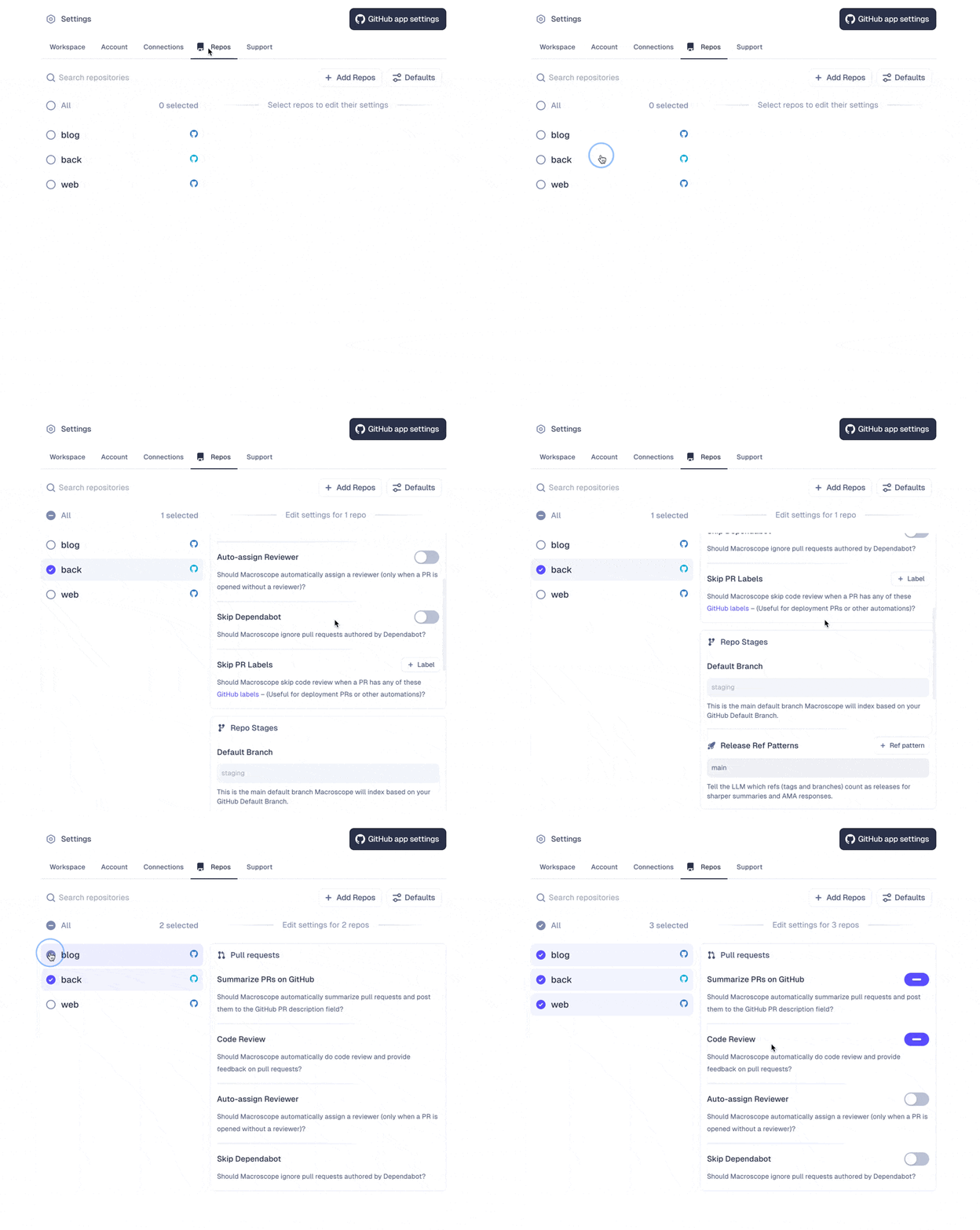
Select repos on the left and configure settings on the right. All settings below are per-repo and can be applied across multiple repos at once. Use **Defaults** to set the default for newly linked repos.
 ### Pull Request Settings
* **Correctness**: toggle code review for logical errors and bugs
* [**Detection Mode**](/bug-detection-and-fixes#detection-mode): balance bug coverage against noise (Prefer Coverage or Prefer Precision) for this repo. Set the default for new repos under **Defaults**.
* [**Check Run Agents**](/check-run-agents): toggle to enable/disable agents defined in your repo's `.macroscope/` folder
* **Summarize PRs on GitHub**: toggle auto-generated PR summaries
* **Auto-assign Reviewer**: assign a reviewer when a PR is opened without one
* **Skip Dependabot**: ignore PRs authored by Dependabot
* **Skip PR Labels**: skip code review for PRs with these GitHub labels (useful for deployment PRs)
* **Always Review PR Labels**: always run code review for PRs with these labels, even when repo-level review is disabled
### Approvability Settings
Toggle on/off to allow Macroscope to auto-approve eligible PRs based on eligibility criteria and correctness checks you define. [Learn more about Approvability](/approvability).
### Repo Stages
### Pull Request Settings
* **Correctness**: toggle code review for logical errors and bugs
* [**Detection Mode**](/bug-detection-and-fixes#detection-mode): balance bug coverage against noise (Prefer Coverage or Prefer Precision) for this repo. Set the default for new repos under **Defaults**.
* [**Check Run Agents**](/check-run-agents): toggle to enable/disable agents defined in your repo's `.macroscope/` folder
* **Summarize PRs on GitHub**: toggle auto-generated PR summaries
* **Auto-assign Reviewer**: assign a reviewer when a PR is opened without one
* **Skip Dependabot**: ignore PRs authored by Dependabot
* **Skip PR Labels**: skip code review for PRs with these GitHub labels (useful for deployment PRs)
* **Always Review PR Labels**: always run code review for PRs with these labels, even when repo-level review is disabled
### Approvability Settings
Toggle on/off to allow Macroscope to auto-approve eligible PRs based on eligibility criteria and correctness checks you define. [Learn more about Approvability](/approvability).
### Repo Stages
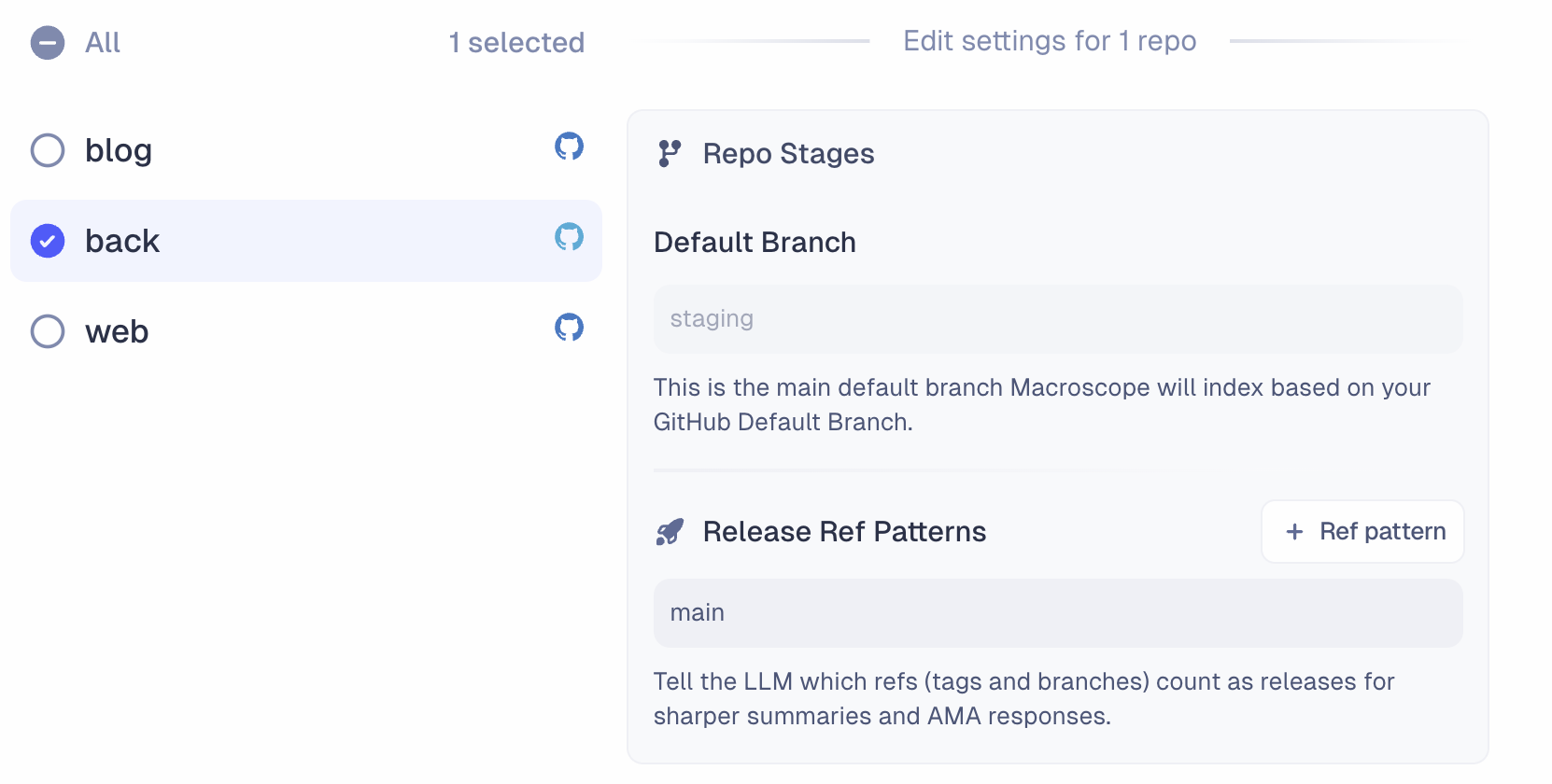 * **Default Branch**: the main branch Macroscope indexes, based on your GitHub default branch.
* **Release Ref Patterns**: tell Macroscope which refs (tags and branches) count as releases for sharper summaries and agent responses. Supports [glob patterns](https://en.wikipedia.org/wiki/Glob_\(programming\)) like `release/*`, `release/**`, or `production`.
## Connections
Configure integrations with Slack, Jira, Linear, BigQuery, PostHog, LaunchDarkly, and GCP Cloud Logging. Each integration gives Macroscope more context and capabilities. [Learn more about integrations](/integrations).
### Webhooks
Create webhooks to trigger Macroscope's agent from external services. Each webhook generates a unique **trigger URL** and **API key**. If you want results forwarded to an external URL (instead of Slack), that URL must be added to the **allowlist** here. Only GitHub admins can manage the allowlist. [Learn more about the API](/api).
## Support
* **Slack Support Channel**: open a shared Slack channel with the Macroscope team. Enter your Slack email address and we'll send an invitation.
* **Synchronize with GitHub**: manually resync if your repos or data fall out of sync with GitHub.
* **Default Branch**: the main branch Macroscope indexes, based on your GitHub default branch.
* **Release Ref Patterns**: tell Macroscope which refs (tags and branches) count as releases for sharper summaries and agent responses. Supports [glob patterns](https://en.wikipedia.org/wiki/Glob_\(programming\)) like `release/*`, `release/**`, or `production`.
## Connections
Configure integrations with Slack, Jira, Linear, BigQuery, PostHog, LaunchDarkly, and GCP Cloud Logging. Each integration gives Macroscope more context and capabilities. [Learn more about integrations](/integrations).
### Webhooks
Create webhooks to trigger Macroscope's agent from external services. Each webhook generates a unique **trigger URL** and **API key**. If you want results forwarded to an external URL (instead of Slack), that URL must be added to the **allowlist** here. Only GitHub admins can manage the allowlist. [Learn more about the API](/api).
## Support
* **Slack Support Channel**: open a shared Slack channel with the Macroscope team. Enter your Slack email address and we'll send an invitation.
* **Synchronize with GitHub**: manually resync if your repos or data fall out of sync with GitHub.