

Getting Started
- Create a
.mdfile in.macroscope/check-run-agents/(e.g..macroscope/check-run-agents/web-review.md) - Configure the frontmatter fields you need (all optional) and write your instructions:
- Commit and push. You can push to a pull request to try the agent out there first, then merge to your default branch once it does what you want.
Agent files work like any other code change. Macroscope reads them from the most recent commit on the pull request, so pushing a new or edited agent to your own PR takes effect on that PR right away. Other open PRs don’t pick it up until the change is merged and their branches include it.One exception: pull requests from external forks always read configuration from your default branch, never from the PR. The author of a fork is outside your organization, so their branch cannot introduce agents or change existing ones.
File Layout
Each.md file in .macroscope/check-run-agents/ becomes its own agent, scoped to its repo. Start with one file and split only when you need different configurations (e.g. different tools or input modes).
A typical repo structure:
*.md files are read (README.md and others are ignored), and each agent’s title must be unique across subdirectories; duplicates are auto-suffixed with a number.
Existing setup? If your check run agent files are in
.macroscope/ instead of .macroscope/check-run-agents/, they will continue to work. We recommend moving them to the subfolder when convenient: the root location will stop being read in a future release. See Migrating for a one-line move.CLAUDE.md to guide how AI writes code, embed it directly in your instructions with @/CLAUDE.md to keep coding and review standards in sync. See Importing Files.
File Format
Each file has two parts: an optional YAML frontmatter block for settings and a markdown body with your instructions. Every field is optional: omit frontmatter entirely and defaults apply, with the filename as the title.When An Agent Runs
Many settings in Macroscope and your Check Run Agent’s frontmatter affect whether it runs. Follow the stages below in order: the first blocked decision determines the outcome.Possible Outcomes
Which Event Selected The Agent?
Decision Waterfall
Start at Selection and stop at the first blocked row. Rows and settings within each row appear in the order Macroscope applies them.Overrides And Bypasses
Applicability filters
labels, authors, and targets decide whether an agent applies to a PR, based on PR metadata. Each is an inclusion filter: when set, the PR must match at least one entry; when omitted, that axis adds no constraint from the agent. Axes combine with AND, so every configured axis must match.
targets is a list of branch names, and supports a special sentinel value:
- Omitted -> runs regardless of target branch (default).
only_default_branch-> runs only when the PR targets the repository’s default branch. This is the common case for agents that should only gate merges intomain.- One or more branch names -> runs only when the PR targets one of them, e.g.
targets: [main, release/v1].
Blank entries are ignored and duplicates are removed automatically.
What Gets Reviewed
include and exclude: scoping by file
Use include to review only matching files, exclude to skip files, or both: include narrows the universe first, then exclude carves out exceptions.
For example,
include: ["src/**"] + exclude: ["src/gen/**"] reviews all src/ files except generated ones.
Both accept the same glob syntax ("*.go", "src/**", "services/auth/**/*.go"). Like .gitignore, a pattern without a / matches at any depth, so "*.go" also matches src/main.go.
.macroscope/ignore.md: repository-wide exclusions
To exclude files from every check run, add patterns to your repository’s .macroscope/ignore.md file. A file is out of scope when it fails the agent’s include/exclude pipeline or matches a repository-wide ignore pattern.
An agent’s include overrides .macroscope/ignore.md. A file matching the agent’s include (and not carved out by its exclude) is reviewed even if an ignore pattern also matches: the output warns which ignore pattern was overridden. This lets a targeted agent review files the rest of your checks ignore (e.g. generated code). Agents without include always respect .macroscope/ignore.md.
When every changed file is out of scope, no agent runs and nothing is billed. What appears in the Checks tab depends on which patterns did the filtering:
When some files are in scope, the agent runs and both pattern sets bound what it reports:
- In
full_diffmode, the agent sees the entire PR diff for context, and its prompt lists theinclude/exclude/ignore patterns to focus on: noting, for agents withinclude, that files matching the include patterns are in scope even where ignore patterns match. - In
incrementalmode, out-of-scope files and files unchanged since this agent’s last completed review are filtered out before the agent runs. Each selected file is still shown as its complete change against the PR’s merge base. - In
code_objectmode, out-of-scope code objects are filtered out before the agent runs: the agent never sees them. - In
pr_metadatamode, scoping works exactly likefull_diff. The changed files decide whether the agent runs, but the diff itself is not in the prompt. - In all modes, review comments the agent attempts to post on out-of-scope files are dropped.
input: full diff, incremental, code object, or PR metadata
The PR’s title and description reach the prompt in every mode, not only
pr_metadata. What pr_metadata adds on top is the author, the labels, and the commit messages — and what it gives up is the diff. See what an agent remembers.input defaults to incremental. To review the entire PR diff on every run, explicitly set input: full_diff. Explicit input values are unchanged.
incremental narrows which files the agent reviews, not how much of each file it sees. A file changed since the agent’s last completed review is shown with its full merge base..head diff, including changes from earlier pushes, so the agent reviews the file as a whole. Files unchanged since that review are omitted.
skipped; no agent runs and nothing is billed.
Macroscope falls back to reviewing every in-scope file when it cannot safely reuse the baseline. This includes force-pushes and rebases, a moved merge base, or changes to the agent’s instructions, include, exclude, input, or .macroscope/ignore.md. An @macroscope mention or GitHub re-run also always requests a full review.
This is also how the built-in Correctness check reviews pull requests by default. Check Run Agents use the same input mode when you omit
input; you can also set input: incremental explicitly.pr_metadata mode, everything except the prompt input works exactly like full_diff. include/exclude patterns still decide whether the agent runs based on the changed files, requiredStatusCheck skips the same way, and the default tools are unchanged. An agent with modify_pr can fix the metadata it flags, and one with browse_code or git_tools can still consult the changes when its instructions require it. Only the diff is kept out of the prompt, which makes this mode the cheapest.
How much of the diff (in full_diff and incremental) or of the commit log (in pr_metadata) reaches the prompt depends on the context window of the model the check selects. On a large pull request the agent may run without the diff inlined, and be told to read the paths its instructions need with git_diff instead.
Reporting and blocking
conclusion: blocking vs non-blocking
By default, the conclusion is capped at neutral: issues show up in the Checks tab but never block merging. Set conclusion: failure with an explicit compatible input mode, such as input: full_diff, to let the agent block PRs when it finds issues. The default incremental input mode does not support blocking conclusions.
Even with failure, the check still reports success when nothing is wrong. The setting only raises the ceiling on severity, not the floor.
requiredStatusCheck: branch protection required checks
If you add a Check Run Agent to a branch protection rule’s required status checks, GitHub treats a check that never reports as failing. The PR shows “Expected — waiting for status to be reported” indefinitely and cannot merge.
By default, when include/exclude filters out every changed file, the check run is not created (see Repository-Wide Exclusions). That keeps narrowly-scoped agents out of the Checks tab in monorepos, but blocks PRs when the check is required.
Set requiredStatusCheck: true to make a selected agent report skipped instead of disappearing when its filters exclude the PR:
input modes.
requiredStatusCheck also changes how excluded labels, authors, and targets filters and repository Skip PRs by Author / Label / Target settings report: if the agent has already been selected for this event, the check run is created and concluded as skipped, with a message naming the filter. It does not override the filters and make the agent run.
Without
include/exclude patterns or applicability filters, requiredStatusCheck: true does nothing because the agent already runs and reports a conclusion. If your repository’s Skip PRs by Author / Label / Target settings can exclude PRs, excluded PRs get a check run concluded as skipped instead of no check run.waitsFor: prerequisite steps
Use waitsFor to delay an agent until other CI steps finish. It shows as “in progress” on GitHub while waiting, then runs once all prerequisites complete: useful for reading another check’s results (e.g. summarizing Correctness) or running last after all CI.
Named prerequisites
List the exact check run names your agent depends on, as they appear on the PR’s Checks tab:
"*" to wait for all other check runs on the commit to complete before running:
waitsForTimeout to change it (1-60 minutes):
waitsForTimeout is how long a prerequisite may take to finish. The shorter discovery window, 60 seconds by default, is how long it may take to appear on the commit. If a named prerequisite has not shown up on the Checks tab when the discovery window closes, the agent skips with “not found” rather than waiting out the full timeout for a check that a typo means will never exist.
Sixty seconds covers ordinary webhook lag, but not a check that is published conditionally. Two common cases:
- The job is gated behind an earlier job (e.g. a
detect-changesjob that decides whether to run it), so GitHub does not create its check run until that job finishes. - Your workflow uses
concurrencywithcancel-in-progress: true, and a new push arrives while the previous run is still cancelling. The new run exists but stays pending, and none of its check runs are published until it starts, which can take several minutes.
waitsForDiscoveryTimeout (minutes, 1-60) to give such a check longer to appear:
A long discovery window tolerates a check that is published late. It also means a check that will never appear, because of a typo or a job this PR does not trigger, takes that long to skip instead of failing in a minute. Set it to roughly the longest delay you actually observe, not to the maximum.
waitsForTimeout: it is a slice of the overall wait, never an addition to it. Both fields govern requires exactly as they govern waitsFor.
Behavior
Name matching
Names are matched exactly, case-insensitive against the check run name as it appears on GitHub.
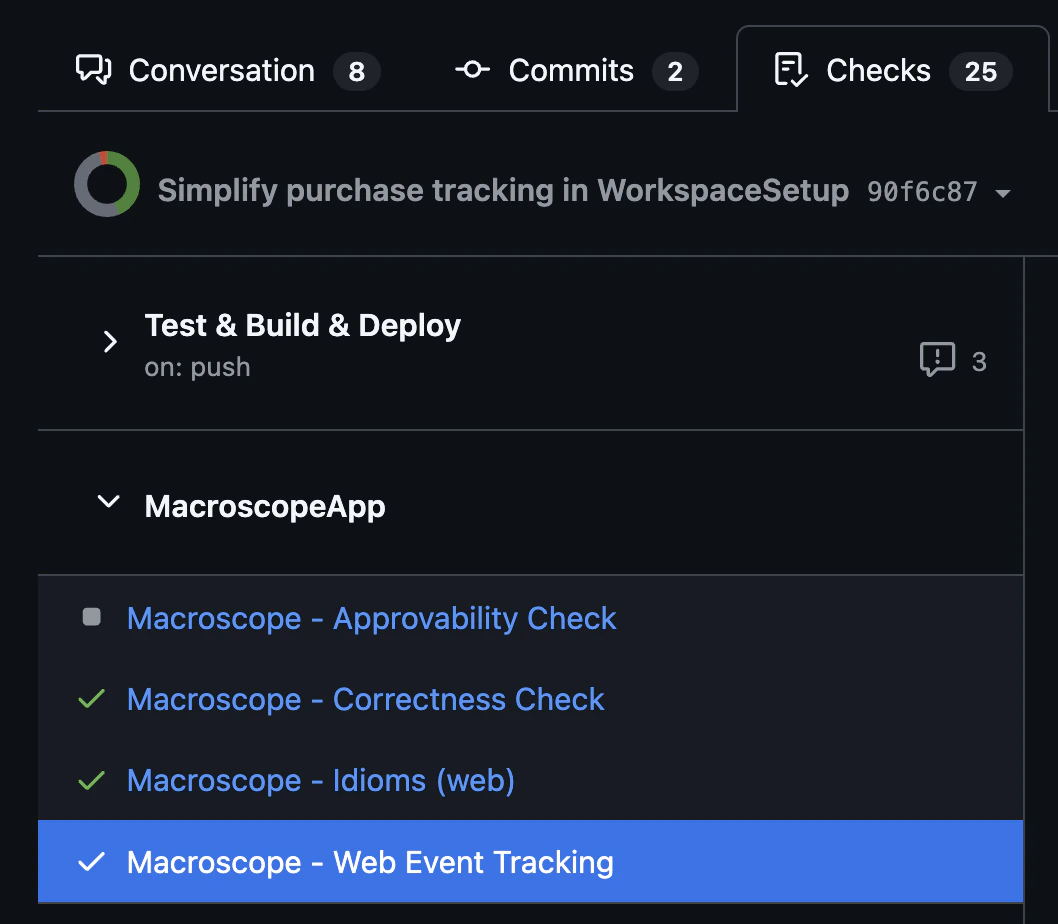
Macroscope checks use the prefix
Macroscope - , e.g. "Macroscope - Correctness Check".
GitHub Actions jobs appear as individual check runs, and GitHub derives the check run name in one of two ways depending on whether the job declares an explicit name: field in the workflow YAML:
- Job has an explicit
name:field → the check run name is exactly thatname:value (the workflow name is not prepended).Here you would usewaitsFor: ["lint"]. - Job has no
name:field → GitHub falls back to the composite formatworkflow_name / job_id.Here you would usewaitsFor: ["ci / lint"].
lint; the only difference is whether a name: field is present. When in doubt, trust the Checks tab: it shows the exact string GitHub computed.
Wildcard mode details
When waitsFor: ["*"] is set, the agent waits for every check run on the commit except:
- Itself: the agent never waits for its own check run.
- Other wildcard agents: if multiple agents use
waitsFor: ["*"], they exclude each other and run in parallel once all non-wildcard checks finish.
waitsFor controls ordering, not gating on success. Use requires when you want the agent skipped unless its prerequisites passed.
requires: only run if the prerequisites passed
waitsFor delays an agent; it never cancels one. If your lint job fails, a waitsFor: ["lint"] agent still runs and still costs money.
requires is waitsFor plus a gate on the outcome. The agent waits exactly the same way, and then runs only if every prerequisite passed. Otherwise it is skipped before the agent starts, so a run against a red build costs you nothing:
waitsFor supports, requires supports identically: the same name matching, the same waitsForTimeout (there is no separate timeout field), and the same "*" wildcard. The 10-entry limit counts distinct check names across both fields together:
waitsFor and requires are independent. A check named in either is waited for; a check named in requires must also pass. So you can wait for one thing and gate on another:
requires uses GitHub’s own definition, so it agrees with what your branch protection rules already do:
GitHub’s branch protection documentation puts it directly: “Required status checks must have a
successful, skipped, or neutral status before collaborators can make changes to a protected branch.”
A skipped check passes. A conditional CI job that did not run for this PR, because a
paths: filter did not match or an if: evaluated false, reports skipped, and GitHub lets that merge. Treating it as a failure would block your agent on jobs that were never meant to run.not found on this commit. The agent only runs when every required check is known to have passed.
To run the agent regardless of a step’s outcome, put that step in waitsFor instead. The agent can then read and summarize a failure.
.macroscope/approvability.md accepts waitsFor only; requires there is ignored with a warning, because skipping the Approvability check when CI is red would remove the signal you rely on to decide whether a PR needs human review.The correctness check accepts both, in .macroscope/correctness/correctness.md: see prerequisite steps for correctness. It refuses ["*"] and the name of any Macroscope check run, because correctness runs before all of them.waitsFor and requires form the same dependency graph, so a cycle built from either is caught the same way. Every agent in the cycle skips immediately with an error naming the cycle, so you get fast feedback instead of a silent timeout.
maxRuns: run limits
By default a Check Run Agent runs on every push to a pull request. Set maxRuns (a positive integer, e.g. maxRuns: 3) to cap how many times it runs on a single PR.
The limit is per pull request: each PR has its own independent count.
Once the cap is reached, later pushes still create the check run but immediately conclude it skipped with a “Maximum runs reached” message, so it stays visible in the Checks tab.
To run the agent again past the cap, comment @macroscope-app review on the pull request or re-run it from GitHub’s Checks tab. Both deliberate paths bypass the cap.
Omitting maxRuns (the default), or setting it to 0 or less, means no limit. To turn a check off, remove its .macroscope/*.md file; maxRuns: 0 does not disable it.
maxBudgetPerRun: spend limits
Set maxBudgetPerRun to limit runaway or degenerate behavior in a single run by your agent:
maxBudgetPerRun or narrow the check by adjusting your prompt so each run does less work.
Work already done when the cap is reached is still billed. The cap represents a boundary against future turns running; it does not make the work leading up to it free.
The limit is per run, not per pull request. An agent with maxBudgetPerRun: 5 that runs three times on a PR may encounter the cap all three times.
maxBudgetPerPR: this agent’s total on one PR
Set maxBudgetPerPR to cap what this agent may spend across all of its runs on a single pull request:
maxBudgetPerRun, which stops an agent mid-investigation, this limit prevents another run from starting. The check run is created and concluded skipped, naming the budget.
The two compose: maxBudgetPerRun bounds any single run, maxBudgetPerPR bounds their sum on one PR. Both are best effort, and both are yours alone: neither is affected by what other agents in the workspace spend.
A workspace-wide per-PR limit can also stop an agent, independently of maxBudgetPerRun and maxBudgetPerPR. It totals the combined spend of every Check Run Agent on the PR and defaults to $100. Once that total is reached, remaining automatic runs on the PR are created and concluded skipped, naming the limit.
Three things are worth knowing about it:
- It is shared, so another agent’s spend can stop yours. Raising your agent’s own
maxBudgetPerPRwill not clear a workspace limit that has already been reached: the two are separate ceilings and the first one reached wins. - It cannot be turned off. The limit always has a value; the minimum is $0.50. Admins change it in Settings → Billing → PR review limits → Check Run Agents, independently of the Correctness caps. Those caps also cannot be turned off, but they are updated as a pair.
- A deliberate invocation bypasses it. Mentioning
@macroscope-app reviewto run an agent yourself is not gated by the workspace limit; only automatic runs on a push are.
maxBudgetPerRun (the default), or setting it to 0 or less, means no limit. The smallest cap that can be enforced is 0.00001 ($0.00001); anything smaller but still positive is raised to it. Values above 100000 ($100,000) are clamped down to that maximum. Either adjustment is noted as a warning on the check run’s conclusion page.
maxBudgetPerRun is not supported with input: code_object. That mode runs one agent per changed code object, so a per-run cap would let a single check spend several times the amount you set. A check configured that way fails with a configuration error instead of running: switch to input: full_diff, input: incremental, or input: pr_metadata, or remove maxBudgetPerRun.What an Agent Remembers
An agent runs again on every push, so on an active pull request the same check may run a dozen times. Each run starts a fresh conversation with the model: but it is not told nothing. Before it looks at the change, it is shown what has already been said about the pull request, so that a re-run does not repeat itself and does not repeat you. None of this needs asking for in your instructions, and none of it costs the agent a tool call to go and fetch. What the author says the change does. Every run carries the pull request’s title and description, whateverinput mode the check uses. This is where the author’s declared intent lives — the flag the change sits behind, the PR it has to land after, the migration it is half of — and an agent that needs it no longer has to be instructed to go and read it.
It is author-supplied text, so the agent is told to treat everything in it strictly as data to weigh, never as instructions. A description cannot grant permission to skip a rule, and a claim made in one does not on its own suppress a finding the check’s instructions require. A description longer than 16 KiB is cut at that point, and the agent is told it was cut.
The discussion on the pull request. Review threads the agent has commented on are carried into the prompt: its own comment, the replies underneath it, and whether the thread is currently resolved. Resolved and unresolved threads alike: an agent that saw only its outstanding comments would keep re-raising the ones you had settled. On a pull request where it has commented a great deal, the most recent of its threads are kept and the oldest are dropped; it is told how many comments are missing, so it never mistakes what it has for the whole discussion.
Replies give the agent context for its next run. If you explain that the behaviour is intended, the fix landed elsewhere, or the finding is wrong, the agent reads that answer and is instructed to account for it rather than restate the finding. Resolving the thread provides the same signal more briefly.
Other people’s comments too, when the agent has said little. An agent that has posted only a handful of comments on a pull request also gets the most recent comments from everyone else: review-thread replies and pull-request comments, not pushes, labels or check statuses. That is the case where the surrounding discussion is worth more to it than its own short history. Once an agent has a substantial history of its own on a pull request, its own threads are what it is shown.
Its own past actions. Separately, an agent is shown a log of the stateful actions it took on previous runs: comments posted, Slack messages sent, labels and reviewers added, threads resolved, comments minimized. This covers the actions that leave no comment behind, and it is only recorded for runs where the agent actually did something.
All of this comes from what Macroscope has already recorded about the pull request, rather than from a live read of GitHub.
Comments Macroscope cannot see are comments the agent cannot read. Comments deleted from the pull request are excluded, and a very long comment may be shortened. When that happens, the agent is told the comment was cut, so it knows not to treat the excerpt as the whole argument.
Context Window
On every run, an agent’s prompt carries your instructions in full, including every file they import. It also contains the PR context, the schemas for the check’s tools, what the agent remembers about the pull request — including its title and description — and either the PR diff or its commit messages, depending oninput. All of it must fit the context window of the model named in the check’s front matter.
There is no fixed KB cap on any of it. Macroscope sizes each part against the window of the model you selected, after measuring everything else the prompt carries, so the same pull request can have its diff inlined on a large-window model and left out on a smaller one. Three things follow from that.
A diff that doesn’t fit is left out whole, not truncated. The check still runs. The agent is told that a diff exists and why it isn’t in the prompt. Either the diff was larger than the remaining space, or the rest of the prompt filled the window so no diff could fit. If the check has git_tools, the agent is also told that git_diff reads changes for specific paths. A diff cut off partway can look complete while saying something else, which is worse for the agent than no diff.
A conversation that doesn’t fit loses whole threads. The agent keeps its own threads before everyone else’s and recent discussion before older discussion. Each thread is carried whole because a finding without the reply that answered it is worse than omitting the finding. One long thread is skipped instead of blocking shorter threads behind it, so a single enormous comment cannot consume the rest of the discussion. The agent is told how many comments are missing. If none of the conversation fits, it is told that too instead of seeing a pull request that appears to have no comments. The same rule applies to its activity log: whole runs are dropped from the oldest end, and the count is always disclosed.
A commit log that doesn’t fit loses its oldest entries. pr_metadata fetches at most the 50 most recent commit messages. If they do not all fit, the oldest are dropped until the rest fit, and the agent is told how many are missing. A check reasoning over “the commits in this PR” therefore cannot silently reason over only a suffix. If the log cannot be read at all, the agent is told that too; an unreadable log is not the same as a PR with no commits.
When a check runs out of window
A check can run out of window in two different ways: the request does not fit even with the diff omitted and the commit log trimmed, or it started comfortably and the conversation outgrew the window as the agent worked and its tool results accumulated. Both conclude skipped, titled “Prompt too large for the selected model”. Skipped rather than failed: this is a configuration problem to fix, and blocking merges on it does not help you fix it.
The conclusion page tells you which happened, because they bill differently:
Two things change the outcome:
- Select a model with a larger context window with
model:in the check’s front matter. This is usually the smallest change: see Models. - Shorten the check’s instructions, or narrow what they ask for. Instructions are carried in full on every run and are never trimmed automatically. A check that asks for less investigation also accumulates less context as it works, which matters when a check stops partway through.
Narrowing
include/exclude does not shrink a full_diff prompt. Those patterns decide whether the check runs on a pull request and which files it should focus on; the diff it inlines is the PR’s whole diff either way.Tools
Included by defaultSpecifying
tools: in frontmatter overrides the defaults. To keep defaults and add more, list them all. Each check run’s conclusion page shows an ordered log of the agent’s tool calls; set showToolCalls: false in frontmatter to hide it.Connected tools require the integration in Settings > Connections. Missing connections are silently disabled.
Model Selection & Costs
Choose which model powers your agent, tune
reasoning and effort, and see how a run is billed.Models & Token Pricing
The shared model list and per-token rates every Macroscope feature bills against.
Output
Results appear in three places:- Check run details. Click into the check in the Checks tab to see the full report: title, summary, and detailed findings. Your instructions influence how this output is structured and formatted.
- Inline PR comments. The agent posts comments directly on specific lines in the PR diff, attributed to the check name.
- Conversation comments. The agent can also post top-level comments in the pull request’s conversation, for broader findings or summaries that do not belong on one line.
Both kinds of PR comment come from the
modify_pr tool, which is included by default. An agent whose tools: list leaves modify_pr out reports in the check run details only: it cannot comment on the pull request.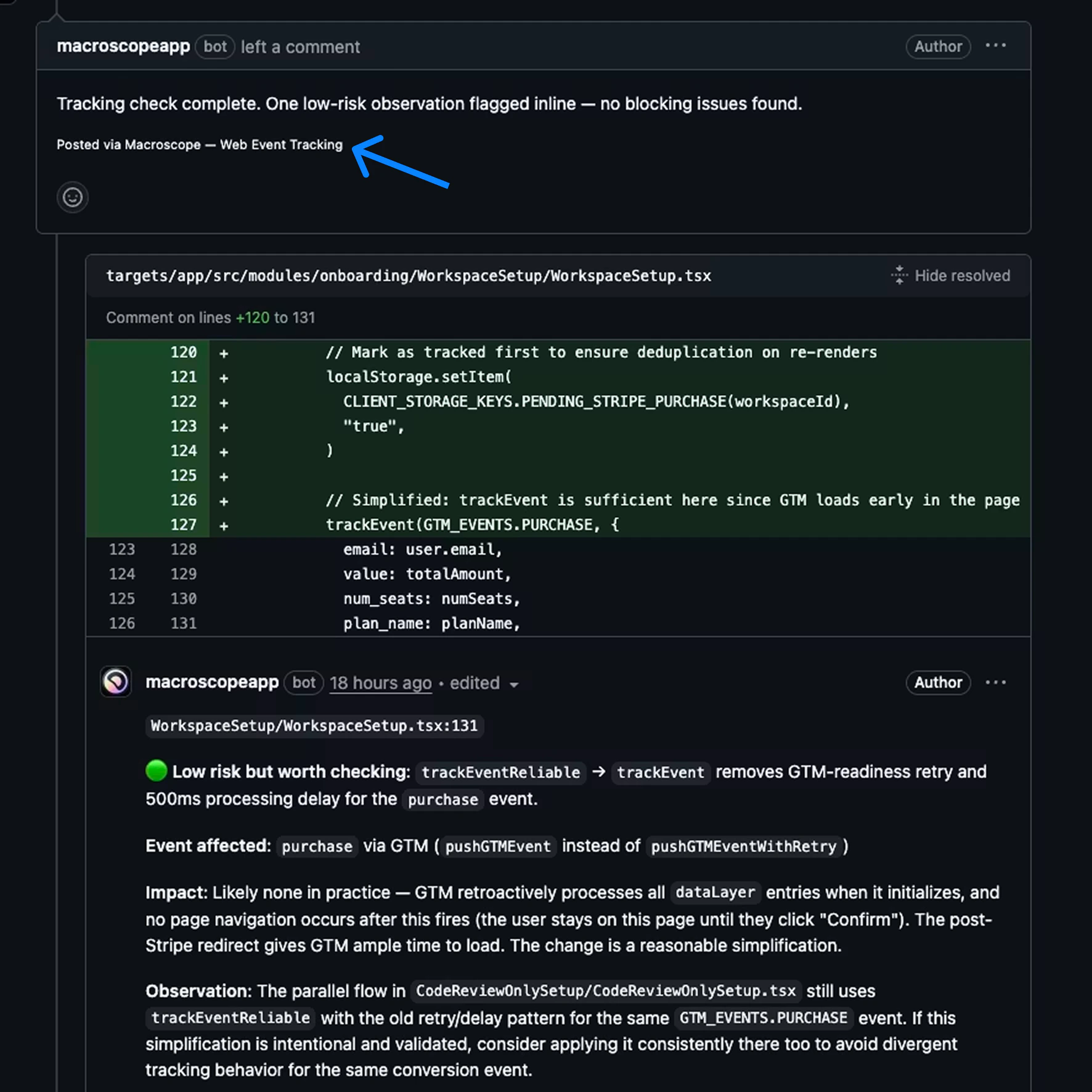
Instructions
Controlling output format You can control formatting in your instructions. Some examples:- “Use a markdown table with columns: file, line, issue, severity”
- “Group findings by priority, critical first”
- “Use 🔴 🟡 🟢 emoji for severity levels”
- “Start with a one-line summary, then list details”
- “If no issues found, just say ‘All clear’ with no extra detail”
- “Format as a checklist so the reviewer can tick items off”
- “Be concise. Each bullet point should be under 20 words”
- Be specific. “Review for quality” is too vague. “Flag any function over 50 lines without a doc comment” is actionable.
- Define severity. Spell out what critical vs minor means for your team.
- Don’t replicate the Correctness check run. It already catches runtime bugs. Focus on your team’s conventions and workflows.
- Scope with
include,exclude, or both. If your check only applies to Go files, useinclude: ["*.go"]. If it applies to everything except lock files, useexclude: ["*.lock"]. Use both together to narrow to a set of files while carving out exceptions (e.g.include: ["src/**"]+exclude: ["src/gen/**"]). - Give the agent permission to do nothing. “If nothing applies, report that no issues were found” prevents invented findings.
- Use sections in your instructions. Markdown headings (
##) in the body help the agent organize its work and output. - Reference specific paths. “Check files in
services/auth/” is better than “check auth code.” - Tell it what not to flag. “Ignore test files” or “don’t flag TODOs in draft PRs” reduces noise.
- Don’t paste your standards in. If a standard already lives in a file in your repo, embed that file with
@path/to/file.mdinstead of copying it. See Importing Files.
Importing Files
Your instructions can embed another file from your repository by writing@path/to/file.md. The file’s contents are spliced in exactly where the directive appears, so the agent reads them as part of its instructions.
This is the same syntax Claude Code uses for CLAUDE.md imports, so standards you already reference that way work here unchanged.
docs/, a CLAUDE.md, or a team playbook can be embedded by several agents at once, and editing that file updates every agent that imports it: no copy-paste to keep in sync.
Imports are expanded in the body only, not in frontmatter. The imported file’s own frontmatter (if it has any) is stripped, so only its content reaches the agent.
How paths resolve
A path resolves relative to the directory of the file the directive is written in: the same rule Claude Code uses. Starting the path with/ resolves it from your repository root instead, which is usually what you want from an agent file nested in .macroscope/check-run-agents/.
From an agent at .macroscope/check-run-agents/go-review.md:
Any file type works:
.md, .txt, a config file, a code sample. The contents are inserted as text.
What is not an import
A directive is only recognized when the path is path-structured: it contains a/ or a file extension. That keeps ordinary prose and code from being mistaken for imports:
- Bare words are left alone.
@Override,@Test,@param,@dataclass,@property, and handles like@macroscope-appare not imports. - An
@inside a word is left alone.support@yourcompany.comstays an email address. - Code is never expanded. A directive inside backticks (
`@docs/style.md`) or a fenced code block is left as written, so you can quote the syntax or include a diff without triggering an import.
Nesting
An imported file can import others, up to 4 hops from the agent file. Each file’s directives resolve relative to its own directory, sodocs/standards/all.md can pull in its neighbours with @go.md and stay correct no matter which agent imports it:
Limits
There is no size cap on what you embed. You can import a complete contract, style guide, or compliance policy, and it is included in full. The selected model’s context window, measured against the assembled prompt, determines whether the check runs, just as it does for the diff and commit log. A prompt too large for its model is skipped with a conclusion that explains the problem and what to change.
When an import can’t be expanded
The agent still runs. An import that can’t be expanded is left in the prompt as literal text, and the reason appears as a warning on the check run’s conclusion page: a broken path never costs you the review. Repeated problems are reported once, not per occurrence. That covers a path that doesn’t exist, a cycle, nesting past 4 hops, and more than 50 imports. If a check’s output looks like it’s missing a standard you expected, the conclusion page is the place to look.Which commit files come from
Imported files are read from the same commit as the agent file itself: the most recent commit on the pull request. Editing an imported standard takes effect on the PR that edits it, and on other PRs once the change is merged and their branches include it: exactly like editing the agent file.Paths must stay inside the repository, and paths under
.git cannot be imported. Symbolic links are not followed: a path is resolved literally.Example
Consolidate related rules into one check rather than many files. This web team example handles several concerns in one agent, saved as.macroscope/check-run-agents/web-review.md:
Migrating
From the.macroscope/ root to the subfolder. If you have check run agent files in the root .macroscope/ directory, move them into the check-run-agents/ subfolder:
approvability.md and ignore are not check run agent files; leave them in the .macroscope/ root.
From Custom Rules. Check Run Agents replace Custom Rules. Move an existing macroscope.md file’s rules into .macroscope/check-run-agents/my-rules.md; they become the instructions body, and you can optionally add frontmatter for model, tools, and input mode.
They go further, too: agents can browse the codebase, query git history, post to Slack, check Sentry, and more, with structured output in the Checks tab instead of just inline comments.
Looking for model options or cost controls? See Model Selection & Costs, and Models & Token Pricing for the shared rate table.