

Workspace Settings
- Custom AMA (Ask Macroscope Anything) Instructions: customize how the agent responds to your team’s questions.
- Product Overview: give Macroscope context about your product to improve summaries.
- Weekly Cadence: set the day and time boundary for weekly reports (e.g. Friday 6pm to Friday 6pm).
- Digest Emails: add or remove recipients for weekly digest emails.
- Productivity Features: toggle coding time estimates, coding time module, and contributors module on/off. Can be limited to specific GitHub teams.
- External Contributors: control whether people with write access who aren’t in your GitHub org are included in summaries and/or productivity metrics.
- Web Search: allow Macroscope to search the web for additional context when generating summaries.
- Administrative Contact Email: email used for policy updates, support, and account communications.
- Teams: enable GitHub Teams to see team-specific productivity metrics in the Contributors module.
Excluded Commit Authors
Workspace admins can exclude commit authors from commit metering, summarization, and productivity metrics under Workspace Settings → Excluded Commit Authors. Authors can be excluded by either GitHub username or Git author name, controlled by a mode toggle in the UI.The Excluded Commit Authors section is only visible in workspaces with Status enabled.
Personal Settings
Per-user preferences for code review and PR summaries. Each can be toggled on/off or set to follow the repo default:- Correctness: review PRs for logical errors and bugs
- Detection Mode: choose Prefer Coverage, Prefer Precision, or Repo Default. Your choice overrides the repo default for your PRs.
- Minimum Severity to Comment: your own floor for correctness comments on PRs you author. Repo Default defers to the repo’s setting.
- Check Run Agents: toggle to enable/disable agents defined in your repo’s
.macroscope/folder - Review my draft PRs: review draft PRs before they’re marked open
- Automatically merge Macroscope’s PRs: auto-merge Fix It For Me PRs when all checks pass
- Auto-summarize my PRs: control whether Macroscope generates PR summaries
- Post in PR description: post summaries in the PR description field (if empty or contains template markers), otherwise as a comment
Repo Settings
Select repos on the left and configure settings on the right. All settings below are per-repo and can be applied across multiple repos at once. Use Defaults to set the default for newly linked repos.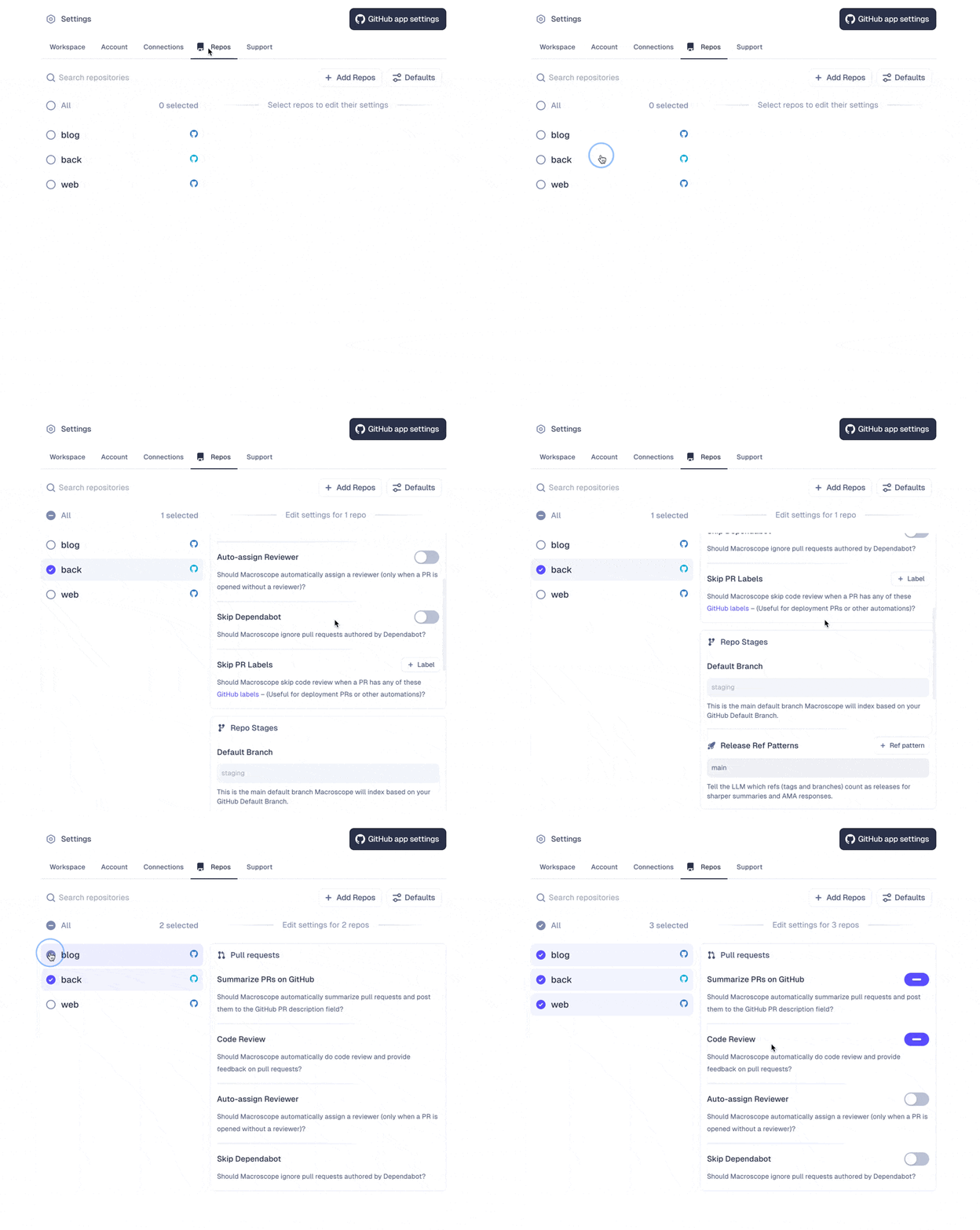
Feature Switches
The section at the top of the page switches a review feature off completely for the selected repos. This is stronger than the toggles below it: those control whether Macroscope reviews a pull request automatically, and an@macroscope mention or an always-review label still starts a review when they’re off. A feature switched off here does not run at all, and nothing overrides it — not a mention, not a label, not a personal setting.
Three features can be switched off:
- Correctness: reviews pull requests for logical errors and bugs.
- Approvability: approves pull requests that meet the criteria you define.
- Check Run Agents: runs the agents defined in your repo’s
.macroscope/folder.
- One repo: select it under Settings → Repos.
- Workspace defaults: set it under Defaults, which governs newly linked repos.
- Several repos at once: select them and use the batch settings panel.
Pull Request Settings
Unless noted, these govern whether Macroscope runs automatically. An@macroscope mention or an always-review label still starts a run when one is off — to stop a feature entirely, use Feature Switches.
- Correctness: toggle code review for logical errors and bugs
- Detection Mode: balance bug coverage against noise (Prefer Coverage or Prefer Precision) for this repo. Set the default for new repos under Defaults.
- Minimum Severity to Comment: how severe a correctness finding must be before Macroscope comments on it. Choose Low, Medium, High, Critical, or Off; defaults to Off, which posts everything. Set the default for new repos under Defaults.
- Max Automatic Runs per PR: cap how many times correctness review runs automatically on a single pull request. Once a PR reaches the cap, the correctness check concludes as skipped, titled “Maximum runs reached”, with a summary naming your limit. Manual reviews, check re-runs, and moving a PR from draft to ready for review are exempt and always run — so a capped PR can still be reviewed by commenting
@macroscope-app review this PR. Set the default for new repos under Defaults. - Max Reviewable File Size: the largest file, in KB, that correctness review will look at. Files above the limit are excluded from the review and listed on the check run with the reason “File too large (exceeds configured limit)”. This is a soft exclusion: a file matched by an explicit
includein your custom correctness instructions is still reviewed, however large it is. The limit applies to every language uniformly, so you can use it to raise a language’s built-in limit as well as lower it. Set the default for new repos under Defaults. - Check Run Agents: toggle to enable/disable agents defined in your repo’s
.macroscope/folder - Review Draft PRs: review draft PRs before they’re marked ready; contributors can override this for their own PRs in Personal settings
- Summarize PRs on GitHub: toggle auto-generated PR summaries
- Auto-assign Reviewer: assign a reviewer when a PR is opened without one
- Skip Dependabot: ignore PRs authored by Dependabot
- Review Cross-Repo PRs: review pull requests from forked or external repositories
- Skip PRs by Author: skip automatic checks for PRs from these GitHub users, except Check Run Agents with their own
authorsfilter - Skip PRs by Labels: skip automatic checks for PRs with these GitHub labels, except Check Run Agents with their own
labelsfilter - Skip PRs by Target Branches: skip automatic checks for PRs targeting these branches, except Check Run Agents with their own
targetsfilter - Always Review PR Labels: always run code review for PRs with these labels, even when repo-level review is disabled
Both limits are optional. Leave the field blank — it shows a No limit placeholder — to apply no limit of your own; entering
0 also clears it.Left blank, Max Automatic Runs per PR never caps a PR. Max Reviewable File Size adds no limit of its own, but two languages have a built-in one that still applies: TypeScript at 1 MB and Python at 2 MB. Every other language is unlimited until you set a value — which is also why setting one is the way to raise those two built-in limits.Approvability Settings
Toggle on/off to allow Macroscope to auto-approve eligible PRs based on eligibility criteria and correctness checks you define. Learn more about Approvability.- Minimum Blocking Severity: the lowest correctness severity that blocks auto-approval. Outstanding correctness comments at or above it stop Macroscope from approving, whatever the eligibility judgment concluded; comments below it do not. Choose Low, Medium, High, Critical, or Off; defaults to Medium. Only a GitHub Admin can change it, per repo or under Defaults. Off removes the deterministic gate: correctness never fails a PR on its own, whatever the review found. Findings are still posted, and the Eligibility agent still weighs them — so it may still recommend human review on their merits. To exclude correctness from that judgment too, say so explicitly in the repo’s custom eligibility rules.
Repo Stages
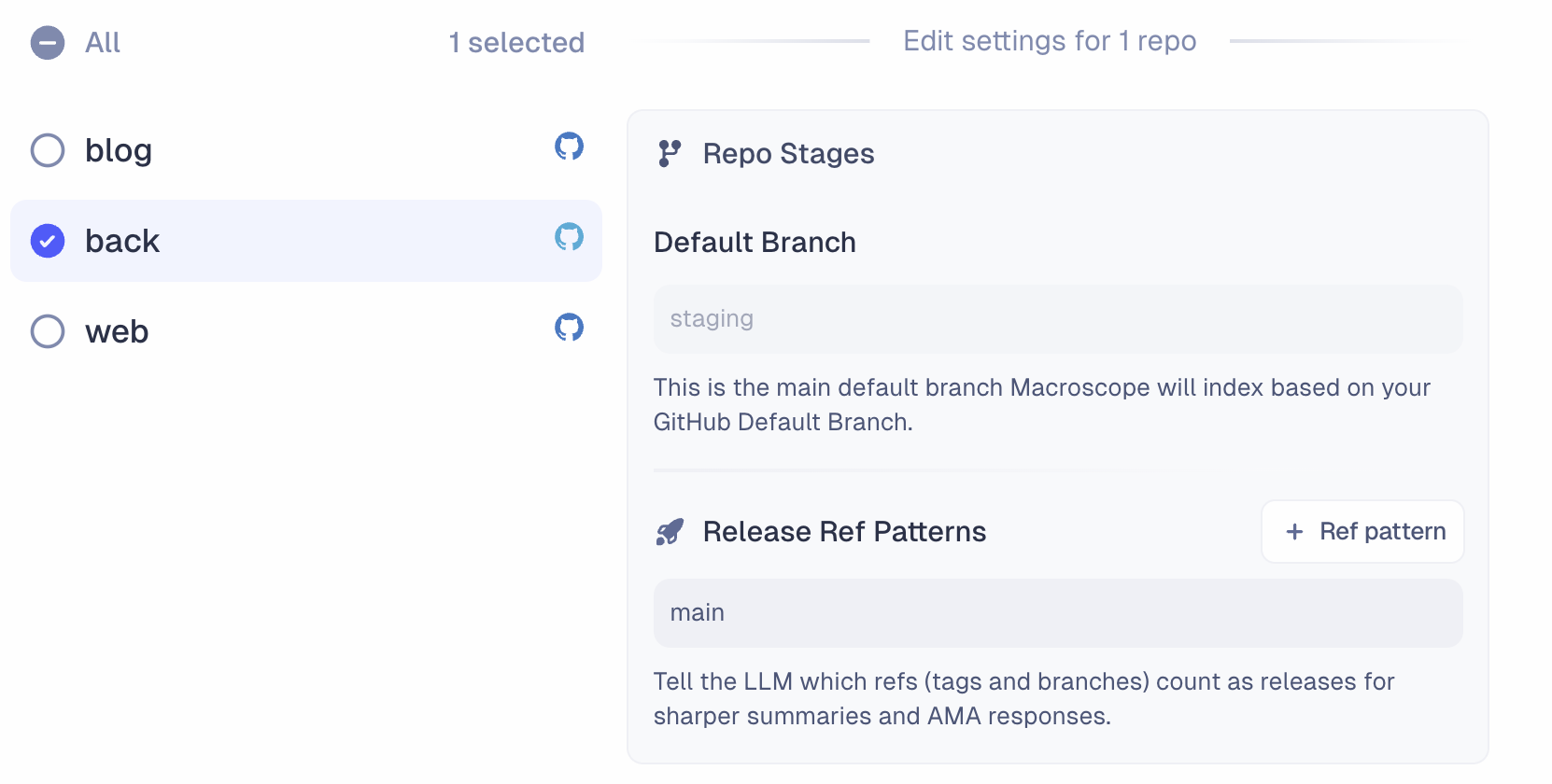
- Default Branch: the main branch Macroscope indexes, based on your GitHub default branch.
- Release Ref Patterns: tell Macroscope which refs (tags and branches) count as releases for sharper summaries and agent responses. Supports glob patterns like
release/*,release/**, orproduction.
Connections
Configure integrations with Slack, Jira, Linear, BigQuery, PostHog, LaunchDarkly, and GCP Cloud Logging. Each integration gives Macroscope more context and capabilities. Learn more about integrations.Webhooks
Create webhooks to trigger Macroscope’s agent from external services. Each webhook generates a unique trigger URL and API key. If you want results forwarded to an external URL (instead of Slack), that URL must be added to the allowlist here. Only GitHub admins can manage the allowlist. Learn more about the API.Support
- Slack Support Channel: open a shared Slack channel with the Macroscope team. Enter your Slack email address and we’ll send an invitation.
- Synchronize with GitHub: manually resync if your repos or data fall out of sync with GitHub.